
Visual Studio 2005 Refactoring is sub-par – level 200
This is a time that envy VB developers who have access to DevExpress’
Refactor tool which is far better than the meager refactoring support
available for C# devs in Visual Studio 2005. There was a bunch of
hype around this feature, and it is really useless. I love
Resharper 1.5 for VS 2003, and I can’t wait until it comes out for VS
2005, but until then, I develop EZWeb with a stock VS 2005
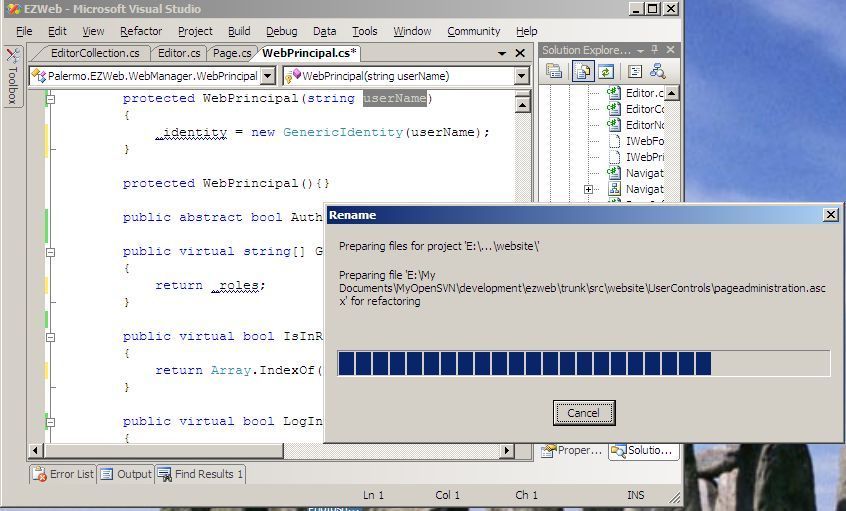
install. I made a screen shot of renaming a parameter so you can
see what happens.
Any time you invoke a refactor feature, a modal dialog pops up that
halts your work. Every time takes at least 15 seconds even for
the small solution I have going. This feature was very poorly
designed, and I hope it is improved in a service pack.
Renaming a
method parameter is one of the simplest refactorings. It can’t
affect code other than in that method, so why is there the need to search
every file in the solution? Only code inside that method could
_possibly_ be affected.
Another downer is that the refactorings don’t have shortcut keys
defined by default. You can only get to them with the
mouse. To keep my hands on the keyboard, custom keyboard mappings
are required.
Here’s an area where we still need to catch up with Java IDEs – refactoring.
G’day Jeffrey,
I use VB and haven’t quite got the hang of refactoring but am impressed with the Refactor tool.
On the topic of your post though: in C# is it possible to call a method and name the parameter? In VB you can do “SomeMethod aParam:=1, anotherParam:=2” with the condition being that if you specify the name of a parameter you have to specify the name of all of them. Could this be a reason that renaming a method parameter starts a solution-wide search?
Cheers,
Thomas (who doesn’t know anything about C#, but is intrigued by your findings)
> …envy VB developers who have access to DevExpress’ Refactor
> tool which is far better than the meager refactoring support
> available for C#
That’s true on the surface… Rafactor! focuses on method refactorings and offers little in terms of class refactorings.
It came as a surprise to Mark Miller when I told him that Rename Class is the most common refactoring that I use. His assumption was that method-level refactorings like Extract Method, Introduce Explaining Variable, Reorder Parameters, etc, were the most common and most important.
This is probably a safe bet for VB developers who have more procedural programming predispositions and for whom a “unit” is often a function rather than a class. Refactoring at the method-level makes more sense for folks that focus on function libary design to the exclusion of class library design.
There’s no doubt that Developer Express hit the ball out of the park when it comes to in-IDE experience, but the broad applicability of Refactor! to OO programming is questionable. Refactor! is better than VC# when it comes to the refactorings that the two have in common, but it doesn’t provide the class refactorings that allow it to compete practicably with either VC# or ReSharper – regardless of the pretty pictures or the animations.
By the way, Refactor is available for C# as well:
http://www.devexpress.com/Products/NET/Refactor/
There’s a new kid on the refactoring block trying to steal some thunder while JetBrains is still dark on ReSharper 2.0. If you’re fed up with VC#’s first crack at refactoring, check out JustCode from Omnicore:
http://www.omnicore.com/justcode.htm
The 30-day trial might just be long enough to carry us into the ReSharper 2.0 release 🙂
Thomas,
A parameter name is only visible to the method that it is declared on… there’s no need to search the entire solution since the scope of the name is limited to a single method. Regardless of why the tool works the way it does, it really misses the mark for refactoring functionality compared to the tools that set the precedent for refactoring in Visual Studio.
VC#’s refactoring is sub-par compared to its competition, but it’s definitely better than nothing if you can’t afford the $150 for a much more productive tool.
The example you provided is pretty interesting. I wonder if Refactor! knows how to re-write a method invocation based on that syntax.
I don’t think the same thing could be done in C#. I would tend to think of something like this as a design anti-pattern, and I would hope that C# doesn’t support it.
“Renaming a method parameter is one of the simplest refactorings. It can’t affect code other than in that method, so why is there the need to search every file in the solution? Only code inside that method could _possibly_ be affected.”
There are rules set in FxCop which force you to use the same parameter names in overrides, or methods with ‘new’ as in the original. That’s why I think it traverses the whole solution.
And make no mistake: it’s slow because:
1) it does parsing of related files in the whole solution at that moment
2) it tries to be 100% correct, and they sacrificed performance over correctness.
All add-ins use background compilation/code sniffing. They can be faster when you start a refactoring feature, but slow down your vs.net experience because of the background compilation. I don’t use refactoring features a lot, I’m that kind of person who thinks more up front and tries to limit messing with existing code afterwards. I find the refactorings for C# limited, and yes they’re slow, but I don’t see the slowness as a problem, even though my codebase is 100,000+ lines of code. (and it doesn’t take more than 5 seconds to do things)
What I find annoying is that the limitations of the offerings is sometimes so severe that the whole feature is useless. Like ‘extract method’. Try to specify a generic method name there (like Foo) No can do.
Refactor! Pro (http://www.devexpress.com/Products/NET/Refactor/) supports both VB.NET and C#. For the next step up, get CodeRush (http://www.devexpress.com/Products/NET/CodeRush/) It includes all functionality in Refactor! Pro and more.
I agree… My VS 2005 experience so far has been painful. The refactoring stuff is useless, IMO. Extract method hardly works at all, and everything else is sloooow..
I had to launch VS 2003 for a minute the other day, and loved the momentary ease of development. This is a first for me as a developer, I’ve never wished I could use an old version of software…
Hopefully ReSharper will save the IDE when it comes out.
I find it a bit surprising that it does have to scan all files — from my limited understanding of how visual studio works, I thought it did background compilation anyway in order to give you the realtime compilation errors (ie. squiggly underlines). Surely it can use that information?
>> I had to launch VS 2003 for a minute the other day, and loved the momentary ease of development. This is a first for me as a developer, I’ve never wished I could use an old version of software…<<
Funny, I felt the same way but was too ashamed to say it. Time to upgrade RAM or something I guess. Microsoft are good at obsoleting whatever PC hardware I have.
You know you guys can use the pre-Beta of ReSharper 2.0 on VS .NET 2005 for free, right? If you’re brave enough, give it a go — if the pre-beta is too buggy for you then you can uninstall it (don’t use it on some large production system yet!) … but, check it out here:
http://www.jetbrains.net/confluence/display/ReSharper/Download
You can also see its complete feature list (and what the pre-betas have implemented so far):
http://www.jetbrains.net/confluence/display/ReSharper/ReSharper+2.0+Plan
Best!
David Stennett
JetBrains, Inc.
I haven’t used ReSharper, and I’ve heard too many good things, but we just don’t use it
but I’ve seen Delphi, you should see how Delphi 2005-2006 does it, is sweet!
you right click on a variable, click rename and it hightlights all the places where that variable is, you start typing and it changes the names of all of them at the same time (and they are all highlightes) until you are done