
New line shortcut keys for Visual Studio 2005 – level 200
I am a big fan of shortcut keys. I find that if I can keep my hands on the
keyboard and not reach for the mouse, my productivity stays high.
First, I
want to say thanks to Steve Donie
for this change in my mindset. Steve has a key for everything, and if there
is not a key for it, he has a batch script with a shortcut key mapped. Below,
I'll illustrate some shortcut keys I love. Note, I use many, many shortcut
keys that hook into Resharper,
but these shortcut keys work in Visual Studio 2005.
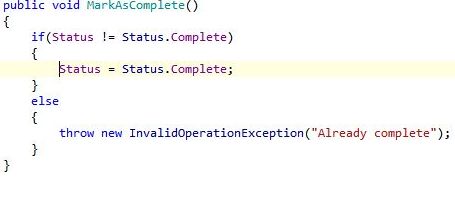
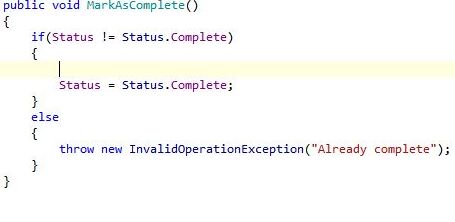
ctrl+enter: Insert a line above the current line and jump to the
new line
before:
after:
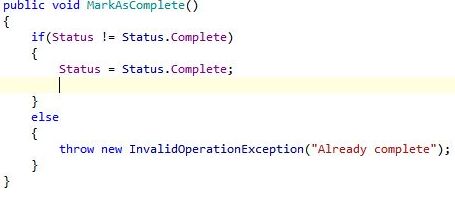
ctrl+shift+enter: Add a line below the current line and jump to
the new line
before:
after:
Yes it is very nice. I am using this feature since last two years in Java Eclipse IDE.
Isn’t shift+enter the same thing as just enter?
asdkljfhas,
Yes it is. Note to self: Don’t blog so early in the morning.
Thanks for the reference. I started using the keyboard very heavily in my first job, where I developed software for blind people. Blind people have terrible eye-hand coordination 🙂 This necessitates that they do EVERYTHING through the keyboard. In order to teach myself to be more like my customers, I would frequently drop my mouse down behind my desk so I couldn’t reach it. When you start doing that, you start learning other ways of doing things.
asdkljfhas, Palermo,
>Isn’t shift+enter the same thing as just enter?
if you are refering to the post above, it says “ctrl+shift+enter” and not “shift+enter”.
Thanks ! Came in handy 🙂
On another note – how do you get VS 2005, to highlight the line with the cursor in it, I have been looking for this, but cannot find it in Options?
Regards
Jesper Hauge
Jesper,
The line-highlighting is not a Visual Studio feature. It’s a Resharper feature. You can read more about R# in one of my previous posts:
http://codebetter.com/blogs/jeffrey.palermo/archive/2006/08/02/BreadAndButterResharper.aspx