Headspring continues to hire: we will train contract-to-hire positions

Refer to position details: http://www.headspringsystems.com/careers/senior-software-engineer/

Headspring is always looking for good people, and we have continued to expand throughout the downturn in the economy.  Over 2009, I increased our development staff 13%, and already in 2010, it has increased 11% just in the first two months.  We are continuing to grow, and it doesn’t look like it is slowing down.

There are two model which work very well:

  1. Contract-to-hire:  This is when a programmer very confident in his capabilities works on a contractor basis for a project while we both decide if it is a long-term fit.  Some individuals decide they like contracting and continue in that model.
  2. Full-time employment w/ 90-day trial:  This is when a programmer definitely wants full-time work including top-notch benefits.  At about 90 days, we reevaluate the fit.  We or the employee can then decide to enter into a more permanent employment agreement.

I am currently looking for programmer who fit into either category.  Please email seniorsoftwareengineers@headspringsystems.com if you are interested.  Refer to http://www.headspringsystems.com/careers/senior-software-engineer/ for the items to include in the email.  Don’t let the email address fool you.  If you are aspiring to improve yourself but are not at the senior level, we want to speak with you as well.  Smart people are hard to find.  I can train you up, but I can’t make you smarter.  You have to bring that to the table by yourself.

Most companies who hire contract-to-hire won’t train them.  We are different.  Anyone who does any work for us represents us.  I believe that it is critical to our reputation that we equip our people with the tools and knowledge to succeed in any project.  We are very leading-edge, and we use the best tools the industry has available.  This is different from being “bleeding-edge”.  I do not believe in bleeding.  We will adopt those items which have passed the bleeding stage and have proven their value.

It takes several weeks to make it through our screening process, so please understand the lead time.  Identifying the right people is something I take very serious.

Video of C4MVC talk on MvcContrib Portable Areas

Recently, I gave a presentation to the C4MVC virtual user group focus on ASP.NET MVC, and headed up by Eric Hexter.  You can see the meeting info here.  I introduced and walked through a Portable Areas sample.  the purpose of MvcContrib Portable Areas is to provide a component model for ASP.NET MVC.  It’s not perfect, but it is a very powerful model.  Our hope is that, along with MvcContrib participating in the CodePlex Foundation, Microsoft will be able to take some of the code, or perhaps just the idea, and productize it into the much-needed component model for ASP.NET MVC.

http://www.viddler.com/player/81f1a688/

Headspring Agile Boot Camp, March 24-26 – sign up now – Austin, TX

Started in January of 2008, Headspring’s Agile Boot Camp series of trainer has received many positive reviews both from local Austin developers to folks traveling from other parts of the country.  Go to Headspring.com, and sign up for the next class now.

This training encompasses…

Part I Agile Boot Camp™ Topics:

  • object oriented programming
  • SOLID principles
  • design patterns
  • dependency injection
  • team design on whiteboard
  • IDE tools and quickly navigating a codebase
  • Test-Driven Development
  • mocking
  • pair programming
  • refactoring
  • pain driven development
  • Domain Driven-Design
  • ORM
  • contributing to open source projects
  • harnessing the community for extreme growth and continuous learning
  • foundations of Agile
  • Continuous Integration:
    • the "check-in dance" to ensure that code to be committed to a repository does not conflict with existing code or unit tests
    • to make code repositories automatically integrate with build scripts to build the most current source to staging servers
    • to make code repositories automatically integrate with build scripts to alert teams if any developer commits code that breaks any of the project’s unit tests (thus keeping the source code free of bugs)
    • to write deployment scripts to make separate databases from the project’s schema at individual developer/pair-programming workstations and well as production and staging servers
    • to write deployment scripts to roll out database changes as they occur at individual developer/pair-programming workstations and well as production and staging servers

What will I need to do to prepare for the training?

You’ve learned the .NET Framework – now learn the principles and tools to use it effectively. This intermediate curriculum will lead developers to work-changing techniques and create momentum towards continuous improvement in an ever-changing field. With a focus on object orientation and software engineering practices refined in real projects, students will discover principles and patterns to manage software complexity. By the end of the course students will have eliminated a reliance on leaky-abstraction APIs by

  • understanding software design concepts and principles
  • understanding and practicing test-driven development
  • practicing working in an effective team
  • implementing designs using object oriented techniques and design patterns
  • understanding object-relational mapping
  • driving future growth through exposure to advanced topics

Day 1

getting started

  • lab 1: check out the project and run a unit test
  • module: Intro
  • module: TDD basics
  • lab 2: writing your first failing unit test
  • lab 3: writing the code that makes it pass
  • demo: working with resharper

LUNCH (provided)

object oriented programming

  • module: SOLID
  • lab 4: interfaces, facade
  • lab 5a: strategy pattern
  • lab 5b: command pattern
  • extra curricular lab: playing with structuremap

Day 2

team design & advanced tdd

  • quick mini-lab involving structuremap
  • module: dependency injection / ioc
  • lab6: configuring structuremap
  • demo: testing with mock objects
  • lab7: rhino mocks
  • team design on whiteboard

LUNCH (provided)

refactoring & pair programming

  • lab8: more tests, enumeration base class, specification pattern, .NET 3.5 feature in the code
  • module: refactoring
  • demo: refactoring legacy code
  • lab 9: pair tasks involving refactoring
  • extra curricular: student-driven discussion and demo

Day 3

morning session

  • lab 10: "refactor this" challenge
  • module: DDD basics, terminology
  • lab 11: repositories, using provided nhibernate stuff (HSB, DTB, etc.), specification pattern
  • module: foundations of Agile

LUNCH (provided)

conclusion

  • module: nhibernate
  • demo: querying nhibernate
  • lab 12: downloading source, creating patch for open source project
  • student-driven discussion, demos

A glimpse at Tarantino database management:

Training located in Austin, Texas (8:30 a.m. to 5:30 p.m.)
Although it is unlikely, class dates are subject to change. We encourage you to obtain transferable airline/hotel reservations in the event that this should occur.

Call Headspring to Enroll: (877) 459-2260

Check out Mercurial version control with my CodePlex repository

Mercurial SCM (Hg) is a Distributed Version Control System (DVSC).  More importantly, your code doesn’t know or care how it is being versioned.  In other words, None of your VS solution or project files will be modified with a pointer to source control, and no *.scc files will be added in your code.

Interesting enough, Martin Fowler currently recommends Mercurial above the others at this point in time.

To get started, you will want to install the Mercurial Visual Studio 2008 SCC provider (for commits) as well as TortoiseHg, which is the tool you will use the most.

Check out my repository at http://palermo.codeplex.com with the getting started guide.  If you already know Hg, the Hq repo can be cloned at https://hg01.codeplex.com/palermo.

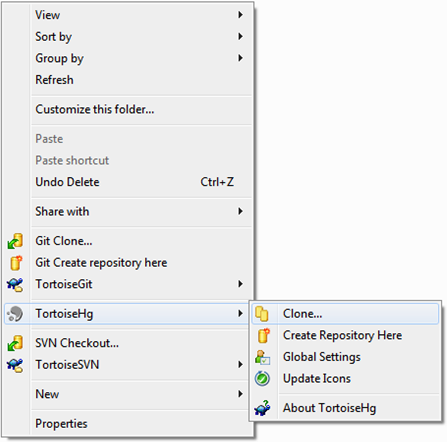
For those who are new to Tortoise, Here is how I would go about getting the source:

image

I do have TortoiseSVN, TortoiseGit, and TortoiseHg installed.  The experience is very similar among the tree, and they do not conflict with each other.

Add post-backs to MVC –or- add front controller to Web Forms

You can download the code for this post at my CodePlex repository: http://palermo.codeplex.com/

Lots of programmers I talk to are managing software assets written in ASP.NET.  These applications have been in production for years, and they work.  The problem that is pervasive among all of them is that the Page_Load method is much too large.  Model-View-Presenter is fatally flawed as a pattern because the view obtains control before the presenter does.  This wrong ordering is an unrecoverable error in the workability of the pattern.  I have spent a number of years attempting to implement the MVP pattern well before I came to this conclusion.

This post contains a short example that inserts a controller in the request pipeline before the Web Form.  This allows large and bloated Page_Load methods to offload a bit of logic to a controller that executes in front of the Web Form.  Interestingly enough, this same technique allows an ASP.NET MVC page to leverage post-backs and server side controls.

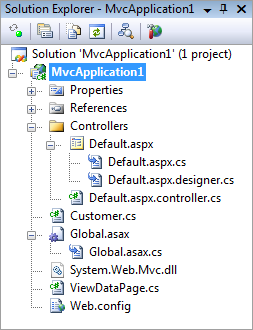
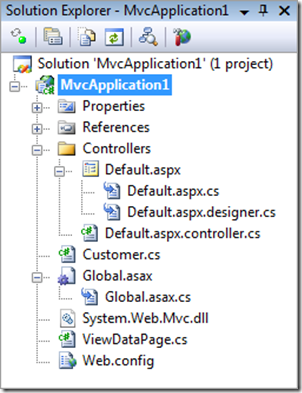
Here is the solution view:
image

Default.aspx.controller.cs is the controller that executes ahead of Default.aspx.  The Visual Studio tooling doesn’t know to nest this file like I would like it.

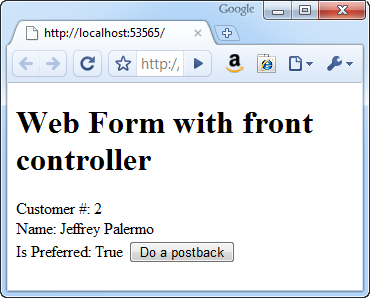
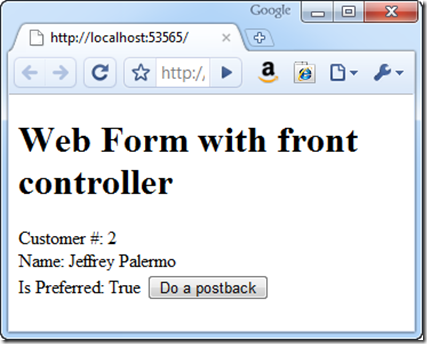
Here is the page run the first time:
image

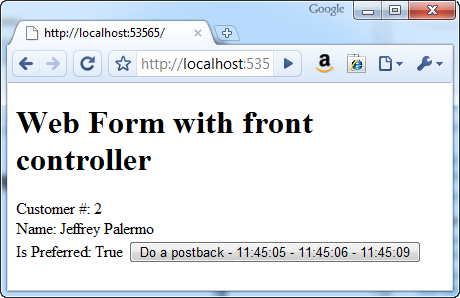
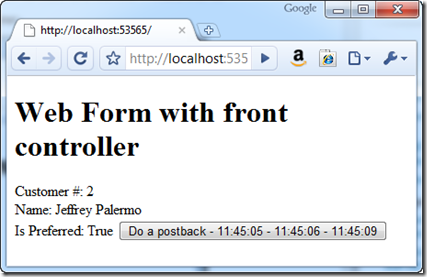
And here is the page after 3 clicks on the button that is an <asp:Button/>
image

Our page looks like the following:

<%@ Page Language="C#" AutoEventWireup="true" 
CodeBehind="Default.aspx.cs" 
Inherits="MvcApplication1.Controllers.Default" %>
<%@ Import Namespace="MvcApplication1"%>

<!DOCTYPE html PUBLIC "-//W3C//DTD XHTML 1.0 Transitional//EN" 
"http://www.w3.org/TR/xhtml1/DTD/xhtml1-transitional.dtd">

<html xmlns="http://www.w3.org/1999/xhtml" >
<head runat="server">
    <title></title>
</head>
<body>
    <form id="form1" runat="server">
    <div>
        <%var cust = (Customer) ViewData["model"]; %>
        
        <h1>Web Form with front controller</h1>
        Customer #: <%=cust.Id %><br />
        Name: <%=cust.Name %><br />
        Is Preferred: <%=cust.IsPreferred %>
        
        <asp:Button Text="Do a postback" runat="server" ID="btn" 
        onclick="btn_Click" />
    </div>
    </form>
</body>
</html>

Here is the code-behind:

using System;
 
namespace MvcApplication1.Controllers
{
    public partial class Default : ViewDataPage
    {
        protected void Page_Load(object sender, EventArgs e)
        {
        }
 
        protected void btn_Click(object sender, EventArgs e)
        {
            btn.Text += " - " + DateTime.Now.ToString("hh:mm:ss");
        }
    }
}

.csharpcode, .csharpcode pre
{
font-size: small;
color: black;
font-family: consolas, “Courier New”, courier, monospace;
background-color: #ffffff;
/*white-space: pre;*/
}
.csharpcode pre { margin: 0em; }
.csharpcode .rem { color: #008000; }
.csharpcode .kwrd { color: #0000ff; }
.csharpcode .str { color: #006080; }
.csharpcode .op { color: #0000c0; }
.csharpcode .preproc { color: #cc6633; }
.csharpcode .asp { background-color: #ffff00; }
.csharpcode .html { color: #800000; }
.csharpcode .attr { color: #ff0000; }
.csharpcode .alt
{
background-color: #f4f4f4;
width: 100%;
margin: 0em;
}
.csharpcode .lnum { color: #606060; }

Now, we can see that we are retrieving the Customer from ViewData.  But wait, Web Forms don’t have view data.  That’s correct.  That’s why I’ve made ViewDataPage an IViewDataContainer:

using System.Web.Mvc;
using System.Web.UI;
 
namespace MvcApplication1
{
    public class ViewDataPage : Page, IViewDataContainer
    {
        public ViewDataDictionary ViewData { get; set; }
    }
}

.csharpcode, .csharpcode pre
{
font-size: small;
color: black;
font-family: consolas, “Courier New”, courier, monospace;
background-color: #ffffff;
/*white-space: pre;*/
}
.csharpcode pre { margin: 0em; }
.csharpcode .rem { color: #008000; }
.csharpcode .kwrd { color: #0000ff; }
.csharpcode .str { color: #006080; }
.csharpcode .op { color: #0000c0; }
.csharpcode .preproc { color: #cc6633; }
.csharpcode .asp { background-color: #ffff00; }
.csharpcode .html { color: #800000; }
.csharpcode .attr { color: #ff0000; }
.csharpcode .alt
{
background-color: #f4f4f4;
width: 100%;
margin: 0em;
}
.csharpcode .lnum { color: #606060; }

.csharpcode, .csharpcode pre
{
font-size: small;
color: black;
font-family: consolas, “Courier New”, courier, monospace;
background-color: #ffffff;
/*white-space: pre;*/
}
.csharpcode pre { margin: 0em; }
.csharpcode .rem { color: #008000; }
.csharpcode .kwrd { color: #0000ff; }
.csharpcode .str { color: #006080; }
.csharpcode .op { color: #0000c0; }
.csharpcode .preproc { color: #cc6633; }
.csharpcode .asp { background-color: #ffff00; }
.csharpcode .html { color: #800000; }
.csharpcode .attr { color: #ff0000; }
.csharpcode .alt
{
background-color: #f4f4f4;
width: 100%;
margin: 0em;
}
.csharpcode .lnum { color: #606060; }

Now, here is the route that we are using:

using System.Web;
using System.Web.Mvc;
using System.Web.Routing;
 
namespace MvcApplication1
{
    // Note: For instructions on enabling IIS6 or IIS7 classic mode, 
    // visit http://go.microsoft.com/?LinkId=9394801
 
    public class MvcApplication : HttpApplication
    {
        public static void RegisterRoutes(RouteCollection routes)
        {
            routes.IgnoreRoute("{resource}.axd/{*pathInfo}");
 
            routes.MapRoute(
                "Default", // Route name
                "{controller}", // URL with parameters
                new {controller = "Default"}
                // Parameter defaults
                );
        }
 
        protected void Application_Start()
        {
            AreaRegistration.RegisterAllAreas();
 
            RegisterRoutes(RouteTable.Routes);
        }
    }
}

.csharpcode, .csharpcode pre
{
font-size: small;
color: black;
font-family: consolas, “Courier New”, courier, monospace;
background-color: #ffffff;
/*white-space: pre;*/
}
.csharpcode pre { margin: 0em; }
.csharpcode .rem { color: #008000; }
.csharpcode .kwrd { color: #0000ff; }
.csharpcode .str { color: #006080; }
.csharpcode .op { color: #0000c0; }
.csharpcode .preproc { color: #cc6633; }
.csharpcode .asp { background-color: #ffff00; }
.csharpcode .html { color: #800000; }
.csharpcode .attr { color: #ff0000; }
.csharpcode .alt
{
background-color: #f4f4f4;
width: 100%;
margin: 0em;
}
.csharpcode .lnum { color: #606060; }

Now, what does the front controller look like?

using System.Web.Compilation;
using System.Web.Mvc;
using System.Web.Routing;
 
namespace MvcApplication1.Controllers
{
    public class DefaultController : Controller
    {
        protected override void Execute(RequestContext requestContext)
        {
            var customer = new Customer
                               {
                                   Id = 2,
                                   Name = "Jeffrey Palermo",
                                   IsPreferred = true
                               };
 
            ViewData.Add("model", customer);
            string controllerName =
                requestContext.RouteData.GetRequiredString("controller");
            string pagePath = string.Format("~/Controllers/{0}.aspx", 
                controllerName);
            var page = (ViewDataPage) BuildManager
                  .CreateInstanceFromVirtualPath(
                  pagePath , typeof (ViewDataPage));
            page.ViewData = ViewData;
            page.ProcessRequest(System.Web.HttpContext.Current);
        }
    }
}

.csharpcode, .csharpcode pre
{
font-size: small;
color: black;
font-family: consolas, “Courier New”, courier, monospace;
background-color: #ffffff;
/*white-space: pre;*/
}
.csharpcode pre { margin: 0em; }
.csharpcode .rem { color: #008000; }
.csharpcode .kwrd { color: #0000ff; }
.csharpcode .str { color: #006080; }
.csharpcode .op { color: #0000c0; }
.csharpcode .preproc { color: #cc6633; }
.csharpcode .asp { background-color: #ffff00; }
.csharpcode .html { color: #800000; }
.csharpcode .attr { color: #ff0000; }
.csharpcode .alt
{
background-color: #f4f4f4;
width: 100%;
margin: 0em;
}
.csharpcode .lnum { color: #606060; }

Notice that I overrode the Execute method.  In this case, there is no need for the concept of an action.  We merely have an object that executes before the Web Form.  Then the controller builds the Web Form and asks it to process the request.

Half of this method could easily be factored into another class, but it works very simply.   I did not have to jump through any hoops.  I hammered out this code in about 10 minutes.

If your Page_Load methods are getting too long, consider putting a front controller in front of the page.

Windows 7 brings new life to devices that don’t have Vista drivers

MiniVox USB SpeakerphoneBack in 2005, I purchased an mVox 100 (mv100).  This device worked great on Windows XP, and I used it in various VOIP application.  Really great USB speakerphone.  It’s tiny, also, and I kept it tucked in my back for the last 5 years.

When I upgraded my computer to Windows Vista, I was rather disappointed that this useful little device no longer worked.

I could not find any Vista drivers.  From what I gleaned from forums, it relied on usbaudio.sys, which was overhauled in Windows Vista.  Even though I couldn’t use the device, it stayed in my computer bag for 2 years!  I switched computer bags today and uncovered this little speakerphone.  I decided to give it a shot on my Windows 7 computer.  Lo and behold, it worked!  No driver install.  I plugged it in, it detected it, and registered both the built-in microphone and sound card/speaker.  I happened to have Skype open, and Skype immediately registered the device as the microphone and speaker.  Bottom line:  I am impressed by Windows 7 once again!

image My mobile telephony kit now contains this mVox 100 USB speakerphone as well as my trusty Logitech notebook headset.

IE, Firefox, Chrome, Safari, Opera – what browser does a .Net developer choose?

The short answer:  all of them.

According to NetMarketShare, Internet Explorer still has, what is considered in politics, a 62.18% complete landslide domination of the other browsers.

image

So we can read:  62% IE, and 38% “not IE”.  But that doesn’t work in practice because the other 38% is fragmented among at least 4 other major players (major being defined as more than 1% market share, or about 17,300,000 installations).  Think about it.  Opera has over 41 MILLION users.  So that 2.38% is still not anything to sneeze at. . . unless you are serving the 1,075,714,000 IE users.  Wow.  over 1 billion Internet Explorer users.  (Internet stats from “Internet World Stats”)

At Headspring, most of the current market wants a mix of web, windows, and mobile business applications with a heavy, heavy lean towards web applications.  As a Microsoft shop, ASP.NET is dominating the line-of-business space for us.  We have to decide which browsers to support (which really means which browsers to heavily test).  Yes, the client might have some browser preferences, but most of our clients trust us to do the right thing for them.  So what do we do, and what browser do “I” run?  See above (I run them all).

First, we have to look at the base of users and what browser they are typically running.  A really popular combination is IE 7 and Firefox 2.  Yep.  Version numbers.  We have successfully deprecated IE 6 support down to the functional level (must work in IE 6, but visual discrepancies won’t be fixed) because clients have either migrated or they plan to migrate within a year, and we present the cost/benefit of the alternatives.  Any clients needing Chrome support?  Nope.  none.  not even a mention.  Now, in our experience, if a web application works properly in IE 7 AND Firefox 2, it is highly likely to be just fine in the other browsers.

Now for me.  Yes, I run all the browsers, but I have chosen one for my day-to-day browsing needs.  That browser is Google Chrome 4.  Not Chrome 3 or 2.  But 4.  And it’s only today.  Why?  Because I think Microsoft is going to wake up and deliver a really killer Internet Explorer that will push it’s market share back to 90% in the coming years.

Let me back up:  for running software applications, it is critical to use the browser that the client will be using (and if it requires a different version of IE, then just run it from Windows 7 XP Mode).  If your client is predominantly Firefox (like some timid IT departments now), then you must test your app predominantly in Firefox.  Same for IE.  Ignoring the dominant browser at your client is a really good recipe for obvious bugs to slip through.

Now, why Google Chrome 4?  Because of the architecture of the browser coupled with new support for extensions.  Each tab runs in its own process.  This is critical because it delegate memory isolation and threading to the operation system instead of trying to manage them all within a single browser process.  Next is extensions.  First, and my favorite, is the IE Tab extension, ported from IE Tab as a Firefox extension.  It runs the page in the IE rendering engine but inside a Chrome tab (which is isolated to one process).  Note that this cannot fully replace actually TESTING with IE proper for your clients.

Below is an image of two Chrome tabs.  The top is regular, and the bottom is with IE Tab.

image

My next favorite extension is just named “Keyboard Navigation”.  It’s just like the really great Numbered Links Firefox extension that makes it possible to really browse the web without the mouse.  You press the comma(,) hotkey to pop up the shortcuts, then choose your link.  The enter key directs your browser to follow the link.  All while keeping your fingers on the home row.

image

I don’t use IE and Firefox anymore for my normal browsing for one single reason:  The process architecture.  Having all the tabs in a single process produces a slow browsing experience (when contrasted with the alternative).  Does Chrome slurp up more memory?  Absolutely.  Here is a screen shot of all the processes.

image

A quick glance produces over 500MB or RAM used just for the browser.  If I was worried about RAM (and willing to spend my time waiting in order to save RAM) I would probably make another decision.  But, when all my guys are equipped with 8GB of RAM in the company computers, it’s just not a constraint to worry about.

I’m not an Internet Explorer MVP, so I don’t get early access to IE information and roadmap plans, but I do expect a big breakthrough on that front to be announced in 2010.  I think the sleeping browser giant is about to wake up.