Prediction: Dell & others to sell new Windows Azure mainframe server
Dell is clearly getting into the Windows Azure business.  With recent news of Microsoft investing in the privatization of Dell, many are wondering what the future holds.  My predictions are more about Microsoft and Windows Azure than Dell.

For several years, Microsoft has been creating a new operating system for data centers.  This operating system has been called “Azure”.  For now, Microsoft has created its own data centers.  We may speculate that Microsoft is trying to become a hosting and data center company.  After all, why stand up data centers all over the world?

I think the Azure data centers are a means to an end.  Microsoft, at its core, is a platform company.  They build tools that the industry uses to build solutions for companies.  Microsoft doesn’t want to compete with Rackspace and OrcsWeb for business.  On the contrary, Rackspace and OrcsWeb are great customers.  Microsoft sees the change in the industry in computer.  Microsoft is designing a new server operating system that manages multiple servers.  In fact, this new operating system is a data center OS.  Windows Azure is an operating system for a data center.

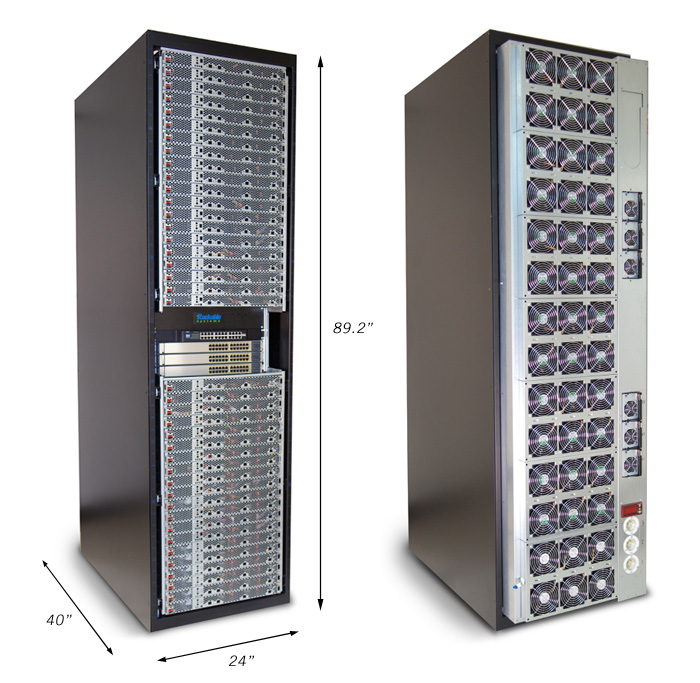
Microsoft needs Dell to create a new type of mainframe.  This mainframe will run Azure and will fit into a normal data center cabinet.  Dell and Microsoft can collaborate and deliver on the dream of a private cloud.  With a server form factor that fits in existing data center, Dell and Microsoft can deploy Windows Azure into every I/T department and colocation facility in the world.  This cabinet would have a set number of CPU cores, RAM, and storage.  It would be “gridable” so that it could collaborate with other Azure servers in the data center.

If Windows Azure is only available in Microsoft data centers, it will not succeed in becoming as successful as Windows Server 2008/20012.  In fact, Amazon could purchase and provide Azure hosting as well in its offering.  At its core, Microsoft doesn’t want to dominate the data center hosting business.  Microsoft wants to create the next operating system for the data center that will dominate the server market and enable hosting partners all over the world to serve their customers.
What a Windows 8 workstation looks like

With all the hype about Microsoft Surface, we desk-dwellers might be left wondering what’s in Windows 8 for us?  In fact, all the media attention we see about Windows 8 is filled with folks dancing around and clicking keyboards to tablets in unison.

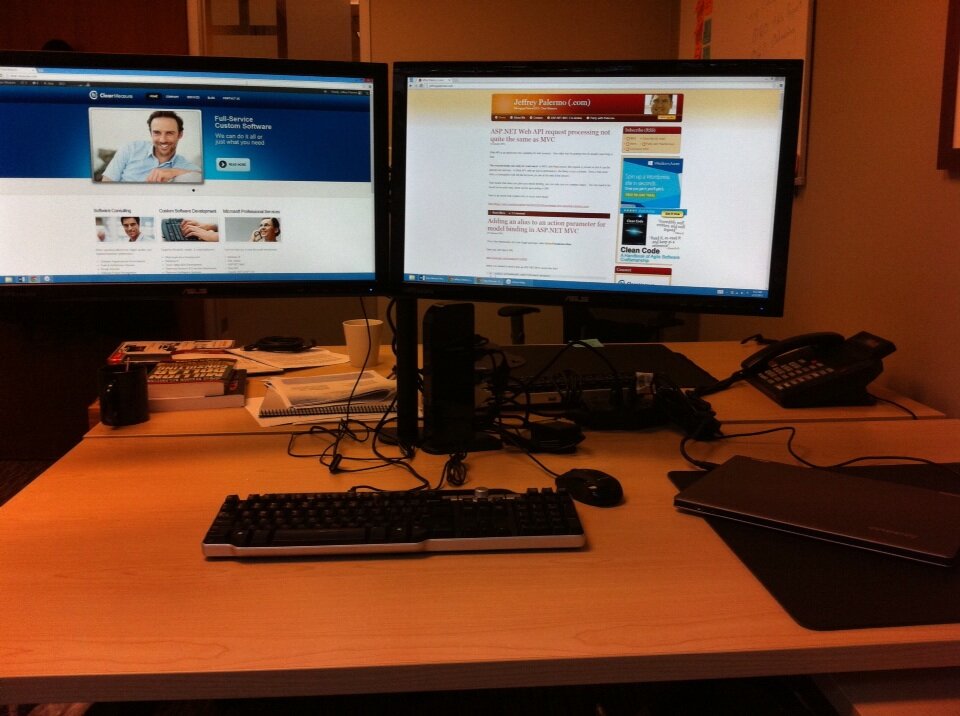
I have recently set up a new workstation configuration with Windows 8 at the Clear Measure offices.  Here is what it looks like.

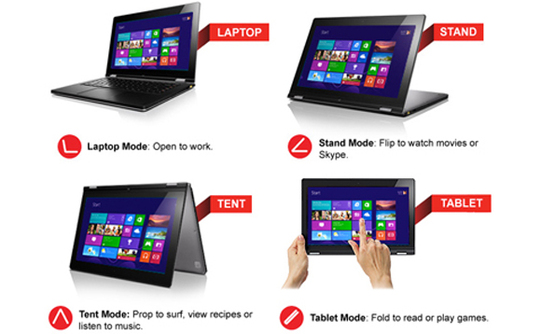
On the bottom-right of the photo, you will see a Lenovo Yoga Ideapad 13”.  The screen is 13.3” in diagonal, but because Windows 8 mandates a 16:9 screen, the laptop is the same width as the old 15” dimension that we normally associate with a full-size laptop.  The screen is a bit shorter, but this is a full-size laptop.  In fact, the slightly shorter screen made it fit nicely on the tray table on the Southwest Airlines flight I took on the way to the MVP Summit.

The Yoga is amazing.  The battery life is outstanding, and I can routinely make it last five hours with continuous use.  The only complaint is the track pad.  It requires a firmer touch for the left mouse click than I’m used to.  If you aren’t familiar with the Yoga, it is first a laptop with a touch screen.  Then, you can fold the screen all the way back around to form a tablet.  The computer disables the keyboard so you can hold it in your hand.
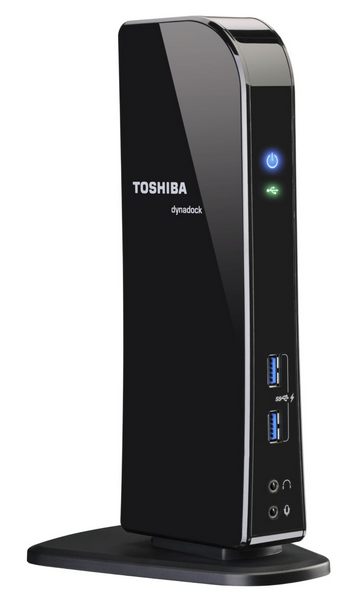

imageNext, I have a regular, boring USB keyboard and USB mouse (I no longer like wireless mice or keyboards because of the battery changing maintenance required).  Mounted at the back of the desk is Halter dual monitor stand.  It clamps onto the desk and has 8” and 10” VESA monitor mounts.  Mounted on the arms are two ASUS VS239H-P 23” LED IPS monitors.  The keyboard, mouse, monitors, and a couple other small peripherals are all attached to the Toshiba Dynadock Docking Station (PA3927U1PRP).  This USB 3.0 docking station is amazing.  It has ports for CAT5, DVI, HDMI, audio, 2 USB 2.0 ports, and 4 USB 3.0 ports.  It runs all the desk accessories and only requires one USB 3.0 port on the laptop, which it has.

The results have been great on everything except the monitors.  The docking station uses DisplayLink technology to paint the images on the screen through the USB cable and Toshiba device.  The DisplayLink technology use the computer’s processor to paint images on the screen.  Playing some video maxed out the processor a few times.  Now, if I wasn’t using my development tools, it would have been perfect.

In the end, I ended up plugging one monitor straight into the HDMI port on the laptop and leaving the other large monitor on the docking station.  The speed of the screen refresh isn’t seamless with this dock, but it does a decent job.  I only notice a jump when playing video or other fast refreshes.

This setup is working very well for me.  I run all kinds of programs on this configuration including Adobe Photoshop and Visual Studio 2012.  I spread screens out across the two monitors.

I would like to know what Windows 8 configuration you are running.  Post a comment here.
Feed: http://feeds.jeffreypalermo.com/jeffreypalermo

How I left a good company and started Clear Measure, Inc.

At the beginning of 2013, I founded a new company with a partner.  For the last year, I was the President/COO of a software consulting firm in Austin.  That company continues to do quite well.  I have broadened my focus a bit in order to provide “one click” experiences for clients

clearmeasure300We have defined Clear Measure, Inc., as a full-service custom software company.  In my  experience, executives of companies don’t want to spend time talking to vendors about the nuts and bolts of the custom software.  They just want it to work.  Developing new software systems is part of this lifecycle of services, but it is just one part of the picture.  Custom software systems live a long life.  In fact, some of our first customers are companies with existing systems that need a little bit of TLC.  They don’t need development right out of the gate.  One needs a hardware migration.  One needs a system upgrade.  These are all parts of custom software, so I’ve turned my attention to moving up-level and serving executives directly.

I had a great time there.  I helped the company grow from 5 people in 2007 to over 30 at the end of 2012.  And just this past year along, I was really proud to be a part of two “Best Place to Work” awards as well as the 67% year over year growth.

I also learned a lot while growing the company.  Initially, I was the only one doing recruiting.  Most of the people there, I personally recruited (so I know they are good!).  This past year, while finishing my MBA at the Jack Welch Management Institute, I worked on managing the company, from a new facilities build-out, to the finances, to sales & marketing (which I never really got good at).  I really enjoyed having a hand in growing and running the company.  And I really enjoyed working with the people.  Prior to jumping into the management parts, I was out in the field doing a lot of project leadership, agile consulting, and agile developer training.  I did quite a few software and departmental audits and assessments.  I missed all the hands-on work with the clients.  I have now taken this opportunity to start a new company and leverage my experience, my MBA perspective, and a market that I see changing rapidly.  My !wife asked quite a few questions because I was coming to this conclusion right as our third child was being born!  God has always provided before, and He will continue to.

I met my new business partner, Mark Stavrou, at a church function, and we have gotten to know each other pretty well over the last year or so.  He is a great compliment to my skills.  He has 20 years of experience in all kinds of sales & marketing, the last few in database performance tuning services.  Our business has taken off really fast, and now we are presented with the challenge of knowing how fast and how much to hire.

We don’t have everything figured out, but I thought I would share with everyone the change.  We are excited to see what the future holds.  As I update all my social media and Internet presences, I realize just how much I have scattered around.  It will probably be a while before I can find every old bio and get it updated.

If any of you have any questions, I’d love to try to answer them.  I appreciate the well-wishes from those of you who saw me update my LinkedIn profile.

If you are seeing this on the web, you can subscribe to my feed here.  I’m also on twitter: @jeffreypalermo

What if we modeled every user action as the passing of a document?

I was listening to a brilliant podcast on .Net Rocks where Carl & Richard interviewed Glenn Block, Henrik Nielsen, and Darrel Miller.  The topic was Web API, but it started with Henrik talking about how he worked as a student helping to create HTTP!  Great history lesson and a great philosophical show.

It made me sit and ponder modern architecture.  When I think about the parallels of HTTP and regular business, I keep coming back to the same premise: they both run by the passing of documents. Before modern computers existed, businesses operated by filling out paper forms and then placing them in the inbox of a clerk of a department. The clerk would have access to filing cabinets, and the clerk would process the form, sometimes creating a report or a reply message in the form of another document.

When I ponder modern architecture for business applications (that are all about productivity and the access to data/information), I keep coming back to the building blocks: passing documents. I think we have gone astray as an industry a little by creating applications that "edit" a customer record. The real business process behind this used to be a "customer change of address form" that was submitted to the office – behind the scenes the clerk would use some white-out (that’s too modern) and edit the actual record sitting in the file cabinet. But the interface between the person making the request and the system/clerk is the passing of a document!

Whether it is a client/server, smart phone app, or just a web application, I think we could make our designs simpler by modeling every user’s operation as a document.

I would love to hear some other thoughts on this.

ASP.NET Web API request processing not quite the same as MVC

Web API is an awesome new capability for web services.  One tidbit that I’m putting here for people searching is that:

The request body can only be read once!  In MVC and HttpContext, the request is stored so that it can be parsed over and over.  In Web API, with an eye to performance, the Body is just a stream.  Once it has been read, a subsequent read will fail because you are at the end of the stream.

That means that when you plan your model binding, you can only use one complex object.  The rest need to be bound some other way, either via the querystring or URI.

Here is an article that explains this is much more detail:

http://blogs.msdn.com/b/jmstall/archive/2012/04/16/how-webapi-does-parameter-binding.aspx

Adding an alias to an action parameter for model binding in ASP.NET MVC

This is the introduction of a new Nuget package called ActionParameterAlias.

Have you ever had a URL:

http://example.com?productid=123456

where you wanted to bind it with an ASP.NET MVC action like this?

   1:  public ActionResult Search(Product product)
   2:  {
   3:      //...
   4:      return View(product);
   5:  }

.csharpcode, .csharpcode pre
{
font-size: small;
color: black;
font-family: consolas, “Courier New”, courier, monospace;
background-color: #ffffff;
/*white-space: pre;*/
}
.csharpcode pre { margin: 0em; }
.csharpcode .rem { color: #008000; }
.csharpcode .kwrd { color: #0000ff; }
.csharpcode .str { color: #006080; }
.csharpcode .op { color: #0000c0; }
.csharpcode .preproc { color: #cc6633; }
.csharpcode .asp { background-color: #ffff00; }
.csharpcode .html { color: #800000; }
.csharpcode .attr { color: #ff0000; }
.csharpcode .alt
{
background-color: #f4f4f4;
width: 100%;
margin: 0em;
}
.csharpcode .lnum { color: #606060; }

Chris Missal was discussing this for a project, so we worked together and came up with an action filter that enables the use of aliases.  More specifically, the following allows the same action to accept url with a query string parameter matching it or any of the aliases.

   1:  [ParameterAlias("Product", "pid", Order = 1)]
   2:  [ParameterAlias("Product", "p_id", Order = 2)]
   3:  [ParameterAlias("Product", "productid", Order = 3)]
   4:  public ActionResult Search(Product product)
   5:  {
   6:      //...
   7:      return View(product);
   8:  }

.csharpcode, .csharpcode pre
{
font-size: small;
color: black;
font-family: consolas, “Courier New”, courier, monospace;
background-color: #ffffff;
/*white-space: pre;*/
}
.csharpcode pre { margin: 0em; }
.csharpcode .rem { color: #008000; }
.csharpcode .kwrd { color: #0000ff; }
.csharpcode .str { color: #006080; }
.csharpcode .op { color: #0000c0; }
.csharpcode .preproc { color: #cc6633; }
.csharpcode .asp { background-color: #ffff00; }
.csharpcode .html { color: #800000; }
.csharpcode .attr { color: #ff0000; }
.csharpcode .alt
{
background-color: #f4f4f4;
width: 100%;
margin: 0em;
}
.csharpcode .lnum { color: #606060; }

Just head on over to Nuget and go grab it.  This is a feature that I’d like to see make it into the next version of the framework.  It’s so tiny of a feature, but so many folks have parameter names that are just a bit off because there is no way to add aliases currently.

CropperCapture[1]

To check out the code, clone it from BitBucket here: https://bitbucket.org/jeffreypalermo/action-parameter-alias or on the Nuget gallery at http://nuget.org/packages/ActionParameterAlias/4.0.0.

New docking station for Samsung Series 7 Windows tablet

Yesterday, the docking station for the Samsung Series 7 tablet came in the mail.  I hooked it up to the computer and set it up as the computer running our 50” plasma TV in the main room from which we do our stand-up meetings in the morning.  Now we have Windows 8 running on the big screen.

Take a look.  It’s a rough video, but you can see what the dock looks like.

Installing Windows 8 on the Samsung Series 7 tablet

Earlier this week, we received shipment of some Samsung Series 7 tablet computers from the Microsoft Store.  Kurt Schindler volunteered to installed Windows 8 on the computer, so he made a rather large USB drive

bootable with the Windows 7 USB/DVD download tool (how-to article here).  I briefly go over the initial experience in this video.  You can see the new tablet interface called Metro.  These apps run in the WinRT runtime, which is a constrained runtime similar to Silverlight’s runtime.  You can also write C++ and Html/JavaScript apps in this runtime.  When running applications you are familiar with, like the desktop version of Skype, you tap the Skype tile that is laid out there for you.  No more hunting around in a huge start menu. 

Could the app be the solution to the failed software project problem?

image

In Fred Brooks’ book, The Mythical Man-Month, Mr. Brooks provides several essays that share his experience in the software industry going back to 1959.  One of the common themes found through several essays is that the size of the project is directly related to the risk of failure.

If the size of the project puts the project at a greater risk to fail, then a smaller project mitigates the size and scope risk.  There are many factors that could contribute to a failed project, but it is interesting to ponder whether we will see project success statistics change at a macro level when the normal size of an interactive application decreases because of the industry’s move to tablet form factors over the next five years. 

What do you think?