A network error occurred while attempting to read from the file: ReSharperSetup.4.5.1231.7.msi

If you tried installing or repairing ReSharper 4.5, you might have received the following error:

image A network error occurred while attempting to read from the file: C:UsersJeffreyDownloadsReSharperSetup.4.5.1231.7.msi

The cause of this was a path mismatch error.  Because my first download had failed, I downloaded the file again, and the browser downloaded the file with the filename of “ReSharperSetup.4.5.1231.7 (1).msi”.  The setup program somehow has the original filename programmed in, and the setup could not complete if the file was renamed.  That’s fine if it’s communicated, but the error message didn’t help me fix the problem.  I had to use my programmer intuition to guess why this was happening.  I guessed right, renamed the file, and everything was fine.

ASP.NET MVC in Action at the Aggileland .Net Users Group tomorrow

Tomorrow, I’ll be traveling to College Station, TX to visit with the .Net Users Group from my alma mater.  The group, started by Noah Coad, continues to be a part of the university experience for those students interested in .Net development.

Url here: http://aggielanddnug.org/dnug/

Title:  ASP.NET MVC in Action (derived from my book)

Abstract:  With the new version of ASP.NET, developers can easily leverage the Model-View-Controller pattern inASP.NET applications. Pulling logic away from the UI and the views has been difficult for a long time. The Model-View-Presenter pattern helps a little bit, but the fact that the view has to delegate to the presenter makes the UI pattern difficult to work with. This session is a detailed overview of the ASP.NET MVC Framework.  It is meant for developers already building systems with ASP.NET 3.5 SP1.

Logistics:

Tuesday, July 14, 2009 12:00 PM

TAMU GSC 101B

Billy Hollis on Silverlight at the Austin .Net User Group tonight

Monday July 13th 5:30pm

Silverlight presented by Billy Hollis

Monthly Meeting

Microsoft Office Austin

9606 N Mo Pac Expy # 200

Austin, TX 78759-5933

07/13/2009 17:30 to 07/13/2009 20:00

Billy Hollis has authored and co-authored many books, including the first  book ever published on Visual Basic .NET and many other .NET oriented books. He’s a frequent speaker at industry events like TechEd, Professional Developer Conference (PDC), VSLive, VSConnections, Patterns and Practices Summit, and many others.

View Larger Map

Billy is a member of the Microsoft Regional Directors, a group of third party luminaries that Microsoft recognizes as having the highest level of expertise in Microsoft technologies. Billy was selected as Regional Director of the Year in 2001. Billy is also a Microsoft MVP (Most Valuable Professional) in Visual Basic. Billy is one of the original members of the INETA speakers bureau. INETA is the International .NET Association of user groups. Through INETA, Billy speaks to user groups all over the country. Billy was selected as a Software Legend in 2002.

Agile Austin talk coming up this next Tuesday – July 7th

I am honored to be the speaker at AgileAustin this next Tuesday on July 7, 2009.  You can see the details of my talk here.

Speaker: Jeffrey Palermo – CTO, Headspring
Title: Being The Manager Of An Agile Team
Description:
Extreme Programming has lots to say about agile software engineering and testing.  Scrum has a lot to say about the process of iterating and organizing priority.  Lean has a lot to say about increasing production and production quality as well as eliminating waste.  Lots of client, even with agile training, still remain with questions about where management fits in within an agile culture.  This session is a blend of project management and people management.  Some of the looming questions surround:

* How to deal with risk
* Predicting issues
* Forecasting
* Hiring and firing
* No broken windows (defects)
* Feedback and metrics
* Managing scope & setting expectations

Additional Information:
Cost: Free
Map & Directions: From South of Hwy 183: Travel North on Mopac (Loop 1) exiting at Capitol of Texas Hwy. Make a U-turn before the traffic light. Go one block on the access road.  Stonebridge Plaza One is to the right, with an entrance between the two towers.  Building One is on the right as you enter.  (map)
More Info:  info@AgileAustin.org
Agenda: Sign-in and Networking 6:00 – 6:30 PM
Announcements, Presentation 6:30 – 8:00 PM
Q&A and Networking 8:00 – 8:30 PM

Proof of Attendance forms will be provided for PMI (PDU), ASQ (RU) and PDMA (PDH) re-certifications

Upgraded to Windows 7 RC – how I kept from reinstalling everything, and what didn’t work

Last night, I downloaded and installed Windows 7 RC.  I installed the Beta for my wife on a spare laptop, and she hated it, so I gave her her Windows XP back. :-).  I have used it for a single day now, and I haven’t encountered any blocking issues.  My process:

  1. Backup disk partition with Acronis True Image Home 2009
  2. Upgrade from Vista x64 to Windows7 x64
  3. Try all critical applications and drivers to ensure they still work
  4. Breath a sigh of relief.

If anything had stopped working, I was prepared to immediately reimage my hard drive with the backup image taken with Acronis (I don’t like to repave machines – big waste of time).

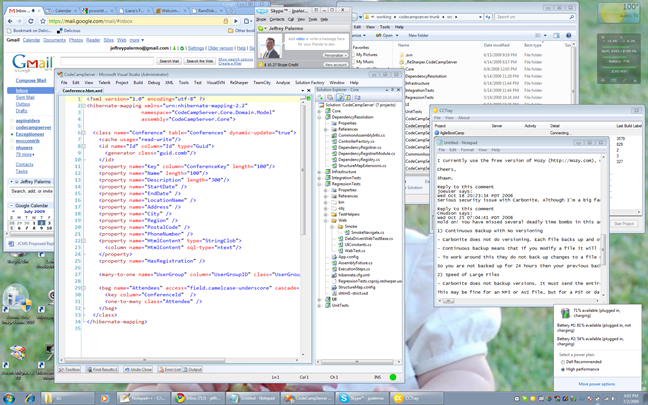
Here is a picture of my new desktop (1900 x 1200) from the Dell 24in monitor.  I have checked the following things I depend on daily and have ensured they still work:

  • Google Chrome
  • Skype
  • Visual Studio 2008 w/ Resharper (I did turn off UAC because it’s still annoying)
  • Tethering Windows Mobile Smartphone through AT&T for mobile internet connection
  • Google Desktop (search and app launching)
  • Pidgin (IM)
  • PortableApps
  • TweetDeck
  • Microsoft Office
  • CCTray
  • And all my diverse hardware

What didn’t work was Syncing my smartphone.  I haven’t dug in, but that doesn’t work at present (Samsung BlackJack II with WM5).

image

Running development from a RAM disk – options and products

In my post about ditching the Solid State Drive in favor of the RAM disk, I mentioned the speed increases.  Taking away the IO bottleneck is significant, and it can let us turn our attention to other bottlenecks that remain.  Here, I am going to outline what I’m currently using, what I’ve tried, and some steps to get it all working.

Workstation specs

If your Windows OS is already paging to disk because of a lack of RAM, then using a ram disk doesn’t make much sense.  You must have unused RAM.  I tried Vista SuperFetch for almost a year, and while it did fill up all available RAM, I still didn’t see the machine fly.  Allocating  a RAM disk with my surplus of RAM did make the machine move much quicker.  I’ve looked at SuperCache and SuperVolume from SuperSpeed, but those products are only offered for Windows XP.  They seem very promising because SuperCache does a delayed write on the entire boot drive and uses RAM as the primary IO resource. 

My workstation (and that of all of my employees) is:  Dell Precision M4300 laptop (2.x GHz dual core proc, 8 GB RAM, Seagate 7200 hard drives)

I was able to get 4GB RAM sticks from memory-up.com for less than $160 each.

Products

I tried out SuperSpeed RamDisk Plus as well as DataRam RAMDisk.  Both products can support the size of the RAM disk that I need (3GB).  Both products automatically persist the contents of the RAM disk to the hard drive upon shutdown and restart, so there is a seamless experience with both.  Because I’m using these in a laptop scenario, a sudden power outage is unlikely, and all the stored files are working copies of Subversion, where commits happen multiple times per day.

Decision

Ultimately, I’m currently running DataRam RAMDisk not because I see it as materially superior to SuperSpeed’s product, but because it gives me what I need for a lower investment.  RamDisk Plus gives me much more than I need; therefore, I would be paying for unneeded features.  I used both, and both are easy to use.  RamDisk Plus is about $100 for a Vista x64 license, and DataRam’s RAMDisk is free for the size I need, which is <= 4GB.  You have to pay for larger.
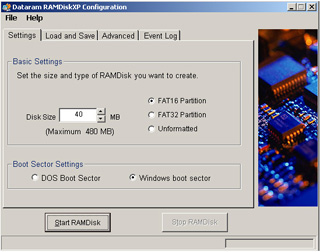
Ramdisk Screenshot

With DataRam RAMDisk, you can format it yourself, so that’s what I did by formatting it as NTFS with Disk Manager.  You can see that I’ve mapped a 3GB RAM disk to the R: drive.
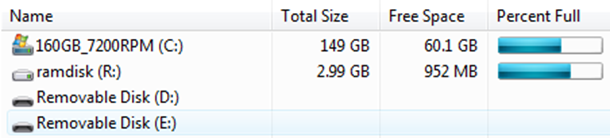
image

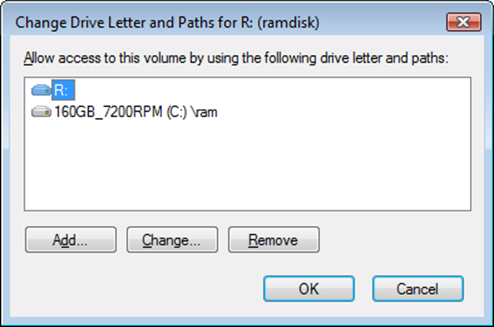
I have also mounted it inside the C: drive so that I can access it quickly from WINDOWS+R:
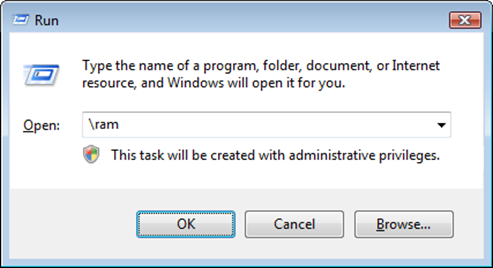
image

I did this through the Disk Manager’s mount points:
image

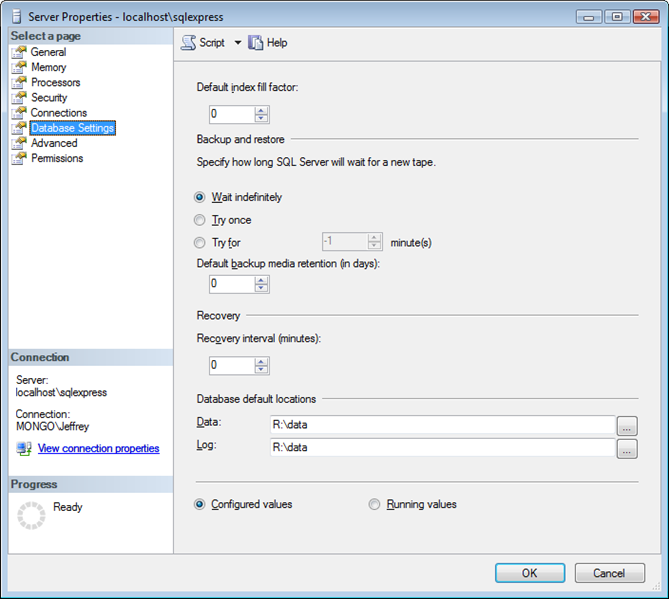
My final step was to set SQL Server to use the RAM disk as its disk for newly-created databases.  Our line-of-business applications are IO intensive including database interaction, and the automated tests are especially so.
 image

All-in-all, the setup is pretty simple regardless of which RAM disk product is used.  I love the speed improvement it has given the workstations.  Obviously running less stuff in an automated build will make it run faster, but there are some things that just MUST be run in a first-line build, and that build must remain fast.  Besides the build, even compilation and working inside Visual Studio is quicker because all of the files are in RAM.

Need certified ScrumMaster for a project immediately – send me a note

I have a year-long contract for a capable ScrumMaster.  If you have been a programmer, that is a plus but not necessary.  This is for a government client of ours.  Send me a note using the contact form or respond to jobs [at} headspringsystems.com

Austin, TX candidates only.   Will not pay for travel.