Dino: ASP.NET MVC is MUCH better than MS seems to think

Dino Esposito, from whom many of us have read and learned a great deal over the years, has recently expressed his love for ASP.NET MVC.  Moreover, he has also notice that the message from Microsoft is very tentative about the framework.  Because of the large market share of Web Forms, Microsoft seems hesitant to push ASP.NET MVC as THE NEW VERSION OF ASP.NET for fear that existing customers will worry about being left behind.

I have previously predicted that with Visual Studio 2010, the majority of new ASP.NET projects would use the MVC flavor over the Web Forms flavor.  I stand by that because the IHttpHandler that is MVC is simpler to use and maintain than the System.Web.UI.Page (which is just an IHttpHandler).

Party with Palermo: PDC ‘09 edition – 6 days and counting

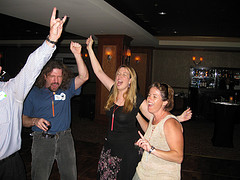
image That’s right, folks!  For those of your coming to Microsoft’s Professional Developers’ Conference (PDC), Party with Palermo is going to kick the week off right.  The conference starts on Tuesday, so Monday night, we are going to get down and party to the turntables of DJ Craig.  If you were at the Party with Palermo at Tech Ed,  you remember this DJ and how he had the uncanny ability to get folks like Ted Neward and Sara Ford dancing like it was 199. . . 2009!

image image

Here is the skinny:  Monday night – 7pm-10pm before PDC.  Come to The Mayan, 6 blocks from the convention center in downtown L.A.  Party with Palermo.  RSVP now!

November 16, 2009 – Los Angeles, CA – 7:00PM – 10:00PM

The Mayan (map, website)
1038 South Hill St., Los Angeles, CA 90015
Ph: (213) 746-4287 – (six blocks from the convention center)
Cover charge is 1 business card.  This will get you in the door and register you for the grand prize drawings.

Entertainment provided by:

DJ Craig

  • Free to attend
  • Free drinks
  • Free swag
  • Eat before you come

Sponsors: (find out how to become a sponsor)

KEEP TABS ON http://www.PartyWithPalermo.com — THIS IS WHERE THE INFORMATION WILL BE POSTED.

Subscribe to the Party with Palermo newsletter

Feel free to blog and link back to this site.

Response: "Agile is treating the symptoms, not the disease" by Ted Neward

Ted Neward, whom I’ve known for about 4 years now, wrote a piece calling out all the complexity that is in the line of business software space these days.

This post is not to say that I agree or disagree, but it is a refreshing blog post to read.  I love discussion like this.  As the CTO of a consulting company that embraces Extreme Programming for project delivery, I’m continually trying to get better at delivering high-quality, maintainable software.

When reflecting on what Ted calls out that is necessary for my people to know, I’ll quickly add to the list:

  • · 7zip
  • · aspnetmvc
  • · AutoMapper
  • · cassini
  • · castle
  • · CruiseControl.NET
  • · exceptioneer
  • · FxCop
  • · gallio
  • · msdeploy
  • · mvccontrib
  • · naak
  • · nant
  • · nantcontrib-0.85
  • · nbehave
  • · ncover
  • · ndepend
  • · nhibernate
  • · nunit
  • · rhinomocks
  • · SourceMonitor
  • · structuremap
  • · subversion
  • · tarantino
  • · watin

The funny thing is, we are building tools to make delivering software easier, so we have other things added to the .Net framework.  At some point, Microsoft and Oracle need to take a good look at .Net and Java and see how they can raise the abstraction level a bit so that the technical business analyst can have a hope of a small program.

Just like DRM in the music business has found (>80% of music pirates could not be forced to pay for the music), >80% of technical business analysts will not use .Net or Java for their small little app.  They will walk away and not write the app.  They will instead add just a few more macros to that huge Excel spreadsheet.

Headspring sponsors the Monospace conference

Headspring has come aboard as a Principal Sponsor of the Monospace conference.  With the heavy focus on open source software, and that the conference is in Austin, TX, we couldn’t pass it up.  We benefit so much from open source that we want to see the open source community on .Net grow ever stronger.

Interesting links:

Udi Dahan to come deliver his SOA & DDD course in Austin

Udi Dahan is delivering his Advanced Distributed Systems Design (SOA & DDD) course in Austin for the second time.  Headspring is hosting the training and is happy to offer this course for those in Austin and those willing to travel to Austin.

November 30 to December 4 of 2009 are the dates of the training.  Go to the Headspring training page to sign up.  Below is the breakdown of the course.

Module 1: Distributed Systems Theory

Decades of distributed systems development have taught us many lessons. In this module we’ll cover many historical mistakes as well as proven best practices for scalable and robust design. Topics include:

  • 8 fallacies of distributed systems
  • Transactions

Module 2: Coupling: Platform, Temporal, & Spatial

Loose coupling has become the watchword of complex systems development, yet few understand its multiple dimensions. In the module we’ll be covering the three different dimensions of coupling as well as patterns for dealing with them.

  • Platform Coupling – XML/SOAP
  • Temporal Coupling – Synchronous/Asynchronous
  • Spatial Coupling – Endpoints/Topics

Module 3: Asynchronous Messaging Patterns

Although scalability is achieved through the use of asynchronous message passing, more advanced message exchange patterns are required to handle today’s complex integration scenarios. This module will cover the most commonly used patterns:

  • One way
  • Correlated Request/Response
  • Publish/Subscribe

Module 4: Bus & Broker Architectural Styles

Enterprise Service Buses are all the rage these days. In this module we’ll be covering what’s the difference between the Bus architectural style, and the more well-known Broker, found commonly in many EAI projects. Topics will include:

  • Architectural advantages and disadvantages
  • Technological advantages and disadvantages

Module 5: SOA Building Blocks

One of the goals of SOA is to develop systems which are more closely aligned with Business. In this module we’ll be covering an analysis methodology from moving from the business domain to executable systems that comply with all the principles of loose-coupling.

  • Business Services
  • Business Components
  • Autonomous components & Queues

Module 6: Scalability and Flexibility

In order to enable agility, services must be able to scale up, out, and down quickly. In this module we’ll see how autonomous components can be configured including transactional and durable aspects of message handling.

  • Configuring autonomous components
  • Scaling up and out

Module 7: Long running processes

The distributed communications patterns wouldn’t be complete without a discussion on orchestration. In this module we’ll see how to manage the state of long-running distributed communication flows as well as:

  • Encapsulating process logic
  • Advantages & disadvantages of orchestration

Module 8: Service / AC Solutions

As developers go to implement autonomous components, guidance is required as to which concepts need to implemented in which project, what dependencies are there between projects, and how to bridge the worlds of messaging, business logic, and reporting. Topics include:

  • Messages + Handlers
  • Databases

Module 9: Service Layer – Domain Model Interaction

Logic-rich services require the use of advanced techniques for logic componentization. The Domain Model Pattern enforces a high level of Separation of Concerns, yet it must eventually be connected with Service Layer code that supports many concurrent users. In this module, the topics covered will include:

  • Domain Model introduction
  • Testing Domain Models
  • Optimistic, Pessimistic, and Realistic Concurrency Models

Module 10: High-Performance Domain Models

The strong separation between the Domain Model and the database which stores and retrieves its data may enable a high level of testability, yet often causes performance problems. In this module, we’ll see the various aspects impacting the performance of persistence:

  • Transactions and Isolation Levels
  • Lazy Loading, Eager Fetching
  • Databases Tips & Tricks

Module 11: Web Services and User Interfaces

The ease of interacting with users over the web drives the need for service to UI interactions. Also, many integrations require exposing synchronous web services to customers. In this module, we’ll see what is required in both cases:

  • ASP.NET 2.0 Asynchronous Tasks
  • Rich Internet Applications and Services
  • Web Services for integration

Module 12: Smart Client / Service Interaction

The publish/subscribe semantics with which services communicate require smart clients to perform a great deal of background work. Also, certain service contracts lead to more performant clients. In this module, we’ll cover the first part of these interactions:

  • Multi-threaded client challenges
  • Client-friendly Service Contracts
  • Service Agents and Client Repositories

Module 13: Notifications & Smart Clients

After Message Handlers in the Service Layer create or update the relevant Model objects in the client Repository, Supervising Controllers are in charge of getting Views to show the updated data. In this module, we’ll describe the parts and interactions of these flows:

  • Client-side Model Objects
  • Supervising Controllers
  • Views and their Interfaces

Module 14: Commands & Smart Clients

Capturing user intent and synchronization between views are at the core of smart clients. After describing solutions that use Events on the View Interfaces, the Command Pattern will be introduced to further decrease coupling between Supervising Controllers. In this module, we’ll describe the parts and interactions of these flows:

  • View Interfaces, and how Entity Cloning affects them
  • Supervising Controllers and clone reconciliation
  • Commands, and Event-Based programming

MvcContrib working on Portable Areas

This is a pretty short post, and it is just enough to announce some plans on the MvcContrib roadmap.

Portable Areas

What is a portable area?  As you know, ASP MVC 2 is going to ship with an implementation of areas where an area can either be in in a single project or separate projects.  MvcContrib already has an Embedded View ViewEngine, which lets views be embedded as resources in an assembly.  The next step is to take an MVC2 area, wire in the embedded view engine, and compile it to a single assembly.  Then, you can publish your area as an assembly to distribute any number of controllers and views.  This can be used to distribute multiple pages that all work together.

I expect control vendors to use portable areas to make their rich control suites work with ASP MVC.  After all, when registering the portable area at application start, the routes are essentially being registered.  Even if there are no top-level pages in the area, it would be really easy for a control vendor to supply an area allowing the developer to type:

<%=Html.RenderAction<ControlVendor.SuperGridController>(c=>c.List(Model.Products))%>

The area has multiple controllers and views, and they can be wired into an application in many ways.

Call for participation

If you are interested in participating in the development of Portable Areas within MvcContrib, please join the discuss list and create a GitHub fork of MvcContrib.

Debunking the duct tape programmer

(subscribe to my feed here:  http://feeds.jeffreypalermo.com/jeffreypalermo)

On 23 September, 2009, Joel Spolsky wrote a piece extolling the virtues of the duct tape programmer.  He contrasted the duct tape worldview to the astronaut architect.  While the astronaut architect would sit in analysis paralysis, the duct tape programmer would have some working product already out the door.

“He is the guy you want on your team building go-carts, because he has two favorite tools: duct tape and WD-40. And he will wield them elegantly even as your go-cart is careening down the hill at a mile a minute. This will happen while other programmers are still at the starting line arguing over whether to use titanium or some kind of space-age composite material that Boeing is using in the 787 Dreamliner.” – from http://www.joelonsoftware.com/items/2009/09/23.html

While indulging in analysis paralysis is certainly the downfall of some, there are more alternatives than merely pulling out duct tape and throwing something together.  We also have to keep in mind how to apply advice and from where the advice is coming.  Matt Hinze put it nicely on twitter:

“i’ve said it before, @jbogard : never take software advice from a bug tracking system salesman” – from http://twitter.com/mhinze/status/4341230362

If you have small tasks, using the duct tape solution will probably serve you well.  Physical analogies are powerful, so I will stay with the duct tape metaphor.  Duct tape is strong.  It is sticky.  It is easy to apply.  On the other hand, it is not durable (it deteriorates in water and direct sunlight).  It is not removed or reapplied easily, and God help you if you get it stuck to itself.  There are good uses for the duct tape approach, and there are times when it is professional negligence.  If I’m developing an application or website for a political candidate, I’m probably fine using duct tape, but I have two constraints:

  1. I throw the whole thing away when my candidate loses.
  2. My candidate succeeds, gets more funding, and I redo the whole thing.

The argument for quick and dirty solutions is always geared toward getting the first version out quickly.  Time to market!  Time to market!  For small products, it works fine, but for larger systems, the code base can collapse on itself after a life of taking shortcuts.  This effect is well documented in the book, Clean Code. 

The third option, which Mr. Spolsky neglects to address, is the approach put forth by Kent Beck, in his book, Extreme Programming Explained.  I highly recommend the book, but I will quote extremeprogramming.org since it is freely accessible.  While getting stuck in analysis paralysis or complex solutions is certainly not a good way to go, XP stresses Simplicity as a key principle:

“A simple design always takes less time to finish than a complex one. So always do the simplest thing that could possibly work next. If you find something that is complex replace it with something simple. It’s always faster and cheaper to replace complex code now, before you waste a lot more time on it.” – from http://www.extremeprogramming.org/rules/simple.html (emphasis mine)

One part of Mr. Spolsky’s premise is supported by this XP principle.  That is, if you are creating a system where a throwaway solution is appropriate (you throw away duct tape – you don’t refactor it), then that is the simplest thing that will work as you need it to.  On the other hand, if you are creating critical business applications like my company does, you want to ensure you are:

  1. Using durable materials
  2. Using malleable techniques so the 2nd, 3rd versions go well
  3. The entire system is clean (no broken windows)

The nasty truth about misapplying duct tape solutions in serious software development is that the duct tape solution ends up creating unnecessary additional complexity because it doesn’t address the whole problem, just the symptoms.  This isn’t unique to software development, but if duct tape solutions are used to achieve short term gains, then future solutions are built on a foundation of duct tape instead of some sound organizational method.  All of us have used quick and dirty fixes, but the craftsmanship quotient applies if we quickly replace the naive fix with a more organized one.  The patch panel on the left has an organization method.  The patch panel on the right has responded over time to “just one more cable” without much effort to proper organization.

Conclusion

The choices presented between duct tape programming and analysis paralysis are not valid.  There are many choices, and quick and dirty fixes should not be standard operating procedure (SOP).  Organized software engineering should prevail.  Approaches that apply rigorous discipline will always yield better product.  Both discipline about keeping scope under control so that you can ship quickly, and solid engineering techniques to ensure that what is shipped is maintainable for the next version.

ASP.NET MVC in Action screencast

On Monday, 21 September, 2009, I visited the Shreveport .Net user group on an INETA speaking trip.  Brian Sullivan is the user group’s leader, and he was a great host.  The following is a recording of the talk.  I used Camtasia for the recording.  It is best viewed full screen.  For more in depth information, get the ASP.NET MVC book.

Download the slide here.

http://content.screencast.com/users/HeadspringSystems/folders/Community/media/e425915f-5b35-4943-8c52-caff6973b11f/flvplayer.swf