Death of the professional speaker? Will never happen

I was listening to Ted Neward on Hanselminutes from the NDC, and he mentions that local conferences are taking away from professional conferences like VSLive and DevConnections.   His hypothesis is that if these professional conferences go away, then capable speakers will not have the incentive to go around teaching.

Scott Bellware aptly countered that the South by Southwest conference has thousands of enthusiastic attendees and is getting stronger every year.  His notion is that the conference must be compelling.

Whether you call it Capitalism or Darwinism, I agree with Scott.  It is up to the conference to offer a compelling experience.  The conference is selling a product, and the product has to have a value proposition.  If struggling conferences can’t provide a value proposition, then they will simply lose market share to other conferences that do.

I don’t think death will ever come to the professional speaker.  The conference venues may change, but it will change as a reaction to changes in the market.  I became a professional speaker in 2007, and I am confident that I will always find compelling conference venues in which to participate.

Manning offers Alt.Net book series and 42% discount on them all

Manning just sent out “alt42” as a discount code for the Alt.Net books until June 25th.  Along with my book, ASP.NET MVC in Action, you can use this discount code on others such as:

Upgrade TortoiseSVN, switch shortcut key for OK

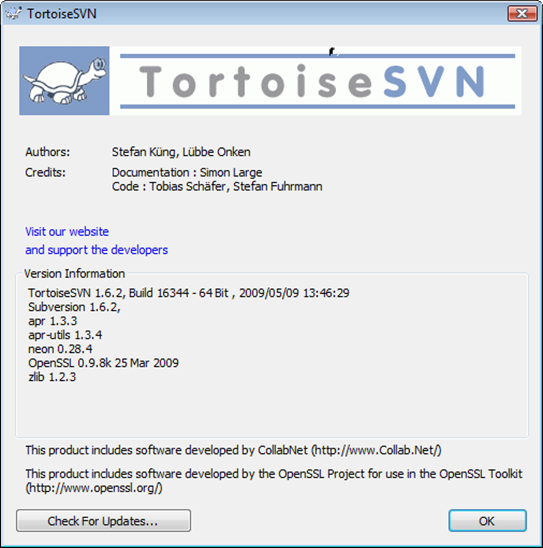
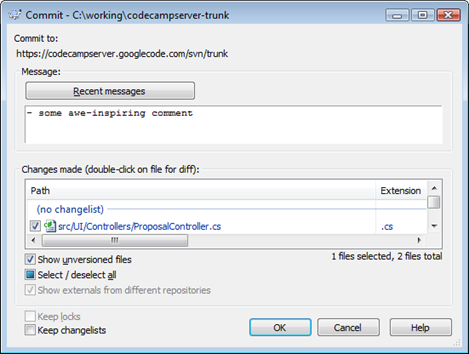
Since this caught me a little by surprise, it probably will catch someone else.  Here’s a tip:  The shortcut key for the “OK” button is:

CTRL+ENTER

image

When on the commit dialog, I often only use the keyboard.  I try to stay away from the mouse as much as possible.  I type the commit message, toggle ALT+A for selecting all files that were chanted (to get non-versioned files as well), and then I was so used to hitting ALT+O because the “O” in “OK” was a hot letter. 

I upgraded to TortoiseSVN 1.6.2, and ALT+O didn’t work anymore.  It may have been in the release notes, who knows, but I found out, quite by accident that CTRL+ENTER keeps my fingers on the keyboard.  I’m sure one of you commenting will let me know that this is some old, universally-known truth, but it’s news to me.  In case it helps someone else, here it is. . . and here is the version of TortoiseSVN I’m on now.

image

Bytes by MSDN mini vidcasts available

MSDN has started a mini video series called “Bytes by MSDN” and has the first video online.  They are pretty short and are perfect for playing on your smartphone, iphone, video ipod, or. . . . . . uh. . . zune.

Scott Hanselman has the first interview.  If you subscribe to the feed, you see my video come through on 27 August, 2009.

Here is the schedule:

Bytes by MSDN Schedule

June 11	Scott Hanselman
June 18	Billy Hollis
June 25	Kate Gregory
July 2	Richard Campbell
July 9	Stephen Forte & Clemens Vasters
July 16	Tim Huckaby & Michele Leroux Bustamente
July 23	Jim Wilt & Brian Noyes
July 30	Loke Uei Tan
Aug 6	Matt Hessinger
Aug 13	Don Box
Aug 20	Juval Lowy
Aug 27	Jeffrey Palermo
Sept 3	Tim Heuer & Out Takes

Independent ASP.NET MVC in Action reviews start even before publication!

Mohammad Azam has published his review of ASP.NET MVC in Action. I particularly liked the following excerpt:

“At merely 300 pages ASP.NET MVC in Action is a true masterpiece. This book clearly shows that authors who have real world experience can write practical books which are more effective than others. . . ”

You can read the full review here.

Speeding up the build – ditch the SSD and go for the RAM drive

Over the past few months, I’ve been searching for the best and most cost-effective way to speed up the build regardless of which projects my guys are working on.  We have a range of projects that see build times from 40 seconds on up to 10 minutes.  At the upper end of the scale, waiting 10 minutes for a build of the software starts to become painful.  I understand that at a larger scale, build systems can become very complex, and we will have to take that leap to the next level of complexity at some point.  I am trying to delay absorbing that complexity as long as possible.  In order to keep it working as a single build, I need to find a way to make the build run faster.

Here are some of the things that run as a part of the Continuous Integration build (it runs on each developer workstation as well as the CI server):

  • Creates a test database
  • Poke xml configuration files with build settings
  • MSBuild compile
  • NUnit running all unit tests
  • NUnit running all fast integration tests

For the purposes of this post, I’ll use CodeCampServer as a demonstration vehicle.  CodeCampServer uses some of the concepts of Head’spring’s architecture, and the build uses our standard NAnt template.

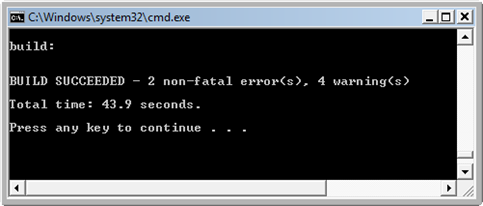
Running the build “Click To Build.bat” from the root of the trunk working copy, we see that it takes 43.9 seconds to run.
image

I tried a Solid State Drive.  In fact, I tried two.  I tried the Patriot Memory WARP 128GB SSD (SATA) as well as the Intel X-25 80GB SSD (SATA).  The Patriot, in my opinion, is a piece of junk!  It benchmarks fast, but under real usage, where the build system (and Visual Studio) are hammering it all the time with small reads and write, it just chokes.  It slows down Windows to a near crawl.  I don’t have any numbers to share with you, but I’m pretty disgusted with that drive.  I had replaced the Seagate 7200RPM 120GB drive that came with my Dell Precision M4300 laptop. 

Next, I tried the Intel X-25 80GB SSD.  This drive is pretty good, but I don’t see a big difference between it and the 7200RPM Seagate.  Power consumption is less, and the heat is less, but I did not feel a big performance boost.  Again, no numbers because I’m not driving toward incremental improvement.  I need a revolutionary improvement in order to feel comfortable doing a hardware upgrade across the board for all of my employees.  I want to upgrade the hardware, but I want to be sure there is a firm ROI story for it. 

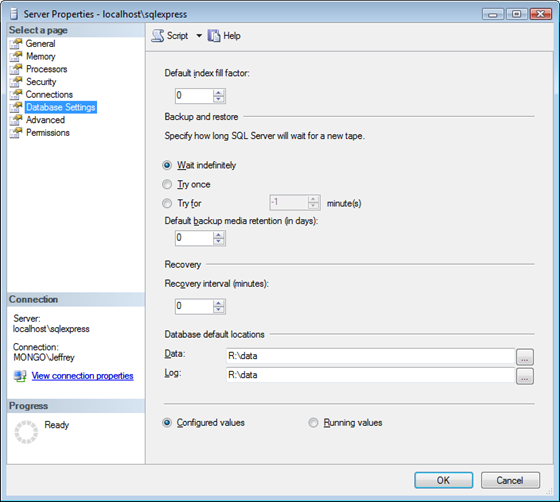
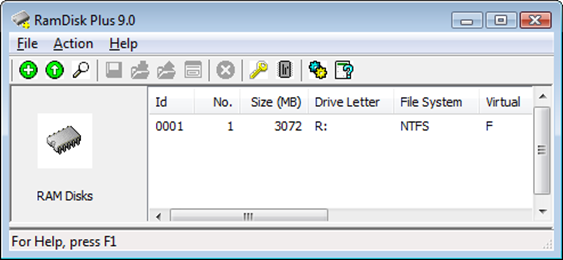
I have gone back to the Seagate 7200RPM drive, but I did the following.  I upgraded the laptop to 8GB of RAM, and I installed SuperSpeed Ramdisk Plus.  I configured a 3GB RAM disk and moved my TortoiseSVN working copies to the ram disk.  I also configured SQL Server to use the ram disk as the default location for databases.
image

image

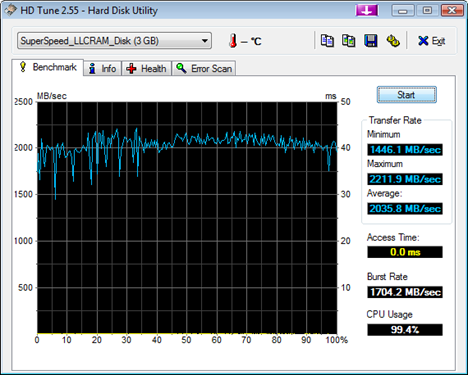
This is important because during one of our software builds, the fast integration tests consume the majority of the build time, and much of that is testing queries and data access.  The log file and the data file will now reside in RAM inside the ram disk.  The .Net framework, MSBuild, and other stuff still resides on the spindle drive, but much of the disk access has now been moved to RAM, which registers over 2000 MB/s on the read side with a 0ms access time.
image

The SuperSpeed Ram Disk Plus product runs about $100 for Vista x64, and it has a nice feature that copies the contents of the ram disk to the main boot drive while shutting down.  It will reload on boot.  This is perfect for version-controlled software source code because the risk of loss is low because of the frequent integration with the version control system.

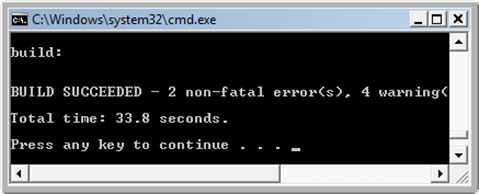
Let’s cut to the chase.  What do these changes net for the CodeCampServer build shown earlier?
image

That’s a 23% savings off the build time.  As a build approaches 10 minutes, it become very critical to reduce the build time.  A slow build will not be run frequently.  A build that’s not run frequently won’t have the opportunity to alert the team to problems right away.  In an extreme programming project, the build is essential to keeping the team going at a fast pace.  I have used CodeCampServer as an example, but with longer builds, the testing step becomes the majority of the time.  Integration tests with the database and file system start to take over 75% of the overall build time, and if we can reduce the time it takes for disk access, then database performance increases as well.  On a larger project that I can’t share, the build time went from 10 minutes down to 6.  That’s a 40% savings.

We’ve also tried running data access tests against an in-memory SQL Lite, but we can’t go with that solution for all projects, and I want an approach that is portable.  If I can find a way to run SQL Server in a memory-only mode, that might help even more.  For now, it seems like beefed-up RAM and a RAM disk give some pretty substantial returns.

I really though that Solid-State drives would be the ticket to faster builds.  With a system that was largely IO-bound, I was counting on SSDs to come to the rescue.  I think they eventually will get better, but it is still too early.  Spindle drives are so mature.  The drivers, firmware, and the drive cache all make them pretty snappy.  The two SSDs I tried did not blow me away.  For now, I’m going to bump up RAM and investigate competing RAM drive products.

By the way, if any of you readers have good experience with RAM drive products, please leave a comment.

Monthly Afternoon Workshops – topics, please (free Headspring events)

This post is an example of free afternoon workshops that we are putting on from Headspring Systems.  This is example of how we find it valuable to give back to the local community here in Austin, TX.

My plans for the free afternoon workshops are to hold one per month.  Philip Wheat, from Microsoft, has been extremely supportive.  He is helping us book the classroom at the Microsoft office so that these can continue on a regular basis.  These events are completely free, and all 4 hours will be used for teaching the topic.  No sales pitches, just learning.

We have scheduled two of these workshops on the topic of ASP.NET MVC.  What I need to find out from you folks, who live in or are willing to travel to Austin, is what topics should be on the calendar.  For instance, ASP.NET MVC is hot, and we have specific expertise on the topic.  As the CTO of Headspring, I am tapping into many of the consultants to provide the topics that are most relevant. 

Some of the topics that have been requested are:

  • ASP.NET MVC
  • NHibernate
  • Inversion of Control (IoC)
  • Test-Driven Development
  • Domain-Driven Design
  • Automated Builds

I need some help from you.  Are any of these topics interesting?  Are there other topics that would be good workshop topics?  Should the workshops be confined to programming topics or should we move into software management topics?  Please leave a comment telling me what you think.  This is one avenue where we are giving back to the community, and I want to ensure it has the biggest impact possible.

Afternoon of ASP.NET MVC [16 June] (free Headspring event)

Next Tuesday, 16 June 2009 from 1pm to 5pm, Eric Hexter and Jeffrey Palermo will be facilitating a 4-hour (free) workshop on ASP.NET MVC.  This is the second event of this kind, and we intend to continue partnering with Microsoft to provide this kind of free technology training.

Last time the event was held, the room was completely full, so it is very important that you RSVP here.

Go here for all the details.

With the new version of ASP.NET…

ASP.NET MVCDevelopers can easily leverage the Model-View-Controller pattern in ASP.NET applications. Pulling logic away from the UI and the views has been difficult for a long time. The Model-View-Presenter pattern helps a little bit, but the fact that the view has to delegate to the presenter makes the UI pattern difficult to work with.

Headspring has been using ASP.NET MVC since the original prototype and has presented on the topic at local conferences as well as Microsoft TechEd. Headspring employees are responsible for a book on ASP.NET MVC, as well as MvcContrib, CodeCampServer, and several community Solution Templates. This workshop offers the opportunity to share the experience using the ASP.NET MVC Framework on real-world systems.

On Tuesday, June 16, from 1PM to 5PM, we would like to show you some of what we know. Please join us for an afternoon of MVC at the Microsoft Technology Center. Register in advance of attending.

The instructors are Eric Hexter and Jeffrey Palermo.

Training located in Austin, Texas (1:00 p.m. to 5:00 p.m.)
Microsoft Corporation
9606 N Mo Pac Expy # 200
Austin, TX 78759
(512) 795-5300
Map

Input Builders for ASP.NET MVC series continues from Eric Hexter

Eric Hexter is continuing his multi-part series on Opinionated Input Builders.  He’s on a role!
They are expression-based, meaning they eliminate the need for most strings for Html Helpers in your views.
They look like this:
<%=Html.Input(x=>x.FirstName)%>

And the output on the screen is:

First Name*: ______________ ex:John
 
Eric is collecting feedback and opinions now because this will eventually go into MvcContrib.  It is being tested on a few small, low-risk projects at Headspring Systems to ensure that they suit a general need.

Input Builders for ASP.NET MVC in the works

Subscribe to my feed here:  http://feeds.jeffreypalermo.com/jeffreypalermo

Eric Hexter has started a multi–part series on Opinionated Input Builders.  They are expression-based, meaning they eliminate the need for most strings for Html Helpers in your views.  They look like this:

<%=Html.Input(x=>x.FirstName)%>

And the output on the screen is:

First Name*: ______________ ex:John
 
Eric is collecting feedback and opinions now because this will eventually go into MvcContrib.  It is being tested on a few small, low-risk projects at Headspring Systems to ensure that they suit a general need.