Get to Tech Ed early for a Pre-conference Pre-PARTY – level FUN

Tech
Ed
 starts on June 6th with the Pre-conference labs being on
June 5th.  June 4th is the Saturday before _anything_ starts.

On Saturday, June 4th, I’ll be hosting a Pre-Pre-Conference PARTY! 
Plan on getting to Orlando one day early (after all, it’s the weekend) to attend
the “Tech Ed Kick-Off Bash“!  I’ll be releasing more details in the following
weeks and finalizing information in late May.  Watch my blog for details.  This
will be a lot of fun and will have something for everyone.

Time to select those sessions for Tech Ed. and vote on Birds of a Feather sessions – level 000

If you are registered for Tech Ed, you will receive in an email a link to
pick your sessions.  Each is identified as a track.  I ended up with a mix
between the following tracks:  Developer, Architect, and Web.  My selections did
include quite a bit of WinForms smart client, and I tended to shy away from the
topics I could learn by reading a few good articles.

Vote on Birds of a Feather sessions here.

The following session is a _must attend_. 

Test-Driven Development is
Design!

With the new testing tools available in Visual
Studio 2005, Microsoft is enabling an ever greater potential for the adoption of
Test-Driven Development. The upwelling of recent test tool adopters that comes
with Visual Studio 2005 has also created a great deal of ambiguity around
Test-Driven Development for Microsoft developers. Test-Driven Development is a
micro-iterative process whose primary aim is software design – specifically
loosely-coupled designs. As the saying goes, “Tests are just a side effect.”
This session is specifically geared to creating a clear understanding of
Test-Driven Development for Microsoft developers in the ramp up to Visual Studio
2005.

Intended Audience: Developer
Submitted By: Scott Bellware,
Bellware.NET

Provider pattern: Abstract class or Interface? – level 300

In Rob Howard’s article, http://msdn.microsoft.com/library/default.asp?url=/library/en-us/dnaspnet/html/asp02182004.asp,
he describes the “Provider” pattern as coined by Microsoft.  I like the pattern,
and it seems similar to the Strategy pattern as put forth GoF.

I love the benefits:  the ability to control what provider is used by a
configuration item.  Microsoft seems to have coined the term “Provider”, so I
guess it’s their definition, but at the lowest level it is an abstract class
that defines the contract, or API.  Then a configuration item controls which of
the abstract class’s implementation in invoked.  For example, I could have a
class that needs data.  I think we can all imagine different classes that allow
access to different data sources.  All the different data sources would have a
class that inherited from the abstract provider class.  My client class would
get the configuration item that contained the assembly and type of the provider
implementation and instantiate it through reflection.  The reference would be of
the abstract base class, so no matter which provider is configured, The client
will instantiate the appropriate one at runtime and access it through the
methods defined in the abstract class.

Personally, I would choose an interface first.  I know they are immutable,
but is that an issue?  Using an abstract class eliminates the possibility of
having a base class for the provider elsewhere, so it seems to me that this is
an unnecessary constraint.  If the contract of the base class needs to provider
base functionality, then an abstract class makes sense, but as long as it is
just an API contract, I would favor an interface.

I feel that the “Provider” pattern should specify the general concept and not
specify inheritance vs. interface.  I would consider either to be the Provider
pattern depending on the application of the pattern.

Architecture prototype revised and tested – level 400

Here, I’m following up on my previous
post
about making a prototype of the architecture diagram presented. 
Please download my revised VS.Net solution
here.

I’ve decided not to repost much of the code because of the amount, but I made
some pretty significant changes.  In line with Scott Bellware’s suggestions,
I’ve added more granularity to the View interface so that the view never
actually holds a reference to the business object.  The control’s to display
information are exposed as properties (actually, the textbox.Text property is
exposed as a property of the interface), so the presenter can actually change UI
elements through the inderection these properties provide.  I defined two events
on the interface as well to denote when the LookUp event first and Persist.  My
Presenter doesn’t care about a button click, so when the View experiences a
button click that actually means “LookUp”, it fires the LookUp event, which the
Presenter is listening for.

I will include one bit of code, and that is the IView interface
implementation in my WinForms code-behind class:

   72 private void button2_Click(object sender, System.EventArgs e) {
   73     if(LookUp
!= null) LookUp(sender, e);
   74 }
   75 
   76 private void button1_Click(object sender, System.EventArgs e) {
   77     if(Persist
!= null) Persist(sender, e);
   78 }
   79 
   80 // Below are
interface members

   81 public event
System.EventHandler LookUp;
   82 
   83 public event System.EventHandler Persist;
   84 
   85 public
Presenter.ContactPresenter Presenter {
   86     get {
return _presenter; }
   87     set {
_presenter = value; }
   88 }
   89 
   90 public string ContactPhoneNumber {
   91     get {
return txtPhoneNumber.Text; }
   92     set {
txtPhoneNumber.Text = value; }
   93 }
   94 
   95 public string ContactName {
   96     get {
return txtName.Text; }
   97     set {
txtName.Text = value; }
   98 }
   99 
  100 public int ContactAge {
  101     get {
return int.Parse(txtAge.Text); }
  102     set {
txtAge.Text = value.ToString(); }
  103 }
  104 
  105 public string ContactUserName {
  106     get {
return txtUserName.Text; }
  107     set {
txtUserName.Text = value; }
  108 }
  109 
  110 public string UserNameToLookUp {
  111     get {
return ddlUserName.SelectedItem.ToString();
}
  112 }
  113 
  114 private void Form1_Load(object sender, EventArgs e) {
  115     if(_presenter == null) _presenter = new Presenter.ContactPresenter(this);
  116 }

The above is a snippet from the form code.  Notice how the interface
properties are mapped to the appropriate text box, and the button click handlers
just invoke the events defined by the interface.  Now it would be very trivial
to snap a different UI on to the same Presenter.

I used NUnit to hook up unit tests to the entire thing to prove that this
layout was fully testable.  Each component at every layer has been tested in
isolation.  The interfaces make it easy to make stubs, but interfaces were
mainly used for loose-coupling.  I’m tightly coupled where concrete classes are
referenced, but that’s fine.  I think that loose-coupling should server a
purpose, so it may not be appropriate everywhere.  For instance, my Presenter is
tightly coupled with the Repository object.  I can still test my Presenter is
isolation because I have a property in my Presenter to hold a reference to the
Repository.  In my test, I inherit from the Repository, override the members,
and set the Presenter’s property to my stub object.  This isolates Presenter. 

I was a bit surprised at how simple my tests ended up being because each
class served a specific purpose, so it was easy to test for that purpose.  As
long as my Presenter could call the Repository, it was working.  As long as the
Repository could get a Contact back from the ContactData object, it was
working.  Only my unit test for MyContactData actually tested that the data was
correct because the object was being created at this point.

Another point of interest is the amount of private methods in my solution. 
My two event handlers in the Presenter are private, and that is it.  Everything
else is a publicly exposed piece of a concrete class that serves a distinct
purpose.

Download my code and give it a look.  I’m open for criticism.  Maybe with a
little collaboration, we can, as a community, make architecture recommendations
and provide a community-supported prototype of a single feature demonstrates the
use of good practices.  The more feedback the better.

General application architecture revisited – level 400

I’ve reviewed my architecture diagram, and the revised one is as follows:
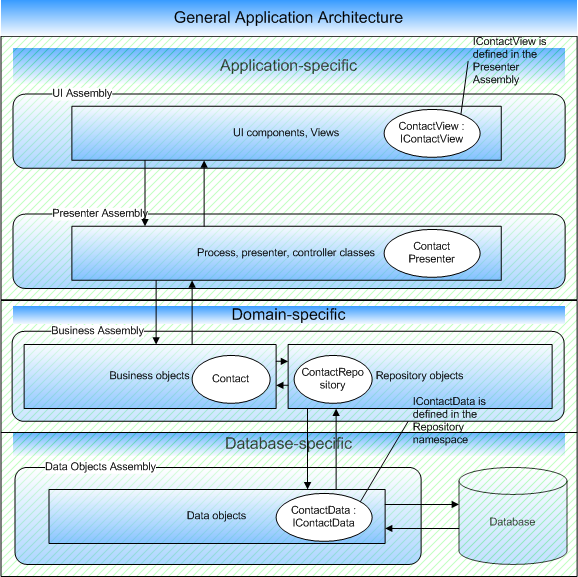
Although it may seem like a straight-forward diagram, I had to create a prototype, and the diagram just doesn’t do justice to the implementation.  There are things that are hard to communicate using just these ovals and boxes.  Make sure to download and try out my sample solution.  It has a WinForms app ready to run.

I’ve made a VS solution as a sample implementation of this diagram.  You can download it here.  In it, the UI uses the M-V-P pattern, I use the Strategy pattern for my Data Provider, and my Repository objects are Factories.  I can’t include all the source in this blog post, so I’ll just include the key pieces:

The following is a snippet from my WinForms class.  Notice how I delegate key events to my Presenter class.  This class implements the IContactView interface(included in my source code), so the presenter can control the view.

   61 public Form1() {
   62     //
   63     // Required for Windows Form Designer support
   64     //
   65     _presenter = new Presenter.ContactPresenter(this);
   66     _currentContact = new Model.Contact();
   67     InitializeComponent();
   68 
   69     //
   70     // TODO: Add any constructor code after InitializeComponent call
   71     //
   72 }
   73 
   74 private Presenter.ContactPresenter _presenter;
   75 
   76 private void button2_Click(object sender, System.EventArgs e) {
   77     _presenter.LookUpContactByUserName(ddlUserName.SelectedItem.ToString());
   78 }
   79 
   80 private void button1_Click(object sender, System.EventArgs e) {
   81     this.CurrentContact.UserName = txtUserName.Text;
   82     this.CurrentContact.Name = txtName.Text;
   83     this.CurrentContact.PhoneNumber = txtPhoneNumber.Text;
   84     this.CurrentContact.Age = int.Parse(txtAge.Text);
   85     _presenter.SaveContact();
   86 }
   87 
   88 private Model.Contact _currentContact;
   89 
   90 public Model.Contact CurrentContact {
   91     get {
   92         return _currentContact;
   93     }
   94     set {
   95         _currentContact = value;
   96     }
   97 }
   98 
   99 public void Update() {
  100     if(CurrentContact != null) {
  101         txtUserName.Text = CurrentContact.UserName;
  102         txtName.Text = CurrentContact.Name;
  103         txtPhoneNumber.Text = CurrentContact.PhoneNumber;
  104         txtAge.Text = CurrentContact.Age.ToString();
  105     }
  106 }

In my Presenter class that follows, I handle View behaviors and contact the Repository objects in my business layer to get and save my business object.

    6 public class ContactPresenter
    7 {
    8     public ContactPresenter(View.IContactView view) {
    9         _view = view;
   10     }
   11 
   12     private View.IContactView _view;
   13     private Model.Repository.ContactRepository _repository = new Model.Repository.ContactRepository();
   14 
   15     public Model.Repository.ContactRepository Repository {
   16         get { return _repository; }
   17     }
   18 
   19     public void SaveContact() {
   20         Repository.SaveContact(_view.CurrentContact);
   21         _view.Update();
   22     }
   23 
   24     public void LookUpContactByUserName(string userName) {
   25         _view.CurrentContact = _repository[userName];
   26         _view.Update();
   27     }
   28 }

My business object is very simple:

    5 public class Contact
    6 {
    7     // public fields used for simplicity (Don’t do this for real).
    8     public string UserName;
    9     public string Name;
   10     public string PhoneNumber;
   11     public int Age;
   12 }

And my repository object (inside my business assembly):  Note how I’m using a ConfigurationService singleton.  This configuration service is responsible for reading configuration required by my business layer.  This method does couple an appSettings key with my business layer, but if this is a problem for a particular application, the Presenter layer, on application startup, could get appropriate configuration and set the instance of ConfigurationService in the Repository layer.

The ConfigurationService will handle (based on the config key) creating an instance of the DataProvider.  The DataProvider will implement IDataAccessLayer (included in source code).  This interface defines methods for getting data objects.  The data object responsible for Contact data implements IContactData, an interface defined in the Repository layer.  To switch persistence mediums, I merely change the config item and provide a library that implements the appropriate interfaces.

    5 public class ContactRepository {
    6 
    7     private Data.IContactData ContactData {
    8         get { return ConfigurationService.GetInstance().DataProvider.GetContactData();}
    9     }
   10 
   11     public Contact this[string userName] {
   12         get { return this.ContactData.GetContact(userName); }
   13     }
   14 
   15     public void SaveContact(Contact contact) {
   16         ContactData.SaveContact(contact);
   17     }
   18 }

My data provider object follows.  Note that only one method is defined now, but the class would grow with the number of domain objects needing corresponding data objects.

    7 public class DataAccessLayer: IDataAccessLayer {
    8 
    9     public IContactData GetContactData() {
   10         return new ContactData();
   11     }
   12 }

And finally, I have stubbed out a data object which handles getting and saving my Contact objects.  I just whipped up a quick implementation for demonstration purposes, and it works because I implement the IContactData interface.  An instance of this type is created and returned by my DataAccessLayer class to the Repository, which can use it.

    7 public class ContactData: IContactData {
    8 
    9     private static Contact jpalermo, sbellware;
   10 
   11     static ContactData() {
   12         jpalermo = new Contact();
   13         jpalermo.UserName = “jpalermo”;
   14         jpalermo.Name = “Jeffrey Palermo”;
   15         jpalermo.PhoneNumber = “555-5555”;
   16         jpalermo.Age = 26;
   17 
   18         sbellware = new Contact();
   19         sbellware.UserName = “sbellware”;
   20         sbellware.Name = “Scott Bellware”;
   21         sbellware.PhoneNumber = “555-5555”;
   22         sbellware.Age = int.MaxValue;
   23     }
   24 
   25     public void SaveContact(Contact contact) {
   26         // Bogus implementation.  In a real scenario, I’d go to my database or other
   27         // persistence medium to save the contact.
   28         Contact o = null;
   29         switch(contact.UserName) {
   30             case “jpalermo”:
   31                 o = jpalermo;
   32                 break;
   33             case “sbellware”:
   34                 o = sbellware;
   35                 break;
   36         }
   37         o.UserName = contact.UserName;
   38         o.Name = contact.Name;
   39         o.PhoneNumber = contact.PhoneNumber;
   40         o.Age = contact.Age;
   41     }
   42 
   43     public Contact GetContact(string userName) {
   44         // Bogus implementation.  In a real scenario, I’d go to my database or other
   45         // persistence medium to retrieve the contact.
   46         Contact o = null;
   47         switch(userName) {
   48             case “jpalermo”:
   49                 o = jpalermo;
   50                 break;
   51             case “sbellware”:
   52                 o = sbellware;
   53                 break;
   54         }
   55         return o;
   56     }
   57 }

I wanted to create this prototype as a proof of concept of this architecture.  It may seem complex with all the interfaces, but I believe that for an enterprise-class application, it provides the flexibility required for unit-testing and bolting on components as required.  The biggest issue, I believe, it testability.  Each class is highly cohesive in that it serves a clear purpose, but the components are loosely-coupled because each can be used and tested in isolation.

One important thing to note is that the business assembly doesn’t reference any other assemblies.  All of the assemblies reference it.  It is able to communicate and even call to the other assemblys only because classes in other assemblies implement interfaces defined in the business assembly.

Note: The downloadable sample has been revised for testability, and unit tests have been included.

Austin, Texas Agile Yahoo Group – seeking local Agile users – level 000

If you live around Austin, TX and are interested in Agile development
methodologies, check out http://groups.yahoo.com/group/AgileATX/.

This group is for locals, and we have a biweekly lunch to discuss a wide
range of development topics.  We meet at Mongolian BBQ, which is a great
environment for our information meetings.  Our next meeting will likely contain
a lot of content regarding domain-driven design and designing for testability. 
Come and join us.  Subscribe to the Yahoo group.

Highlights from my previous 199 ramblings – level 100 – 400

I started out reading blogs in early 2004 while in Iraq.  In March, I started
a blog at blogspot (and with a
little ‘customization’ of the stylesheet, I got it to redirect to my blog at
.Net junkies).  On April 16th, I transfered my initial posts to .Net junkies. 

One of the drawbacks of blogs is that old posts get buried even though the
information may continue to be relavent.  Here, I’ll review some topics:

I’m not sure how many regular readers I have (that isn’t my goal), but I
figured that on average, my blog website gets 430 hits per day.  Google is
responsible for most of them by matching up searches with content on my blog. 
Then another 500 RSS hits for most blog posts.

Looking back on my blog, it really is a journal of my coding experiences, and
I can see how far I’ve progressed. 

Local Agile lunch today – level 100

Today we had our second Agile lunch at the Mongolian BBQ.  We have a Yahoo
group at: http://groups.yahoo.com/group/BellwareNET to
coordinate locals interested in Agile methodologies.  We’ve decided to have our
meetings be over lunch since the attendance will be small; much smaller than the
Austin .Net User Group attendance.  At today’s meeting we discussed such topics
as:

– San Antonio user group web site
–
FitNesse
– Continuous integration, CruiseControl
– Testing user
interfaces
– NUnitForms
– Model-View-Presenter pattern
– DI, IOC,
Structure Map, Spring .NET

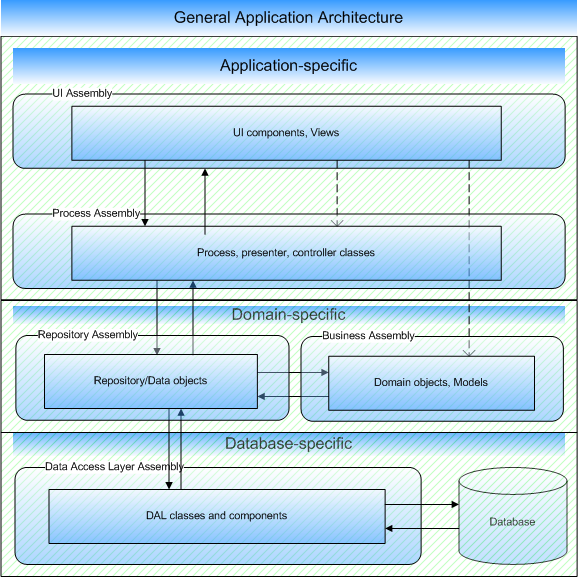
General application architecture diagram – level 300

Many applications I’ve encountered and most of my first applications had
loose or no defined architecture.   From a high level, everything just was.  And
it worked.  And it became hard to maintain.  I’ve been researching better ways
to organize the application and how to take advantage of high-level design
patterns.  With this knowledge, I’ve developed a general architecture for any
application with a UI (apps without a UI will just lack that layer, and, of
course, I haven’t included a service layer (which might even be the interface
layer).

My goal was to describe how the layers might interact and what bindings would
exist.  The most important things follow:  The UI layer holds references to the
process and business layers and no others.  The process layer holds references
to the repository, business, and UI layers.  The repository layer references
business and DAL.  The business layer references nothing (and this is key for
object portability).  The DAL references only the database (most likely through
the connection string) but holds no assembly references except ADO.NET, of
course.

With this architecture, we can implement Model-View-Presenter,  Repositories,
and Observer.   For example, the Process layer would hold presenter objects that
invoke business objects and set the View (UI).  The View observes business
objects but does not control them.  The Presenter objects control the process
layer and invoke the repository classes to get or persist the business objects. 
The repository layer does this by calling the correct classes of the DAL.  And
then, if the database changes (either in vender or schema), only the DAL needs
to be changed.  The DAL should expose classes that return data by calling the
right query in the database.  The DAL might wrap ADO.NET or perhaps the Data
Access Application Block for the direct database access.  The DAL would know the
names of stored procedures.  The repository objects would not know this.  Rather
the repository objects would just know what class and method to invoke to get
information with which to populate a business object.  The DAL should return
generic objects such as an IDataReader. 

I’ve read a lot about application design patterns and best practices, but I
wish there was some more architecture guidance out and about.  I think the
industry would benefit from standard approaches to application development from
a high level.  We hear a lot about n-tier and business layers, but a business
layer that knows how to persist its own objects is not the way to go, so I see
this guidance lacking.

Feedback is welcome on the above diagram.