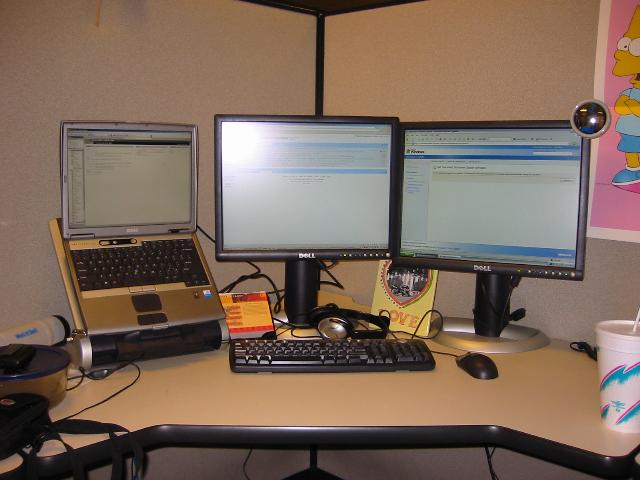
My newly renovated desk at work – 3 displays – level 000

Honestly, my CRT was starting to give me eye strain.  I’m a hardcore developer, and I decline meetings whenever possible.  I routinely type code at my computer 7-8 hours per day.  I have two LCD monitors now, and my screens are SO much clearer.  No refresh rate, just crystal clear pixels.

Here’s my desk.  I run off of a Lattitude D600 laptop (P-m 1.8/1GB RAM) with Windows Server 2003.  I have VS.Net 2003 and 2005 Beta 1 (they work great together).  And once you can run your app on one screen, debug it on another, and keep NUnit/Outlook on the other, you’ll never go back.  I’m already thinking of how I can work in a 4th display.  For laptops, it’s difficult because you actually need another video adapter.  I ordered the VTBook.

Managing work running in the Threadpool – level 350

I recently solved a problem that the community might run into, so I think I’ll share my solution.  I had a process (in my case a Windows service, but this concept applies to Console or WinForms apps as well) that dispatched work to the threadpool.  There are different types of work, and each type should not have to wait for all of another type to finish, so I use the threadpool for concurrent execution (I have to wait for a database, so I actually do see performance gains), but if there is 3 hours worth of type A work to do, type B should not have to wait that 3 hours to begin.  The situation worked fine until I needed to stop my service.  When you stop a process, it stops.  It doesn’t wait for catch and finally blocks to execute, either.  If there was work in progress, that work was left in a corrupted state.  That possibility is not acceptable for a production application.  I need to be able to stop or wait for the work before I allow the service to complete stopping.  My solution was that for each new work item that was started in the threadpool, I added that thread to an ArrayList, and when the work was finished, I removed it.  When I needed to stop, I walked through each thread and called Abort() and Join().  This threw a ThreadAbortException down that thread allowing my normal cleanup code to execute, and Join() waited a specified period of time for that thread to finish and exit, then control returned to the main thread.  After all the threads were finished, I would finish stopping.  In this way, I could maintain control over work being done in the threadpool.

Here is a sample class that dispatches work (it makes the work run in its own AppDomain too).


    public class Controller


    {


        public ArrayList threads = new ArrayList();


        public Controller(){


            // Just so we can see the activity.


            Trace.Listeners.Add(new TextWriterTraceListener(Console.Out));


        }


        public void DoWork(){


            try{


                // Three might be running at the same time.


                for(int i = 0; i < 3; i++){


                    ThreadPool.QueueUserWorkItem(new WaitCallback(Execute));


                }


                Thread.Sleep(20000);


                Trace.WriteLine(threads.Count, this.ToString());


            }finally{


                foreach(Thread t in threads){


                    t.Abort();


                    t.Join();


                }


            }


        }


        private void Execute(object state){


            AppDomainSetup setup = null;


            AppDomain domain = null;


            try{


                threads.Add(Thread.CurrentThread);


                setup = new AppDomainSetup();


                setup.ApplicationBase = AppDomain.CurrentDomain.BaseDirectory;


                domain = AppDomain.CreateDomain(“Processor”, null, setup);


                Processor proc = (Processor)domain.CreateInstanceAndUnwrap(Assembly.GetExecutingAssembly().FullName, typeof(Processor).FullName);


                proc.Process();


            }finally{


                threads.Remove(Thread.CurrentThread);


                if(domain != null)


                    AppDomain.Unload(domain);


            }


        }


    }

And here is my sample Processor class:


    [Serializable()]


    public class Processor


    {


        public void Process(){


            try{


                Trace.WriteLine(“Beginning Processing”, this.ToString());


                // Simulate a long-running process.


                System.Threading.Thread.Sleep(20000);


            }finally{


                Trace.WriteLine(“Finished”, this.ToString());


                // Close out database record an other cleanup.


            }


        }


    }

This has solved my problem, and now when I sent work to the threadpool it’s not just a foreign country with no phones.  I stay in control of those threads.  The above code is a sample of the same concept I’m using.  Feel free to use the sample. but it’s been simplified to protect the innocent, so make sure to fully test whatever you put into practice.

Run features in a separate AppDomain – level 300

Along with putting feature dlls in a separate directory with the shared assemblies they need, I like to run these features in an isolated AppDomain to contain memory usage as well as state.  When using Trace for logging, this is a great benefit because application state is local to the AppDomain, so my Trace.Listeners collection is dedicated to the AppDomain.  Here’s an easy sample showing how to do this:


            Trace.Listeners.Add(new TextWriterTraceListener(Console.Out));


            Trace.WriteLine(“Starting MainClass”);


            AppDomainSetup setup = new AppDomainSetup();


            setup.ApplicationBase = AppDomain.CurrentDomain.BaseDirectory; // or another directory.


            setup.ApplicationName = “My Domain”;


            AppDomain ad = AppDomain.CreateDomain(“CreateDomain”, null, setup);


            object o = ad.CreateInstanceAndUnwrap(“BusinessLogic”, “BusinessLogic.BusinessLogic”);


            Trace.WriteLine(o.ToString());


            Trace.WriteLine(“DONE testing appdomain.  Now testing process”);


            Console.ReadLine();

And here is my BusinessLogic class I contrived for this test:


namespace BusinessLogic


{


    /// <summary>


    /// Summary description for Class1.


    /// </summary>


    [Serializable()]


    public class BusinessLogic : MarshalByRefObject


    {


        public override string ToString(){


            System.Diagnostics.Trace.WriteLine(“From Business Logic”);


            string retValue = “Information about current runtime:n”;


            retValue += “Current AppDomain location: ” + AppDomain.CurrentDomain.BaseDirectory + “n”;


            retValue += “Executing Assembly FullName: ” + Assembly.GetExecutingAssembly().ToString() + “n”;


            retValue += “BusinessLogic location: ” + Assembly.GetExecutingAssembly().Location + “n”;


            retValue += “Framework Assembly FullName: ” + typeof(Audit).Assembly.ToString() + “n”;


            retValue += “Framework location” + typeof(Audit).Assembly.Location + “n”;


            return retValue;


        }


        public override bool Equals(object obj) {


            throw new Exception(“BOMB”);


            return base.Equals (obj);


        }


    }


}

Notice how I marked the class as Serializable.  And don’t forget to mark other classes that  you may need to pass back and forth (not many, I hope).  I also have to inherit my object from MarshalByRefObject because my initial call is directly to this object.  Any exceptions that may be raised up back to the parent AppDomain must also be Serialiable and implemet a Serialization constructor. 

I love this model for code and state isolation, and it has made my life so much easier!

Avoid the GAC, prefer XCOPY. Here’s why – level 300

I know I may get some comments saying that the GAC should be used for shared
assemblies, but it’s so much easier to maintain XCOPY deployment with a
consuming assembly in a directory by itself with the shared assemblies it
needs. 

Let me give a scenario where I would do this:  I have a windows application
that is modularized into main features.  The base directory has the main
executable and all the shared libraries.  Feature teams work on the main
features and deploy the feature’s .dll files into a subdirectory along with the
version of the shared assemblies they compiled and tested against.  Maybe I
release a new version of the program shell (the main assembly).  That team has
to test against the most current build of the shared assembly and deploy.  The
feature assemblies aren’t retested and continue to use the assembly they were
tested with.  A single feature team can redeploy their feature along with the
current build (at that time) of the shared assembly.  The features are
completely decoupled and the deployment is easy. 

Consider the alternative:  the main executable and feature assemblies are
deployed to the same directory.  No matter the feature, the shared assembly in
the current directory is loaded.  I version the main EXE, and it needs the
latest version of the shared assembly.  I have a situation where I have to
retest all the features because they were built against an
older version of the shared assembly.  I have no way to version each major piece
separately.  Or if a feature team makes a new release, and they have to have the
latest shared dll, you have a major retest burden every time this happens.  If
you keep the binaries separate, you avoid this problem.

Put the shared assembly in the GAC, you say?  Yes, that would work.  If you
prefer it, go ahead, but what, really, is the benefit?  There is no
real performance difference.  It is another method that would
work, but there is no benefit to the increased deployment burden.  KISS.  Keep
it simple, stupid, that’s my motto.  The simplest thing that will work.  If I’m
wrong, I would love to hear the real benefits
of the GAC.

I’m not knocking the MS team who made the GAC, but XCOPY is just such a great
deployment model, why mess with a good thing?

Update on XmlSerializerSectionHandler – level 200

Here is another update to the XmlSerializerSectionHandler that Craig
Andera
introduced.  The code below is essentially the same:

    public
class
XmlSerializerSectionHandler : IConfigurationSectionHandler
{

        public
object
Create(object p_oParent, object p_oConfigContext, System.Xml.XmlNode
p_oSection) {

            XPathNavigator oNav =
p_oSection.CreateNavigator ();

            string sTypeName =
oNav.Evaluate(“string(@type)”).ToString();

            Type oType =
Type.GetType(sTypeName);

            XmlSerializer oSer = new XmlSerializer(oType);

            XmlNodeReader oReader = new XmlNodeReader(p_oSection);

            object oRetValue =
oSer.Deserialize(oReader);

            oReader.Close();

            return oRetValue;

        }

    }

I wanted to demonstrate how powerful this really is.  Not only can we now use
this to strongly-type our configuration keys as elements, but we can configure
arrays as well.  Here is my config section:

<configSections>

<section name=”MyConfig” type =”Dell.Titans.Framework.Configuration.XmlSerializerSectionHandler,
Dell.Titans.Framework”/>
</configSections>


<MyConfig type=”ConsoleTestHarness.MyConfig,ConsoleTestHarness”>
<List>
    
<int>1</int>
     <int>2</int>
     <int>4</int>
</List>
<Foo>1.234</Foo>
<Bar>A bunch of
information</Bar>
<ConnectionString>my string</ConnectionString>
</MyConfig>

Now the section name must be the same as the type name, but see how we can
configure an array of int object as the “List” property.  Here is my type:

    public
class
MyConfig {

        private
float
foo;

        private
string
bar;

        private
string
connectionString;

        public
float
Foo {

            get { return foo ; }

            set { foo = value ; }

        }

        public
string
Bar {

            get { return bar; }

            set { bar = value; }

        }

        public
string
ConnectionString {

            get { return connectionString; }

            set { connectionString = value; }

        }

        public
int
[] List = new int[]{1, 2, 4};

    }

Note how I have added one more property as well as the List array.  Another
thought is:  What if I add a method to the getter of ConnectionString to
unencrypt the value before returning it?  Then I could encrypt sensitive keys
without much effort.

The <appSettings> configuration section offers basic functionality, but
the configuration architecture is so flexible that we are able to customize
configuration to our exact needs.  Happy programming.

Use XHTML for your web applications, please! – level 100

I realize that a lot of web applications are targeted for IE, and it may be an intranet application.  Even so, it pays to put the line:

<!DOCTYPE html
PUBLIC “-//W3C//DTD XHTML 1.0 Strict//EN”
“http://www.w3.org/TR/xhtml1/DTD/xhtml1-strict.dtd”>

Adding this will save you so much grief later on.   First, your CSS will actually cascade down to child elements, so you can have a very clean stylesheet.  Second, you know that your site will render properly in all browsers.  No need to test all the browsers.  By making your pages XHTML, you are adhering to the standard, so that’s all you need to worry about. 

The alternative is to muck up your stylesheet with duplicate declarations and the same css class on nested elements.  Then, when the site looks good, just open it in another standards-based browser and cry.

Many people don’t know that if you fail to put a doctype at the top of a page, IE will interpret it as HTML4.0.  If you want HTML4.0, then at least put the doctype there:

<!DOCTYPE HTML PUBLIC “-//W3C//DTD HTML 4.01//EN”
   “http://www.w3.org/TR/html4/strict.dtd”&gt;
Even then, the other browsers (that default to XHTML) will see the doctype and interpret it as HTML4.

I wonder how many web application developers out there have never read the standards docs for xhtml or css. . .

Reverse engineering a project from the binaries after losing the source code – level 300

I just did this today, and it actually didn’t take long.  I inherited a project, and the source code did not come with it.  It’s a side project, not at my company, but I originally thought that I might have to start from scratch.  Normally, I probably would have, but by using Reflector I was able to leverage many of the existing objects.  The project is a web site with SQL Server behind it, and there are several controls that pull and display data from the website.  After putting my new website framework in place (EZWeb), I made plugins (user controls that are dynamically loaded) to house the existing controls.  I made a template (a user controls that works with my master page controls) to mimick the look of the original site.  Then I added the individual controls to my plugins.  Even when I received errors, I was able to use Reflector to drill down the call stack and figure out what was going wrong.  Now, I have the site on my EZWeb framework while leveraging the existing code.  It will be very easy to extend the site from here in the new direction, and I didn’t have to start from scratch. 

Scott, if you’re reading this, yes, it’s what you’re thinking of.

Eating at Rudy’s after a talk with Brad Abrams – level 000

Brad gave a great talk Friday at the Austin .Net User Group.  He covered the guts of Exceptions and Finalizers and the Dispose pattern.  Afterwards, we at at Rudy’s BBQ – the worst BBQ in Texas! (that’s the slogan).  Here’s some pics:


I’m the 4th one back on the right.