ASP.NET MVC in Action: two free chapters and all source code online

Along with buying the EBook now and the print book shipping in 17 days on Sept 7th, you can download two free chapters right now online.  Go to http://bit.ly/mvcinaction to download the free stuff.

Along with the free chapters, you can get the source code for the entire book for FREE even if you haven’t purchased the book yet.  Be warned!  It’s a 97MB zip file that expands to about 200MB of Visual Studio solution goodness.  Over 60 ASP.NET MVC projects make up the examples in the book, and it all opens in one solution.  You need SQL Server 2005 Express to run some of the examples.

ASP.NET MVC in Action book complete and headed to the presses!

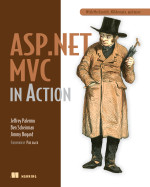
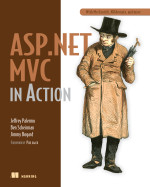
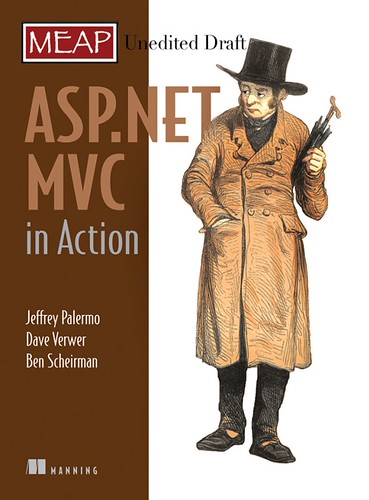
Below is the final cover for the book.  Because of the heavy emphasis on complementary tools for ASP.NET MVC, we’ve added a subtitle, “with MvcContrib, NHibernate, and more”.  MvcContrib is sprinkled throughout the book because we as an author team feel that MvcContrib is essential for its extra features.  It stays out of the way, but it is extremely useful to not have to write common extensions yourself.

I want to thank Phil Haack for coming through with a great Foreword for the book.  Thanks as well for the great framework that deserves this book.  Thanks to my two great co-authors, Ben Scheirman and Jimmy Bogard.  Also thanks to Jeremy Skinner who was a terrific technical editor.

We’re already starting plans for the 2nd edition that will cover ASP.NET MVC 2 (to be shipped with Visual Studio 2010).

If you are interested in buying the book, ASP.NET MVC in Action, don’t forget to get your coupon codes here.  Minimum 30% discount, and if you want to do a review or link to the book, use the shortened URL: http://bit.ly/mvcinaction.

image

Manning offers Alt.Net book series and 42% discount on them all

Manning just sent out “alt42” as a discount code for the Alt.Net books until June 25th.  Along with my book, ASP.NET MVC in Action, you can use this discount code on others such as:

Independent ASP.NET MVC in Action reviews start even before publication!

Mohammad Azam has published his review of ASP.NET MVC in Action. I particularly liked the following excerpt:

“At merely 300 pages ASP.NET MVC in Action is a true masterpiece. This book clearly shows that authors who have real world experience can write practical books which are more effective than others. . . ”

You can read the full review here.

ViewData mechanics and segmentation (excerpt from ASP.NET MVC in Action)

(excerpt from ASP.NET MVC in Action)

Viewdata is the bag of state that is passed to a view. A view should get all the information it needs from the viewdata. This concept is implemented as a dictionary. It contains key/value pairs as well as some special properties, such as Model. Viewdata is accessible on the controller as well. The controller is responsible for filling the viewdata dictionary with objects, but action filters can add to the dictionary as well. When a view is executing, it will pull various object from viewdata while it is rendering. If an expected object is not present, then you will see the same type of exception present in any code using a dictionary collection in .Net.

In Chapter 1, you saw a simple use of viewdata, so we will not repeat that here. In any non-trivial application, your view will be composed of layouts, a main view and many partials, possibly nested partials. It will help to know how viewdata is segmented among the views. For instance, it is important to consider a partial view that might be used by several other views. If the partial view needs an object in viewdata, whose responsibility is it to get the object into the dictionary? The following is an example that illustrates just what happens in this complex scenario. Take a moment to examine the source of the controller in listing 4.5, the Index.aspx view in listing 4.6, Partial.aspx in listing 4.7 and NestedPartial.aspx in listing 4.8.

Listing 4.5 The controller puts some objects into viewdata

using System.Web.Mvc;

namespace ViewSamples.Controllers
{
    public class ViewDataController : Controller
    {
        public ActionResult Index()
        {
            ViewData.Add("one", "onevalue");
            ViewData.Add("two", "twovalue");
            ViewData.Add("three", "threevalue");
            ViewData.Model = "3";
            return View();
        }
    }
}

Listing 4.6 The Index.aspx view demonstrates the combinations of viewdata passing that are possible.

<%@ Page Language="C#" AutoEventWireup="true" Inherits="System.Web.Mvc.ViewPage" %>
<%@ Import Namespace="System.Web.Mvc.Html"%>
<!DOCTYPE html PUBLIC "-//W3C//DTD XHTML 1.0 Transitional//EN" "http://www.w3.org/TR/xhtml1/DTD/xhtml1-transitional.dtd">
<html xmlns="http://www.w3.org/1999/xhtml" >
<head runat="server">
    <title></title>
</head>
<body>
    
This view: Model:
Model Type:
foreach (KeyValuePairstring, object> pair in ViewData){%> View data :
ViewDataDictionary hashcode:

PARTIAL "partial"); %>
NESTED PARTIAL PASSING IN MODEL "nestedpartial", 89); %>
NESTED PARTIAL PASSING IN MODEL AND VIEWDATA "nestedpartial", 89, new ViewDataDictionary {{"first", "1"} , {"second", "2"}}); %>
NESTED PARTIAL PASSING IN VIEWDATA new ViewDataDictionary(); dictionary.Add("first", "value"); dictionary.Model = 100; Html.RenderPartial("nestedpartial", dictionary); %>
</body> </html>

Listing 4.7 Partial.aspx is loaded as a partial and loads a partial itself

<%@ Page Language="C#" AutoEventWireup="true"Inherits="System.Web.Mvc.ViewPage" %>
<%@ Import Namespace="System.Web.Mvc.Html"%>
This view: Model:
Model Type:
foreach (KeyValuePairstring, object> pair in ViewData){%> View data :
ViewDataDictionary hashcode:

"nestedpartial"); %>

Listing 4.8 NestedPartial.aspx is loaded two views deep

<%@ Page Language="C#" AutoEventWireup="true"Inherits="System.Web.Mvc.ViewPage" %>
This view: Model:
Model Type:
foreach (KeyValuePairstring, object> pair in ViewData){%> View data :
ViewDataDictionary hashcode:

Notice the values that are added in the controller in listing 4.5. We have three key/value pairs and an object set in the Model property. It is important to know that when a view renders a partial, the partial will get the same viewdata objects; therefore, anything passed from the controller will also make it to any partial and any layout (not shown here). We also see in listing 4.5 that while rendering a partial, a view can decide to override the viewdata passed into the partial. Even though each view will have access to the same objects in the viewdata dictionary, the instance of ViewDataDictionary is different for each one. This is very important to note that multiple views do not share instances of ViewDataDictionary. We cannot expect to use viewdata as a mechanism for a partial to pass an object back to the parent view. In fact, views should be completely isolated and should not try to communicate with one another. Views are functional and once they begin rendering, they should expect to have all the information necessary to complete rendering. Note the hashcode values printed with the data when rending /viewdata/index in a browser. The output is shown in listing 4.9

Listing 4.9 The output of /viewdata/index shows the viewdata values

This view: views_viewdata_index_aspx Model: 3
Model Type: String
View data one : onevalue
View data two : twovalue
View data three : threevalue
ViewDataDictionary hashcode: 41846725
________________________________________
PARTIAL 
This view: views_viewdata_partial_aspx Model: 3
Model Type: String
View data one : onevalue
View data two : twovalue
View data three : threevalue
ViewDataDictionary hashcode: 6365999
________________________________________
This view: views_viewdata_nestedpartial_aspx Model: 3
Model Type: String
View data one : onevalue
View data two : twovalue
View data three : threevalue
ViewDataDictionary hashcode: 66577120
________________________________________
________________________________________
NESTED PARTIAL PASSING IN MODEL 
This view: views_viewdata_nestedpartial_aspx Model: 89
Model Type: Int32
View data one : onevalue
View data two : twovalue
View data three : threevalue
ViewDataDictionary hashcode: 55942245
________________________________________
________________________________________
NESTED PARTIAL PASSING IN MODEL AND VIEWDATA 
This view: views_viewdata_nestedpartial_aspx Model: 89
Model Type: Int32
View data first : 1
View data second : 2
ViewDataDictionary hashcode: 33936469
________________________________________
________________________________________
NESTED PARTIAL PASSING IN VIEWDATA 
This view: views_viewdata_nestedpartial_aspx Model: 100
Model Type: Int32
View data first : value
ViewDataDictionary hashcode: 41577219
________________________________________
________________________________________

You can see from the above example that viewdata is the central object that is passed to a view. A view relies completely on viewdata to get the information it need to render. The view can choose to pass on all or some of the same objects to partial views, and the layout has access to the viewdata as well. For proper segmentation, each view/layout/partial gets its own instance of viewdata even if the contents are identical.

How ASP.NET MVC Views Are Different Than Web Forms (excerpt from ASP.NET MVC in Action)

(excerpt from ASP.NET MVC in Action).

Views have long been abused in the Microsoft web application space. In Classic ASP, and in IDC/HTX before that, the view was the primary programming tool for the Microsoft-centric developer. Using the server page pattern, developers used IDC and ASP pages as transaction scripts to perform a single operation and render a screen. Each page has logic, behavior and UI. ASP.NET 1.0 sought to separate logic from the UI rendering in an effort to make applications easier to maintain and extend. Having logic intermixed with screen rendering had proved to be an unworkable solution for many teams. While it certainly was possible for teams to separate the concerns in their applications, Microsoft had provided no guidance on how to do so, and most samples and demo applications encouraged the intermingling of concerns. ASP.NET set the foundation for how a Windows web server would handle web requests. The framework has proved to be highly scalable and robust. One specific part of the framework that developers are most familiar with, WebForms, has underperformed expectations. The code-behind idea did, in fact, separate logic from UI rendering, but in practice, and coupled with guidance available in the industry, the logic ended up merely separated in a separate file instead of abstracted into new concepts. WebForms continued the server page pattern started in IDC and carried through Classic ASP. This server page pattern is being dropped with the new version of ASP.NET, ASP.NET MVC.

ASP.NET MVC views and WebForms views can coexist side-by-side, so it is possible to do a phased port from WebForms to ASP.NET MVC. WebForms, however, serve a much bigger purpose in the application than MVC views. For instance, by the time your code executes in a Web Form Page_Load, the framework has already:

  1. Selected the Web Form to execute
  2. Constructed the Web Form and all its design-time controls
  3. Processed any ViewState received.

With a Web Form, your code runs as the page is executing. There are plenty of ways to get into the pipeline before the page starts executing, but it is not obvious or easy. A Web Form is built upon the concept of a Control, which is the building block of the page. Controls can have child controls, and System.Web.UI.Page derives from System.Web.UI.Control. A control’s purpose is to be responsible for the behavior and rendering of what will ultimately become an html element on the web page. During the heyday of browser wars and incompatibility, controls were able to render different markup based on the browser receiving the page. This was a very useful feature in 2002 and 2003. With Internet Explorer 7 and FireFox 2+ now responsible for more than half of the browser markup, most web users employ a more standards-compliant web browser than was the case in 2002; therefore the risk of rendering the same markup to all users has been mitigated by the market.

ASP.NET MVC Views take back control of html markup. While it is possible to use existing controls for their rendering capabilities, the guidance with MVC views is to lay out the html by hand and use server delimiters to make parts of the view dynamic. MVC views leverage the Web Forms rendering engine but jettison the post-back logic, viewstate, and control hierarchy. An MVC view renders top to bottom and then goes away. An MVC view has much less responsibility than a Web Form. The view accepts objects in its ViewData dictionary and transforms those objects into a response suitable for the web. That is it. No decision logic, no permissions, no database access, no web service calls, just rendering. MVC views can still use a code-behind file, but they are not necessary. This ability comes from the fact that System.Web.Mvc.ViewPage derives from System.Web.UI.Page. If you are porting an application from Web Forms to ASP.NET MVC, you will find yourself moving much of your code-behind logic into a controller. You will also probably find that much logic does not even belong in a controller. You will most certainly need to develop additional classes to absorb logic that has inappropriately lived in a Web Form code-behind file.

Stay tuned for more:  My feed:  http://feeds.jeffreypalermo.com/jeffreypalermo

You will also want to pay attention to my co-authors:  Ben Scheirman and Jimmy Bogard.

The basics of ASP.NET MVC routes (excerpt from ASP.NET MVC in Action)

(excerpt from ASP.NET MVC in Action).

The Global.asax.cs file contains some routes that are provided with the MVC Web Application project. Before continuing, we must define what a route is. A route in the ASP.NET MVC Framework is the complete definition for how to handle a web request. With Web Forms, we have little control over this without resorting to url rewriting. With Web Forms, the url of the web request is tightly coupled to the page handling the request. If the page was named Foo.aspx in a folder named Samples, then the url was sure to be http://mvccontrib.org/Samples/Foo.aspx. Many teams have resorted to url rewriting to wrangle some control over the urls and how to satisfy each request. With the ASP.NET MVC Framework, routes are first class citizens in the web application. We start with defining how we want our urls structured. The project template gives us a few routes to start, shown in Listing 1.1.

Listing 1.1 Default routes for a new project. These are added by the project template.

using System.Web;
using System.Web.Mvc;
using System.Web.Routing;

namespace GettingStarted
{
    public class GlobalApplication : HttpApplication
    {
        public static void RegisterRoutes(RouteCollection routes)
        {
            routes.IgnoreRoute("{resource}.axd/{*pathInfo}");

            routes.MapRoute(
                "Default", // Route name
                "{controller}/{action}/{id}", // URL with parameters
                new {controller = "Home", action = "Index", id = ""}
                );
                // Parameter defaults
        }

        protected void Application_Start()
        {
            RegisterRoutes(RouteTable.Routes);
        }
    }
}

Routes need to be defined as one of the first things when the web application starts up, so the project template adds the routes to the Application_Start method in the Global.asax.cs file. Later in the book, you’ll see that we don’t leave the routes in this location except for the most trivial of web applications.

Note

We will follow long-standing best practices of Separation of Concerns and the Single Responsibility Principle , or SRP, by moving the routes to a dedication location separated by an interface. We’ll go more into these principles later, but, in short, the responsibility (or concern) of the Application_Start method is to kick off operations that must happen at the beginning of the application’s life. The responsibility is not to perform every bit of work that must happen on start. Any operations that must happen on application start should reside in separate classes and merely be called in the appropriate order in the Application_Start method.

Note that the url portion of the route is simply a matching mechanism for the request. If the url matches a particular route, then we specify what controller should handle the request and what action method should execute. You can create as many routes as you like, but one route is provided for you. This route has the template, {controller}/{action}/{id}.

Note

This is a very generic route and could be used for many, many different web requests. Tokens are denoted by the inclusion of {braces}, and the word enclosed in braces matches with a value the MVC Framework understands. The most common that we’ll be interested in are controller and action. This is the route we will be using for the rest of the chapter, so we will be content with a url in the form of http://mvccontrib.org/controllername/actionname. The basic RouteHandler is an instance of IRouteHandler and we’ll use MvcRouteHandler most of the time. We have complete control and could provide our own implementation of IRouteHandler if we wished, but we’ll save that for a later chapter.

Before we spin up our first controller, let’s examine what is different about the web.config file in an MVC Web Application project. The differences are easy to spot. Just look for “routing” or “mvc”. One difference we see is that a new IHttpModule is registerd in the config file. Here, we see the UrlRoutingModule in listing 1.2

Listing 1.2 Unique addition to the web.config file. The rest of the web.config file is standard for .Net 3.5.

<add name=”UrlRoutingModule” type=”System.Web.Routing.UrlRoutingModule, System.Web.Routing, Version=0.0.0.0, Culture=neutral, PublicKeyToken=31BF3856AD364E35″ />

The UrlRoutingModule evaluates a request and sees if it matches a route that is stored in the RouteTable. If the route matches, it overrides the default handler (IHttpHandler) for the request so that the MVC Framework handles the request. We are going to examine our first controller as a means to handle a route for the url /home. In the next section you will see how all the pieces of the starter project fit together.

Stay tuned for more:  My feed:  http://feeds.jeffreypalermo.com/jeffreypalermo

You will also want to pay attention to my co-authors:  Ben Scheirman and Jimmy Bogard.

Getting started with the ASP.NET MVC framework (excerpt from ASP.NET MVC in Action)

(excerpt from ASP.NET MVC in Action).

Depending on how long you’ve been building web applications on the Microsoft platform, you’ll relate to some or all of the following pain. In the 1990’s, developers built interactive websites using executable programs that ran on a server. These programs (CGI was a common technology at the time) accepted a web request and were responsible for creating an Html response. Templating was ad-hoc, and the programs were difficult to write, debug and test. In the late 1990’s, Microsoft, after a brief stint with Htx templates and Idc connectors, introduced Active Server Pages, or ASP. Active Server Pages brought templating to web applications. The server page was an Html document with dynamic script mixed in. While this was a big step forward from the alternatives, the world soon saw massive server pages with code indecipherable from the markup. In early 2002, along came ASP.NET. ASP.NET was a complete shift for ASP developers because it moved all server page code into a class file and replaced the Html markup with dynamic server controls in an Xml syntax. While performance increased, and the debugging experience improved, new problems arose. The server-side postback event lifecycle caused newsgroups to explode with activity as developer searched for the magic event in which to add those two simple lines of code. Viewstate, while good in theory, broke down as the application scaled with complexity. Simple pages broke 100KB in size, most of which was the Viewstate. Perhaps the greatest sin of the ASP.NET framework was the tight coupling to everything in the System.Web namespace. There was no hope of unit testing any code in the code-behind file, and today we see Page_Load methods that take several trees to print.

The ASP.NET MVC Framework has been introduced to simplify the complex parts of Web Forms while retaining the power and flexibility of ASP.NET. Controlling code is kept in a class separated from hard dependencies, and server pages have morphed into simple views, which are nothing more than Html templates filled in with objects passed in by the controller. The post-back event lifecycle is no more, and viewstate is no unnecessary. In the following chapter, we will walk through your first lines of code built on tops of the ASP.NET MVC Framework. After this primer, you’ll be ready for more advanced topics.

Throughout this chapter, we will take you through creating a new ASP.NET MVC Framework web application project, creating your first routes, controllers, and views. We will comb through the default application and explain each part. Then we will extend it, and you will create your first controller and view.

In this section, we will understand what the MVC pattern is and create our first ASP.NET MVC Web Application. We will focus first on the controller because in the Model-View-Controller triad, the controller is in charge and decides what model objects to use and what views to render. The controller is in charge of coordination and executes first when the web request comes in to the application. The controller is responsible for deciding what response is appropriate for the request.

The MVC pattern is not new. In fact, it is quite old. A core tenet of the MVC pattern is to separate control logic from the view, or a screen. A view is responsible for rendering the user interface. By separating domain logic and decoupling data access calls from the view, the user interface can now stay the same even while logic and data access changes within the application. In figure 1.1, you will see a simple diagram of the model-view-controller triad. Note that the controller has a direct relationship with the view and the model, but the model does not need to know about the controller or the view. The web request will be handled by the controller, and the controller will decide which model objects to use and which view objects to render.
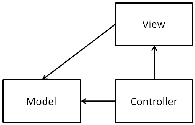
Figure 1.1 The model-view-controller pattern depicted

To begin, we will open up Visual Studio 2008 and create our project. The edition of Visual Studio 2008 makes some difference. You must be using Visual Studio 2008 Professional or a Team Edition sku that has all of the Professional edition’s functionality. The ASP.NET MVC Framework is supported with Visual Web Developer Express as of the Service Pack 1 release, which added web project and class library support. The ASP.NET MVC Framework builds on top of a web application projects, and while it is possible to make it work with Web Sites, the development experience is optimized for use with Web Application Projects.

Note:

You must already have the MVC Framework installed to proceed. The MVC Framework is an independent release that builds on .Net 3.5 Service Pack 1. You can also deploy your application by including the MVC Framework assemblies in the /bin folder of your web application if you need to run on a server with only .Net 3.5 SP1 installed. If you are fond of Reflector (Lutz Roeder’s Reflector: http://www.aisto.com/roeder/dotnet/), you want to be sure to familiarize yourself with the System.Web.Mvc namespace in the System.Web.Mvc assembly.

We’ll begin in Visual Studio 2008 Professional by creating a new ASP.NET MVC Web Application project. When you pull up the New Project dialog, make sure you have .Net Framework 3.5 selected. If you have .Net Framework 3.0 or 2.0 selected, Visual Studio will filter the list, and you won’t see the project template for ASP.NET MVC Web Application.

Stay tuned for more:  My feed:  http://feeds.jeffreypalermo.com/jeffreypalermo

You will also want to pay attention to my co-authors:  Ben Scheirman and Jimmy Bogard.

Announcing ASP.NET MVC in Action (from Manning)

ASP.NET MVC in Action is a book from Manning that covers the newly-released ASP.NET MVC Framework. Jeffrey Palermo, Ben Scheirman, and Jimmy Bogard teamed up to write this advanced volume.  It is not a beginner book.  It is not a professional book.  It is an advanced book for ASP.NET professionals.  These three Alt.Net authors share best practices, patterns, and lots of opinions on how to use the new framework. 

UPDATE:  9/21/2009 – The book is published now.  You can find more information here.

[tags: aspnetmvc mvc asp.net palermo]