Speaking at San Diego .Net User Group Fall Tech Day on ASP.NET MVC in Action

The San Diego .Net User Group has invited me to give two presentations to the Fall Tech Day event.

I’m giving two presentations in the morning.  The first presentation has been on tour quite a bit in 2008 starting with Tech Ed 2008 and then on an INETA User Group tour in the summer.  The second presentation is brand new and based on my upcoming book and lessons learned on real projects I’m directing.  If you are in the area, make sure to register on the site and come on out.

TDD, DI, and SoC with ASP.NET MVC
Description: Spelled out, it is test-driven development, dependency injection, and separation of concerns with Active Server Pages .Net Model View Controller. This talk will dive into how to design a presentation layer using ASP.NET MVC. In today’s industry, TDD, DI, and SoC are proven concepts that lead to more maintainable applications. Along with demonstrating how to use these techniques with ASP.NET MVC, we will discuss just what concerns should be separated. This talk provides a unique perspective on separation of concerns and uses TDD and DI to make it happen. MvcContrib is used in all the demos.

ASP.NET MVC in Action
Microsoft is releasing a new version of ASP.NET that uses a model-view-controller pattern for handling an http request. This session will not cover the basics of the ASP.NET MVC Framework. Instead, this session serves the advanced developer looking to get past basic samples and dive into working with this new version of ASP.NET to create complex business applications. The material will cover as much design as anything else, and the speaker will share real-world experiences using ASP.NET MVC in enterprise applications. Get a good night’s sleep before coming because the pace will be fast and the coverage deep.

How ASP.NET MVC Views Are Different Than Web Forms (excerpt from ASP.NET MVC in Action)

(excerpt from ASP.NET MVC in Action).

Views have long been abused in the Microsoft web application space. In Classic ASP, and in IDC/HTX before that, the view was the primary programming tool for the Microsoft-centric developer. Using the server page pattern, developers used IDC and ASP pages as transaction scripts to perform a single operation and render a screen. Each page has logic, behavior and UI. ASP.NET 1.0 sought to separate logic from the UI rendering in an effort to make applications easier to maintain and extend. Having logic intermixed with screen rendering had proved to be an unworkable solution for many teams. While it certainly was possible for teams to separate the concerns in their applications, Microsoft had provided no guidance on how to do so, and most samples and demo applications encouraged the intermingling of concerns. ASP.NET set the foundation for how a Windows web server would handle web requests. The framework has proved to be highly scalable and robust. One specific part of the framework that developers are most familiar with, WebForms, has underperformed expectations. The code-behind idea did, in fact, separate logic from UI rendering, but in practice, and coupled with guidance available in the industry, the logic ended up merely separated in a separate file instead of abstracted into new concepts. WebForms continued the server page pattern started in IDC and carried through Classic ASP. This server page pattern is being dropped with the new version of ASP.NET, ASP.NET MVC.

ASP.NET MVC views and WebForms views can coexist side-by-side, so it is possible to do a phased port from WebForms to ASP.NET MVC. WebForms, however, serve a much bigger purpose in the application than MVC views. For instance, by the time your code executes in a Web Form Page_Load, the framework has already:

  1. Selected the Web Form to execute
  2. Constructed the Web Form and all its design-time controls
  3. Processed any ViewState received.

With a Web Form, your code runs as the page is executing. There are plenty of ways to get into the pipeline before the page starts executing, but it is not obvious or easy. A Web Form is built upon the concept of a Control, which is the building block of the page. Controls can have child controls, and System.Web.UI.Page derives from System.Web.UI.Control. A control’s purpose is to be responsible for the behavior and rendering of what will ultimately become an html element on the web page. During the heyday of browser wars and incompatibility, controls were able to render different markup based on the browser receiving the page. This was a very useful feature in 2002 and 2003. With Internet Explorer 7 and FireFox 2+ now responsible for more than half of the browser markup, most web users employ a more standards-compliant web browser than was the case in 2002; therefore the risk of rendering the same markup to all users has been mitigated by the market.

ASP.NET MVC Views take back control of html markup. While it is possible to use existing controls for their rendering capabilities, the guidance with MVC views is to lay out the html by hand and use server delimiters to make parts of the view dynamic. MVC views leverage the Web Forms rendering engine but jettison the post-back logic, viewstate, and control hierarchy. An MVC view renders top to bottom and then goes away. An MVC view has much less responsibility than a Web Form. The view accepts objects in its ViewData dictionary and transforms those objects into a response suitable for the web. That is it. No decision logic, no permissions, no database access, no web service calls, just rendering. MVC views can still use a code-behind file, but they are not necessary. This ability comes from the fact that System.Web.Mvc.ViewPage derives from System.Web.UI.Page. If you are porting an application from Web Forms to ASP.NET MVC, you will find yourself moving much of your code-behind logic into a controller. You will also probably find that much logic does not even belong in a controller. You will most certainly need to develop additional classes to absorb logic that has inappropriately lived in a Web Form code-behind file.

Stay tuned for more:  My feed:  http://feeds.jeffreypalermo.com/jeffreypalermo

You will also want to pay attention to my co-authors:  Ben Scheirman and Jimmy Bogard.

Next Agile Boot Camp is October 1-3 in Austin, TX – register now

I’m teaching the next Agile Boot Camp on October 1, 2, and 3 in Austin, TX.  Register now to attend. 

This advanced agile curriculum will cover everything involved in developing software in .NET, from setting up a new project and defining the architecture to implementing functionality in a loosely-coupled and testable manner. We will immerse ourselves in domain-driven design, test-driven development, design patterns, object-relational mapping, inversion of control (IoC), pair programming, automated builds, and continuous integration (CI). Students will discover which practices cause projects to fail and which practices help projects succeed. The course will include a strong focus on solid principles and values that can be applied to any .NET project. With a solid understanding of Agile values and object-oriented programming, students will emerge from the training with a refocused view on software development and the tools to immediately bring value back to their companies. All developers will take back working code developed during the course using the techniques and practices taught.

This course moves very quickly and is not for the faint of heart.  Below are some of the topics that are covered:

• Domain Driven-Design

• Test-Driven Development

• Onion architecture

• Inversion of Control

• Resharper

• Source control with Subversion

• Pair programming

• Refactoring

• Build automation with NAnt and CCNet

• Object-relational mapping with NHibernate

• Automated unit and Integration testing

• Interfaced-based programming

• Team dynamics

• Redgate SQL Compare

• SQL Profiler

• Rhino Mocks

• Separation of Concerns

• Design patterns

See what others have said about the course:

Lee Brandt:

“Man! we actually covered a lot! Jeffrey did a great job of making it seem like not much, but when I got back and started telling my boss about it, there were just TONS of things to talk about. We talked about Team Estimation and Design, NHibernate Mappings, Test-Driven Development, Domain Driven Design, Automated Builds and on and on and on. I have absolutely no idea how we managed to cram all that stuff in three days, but we did.”

Karthik Hariharan (Telligent):

“While a lot of software development training is often presented very academically, Headspring’s was very hands-on and really pushed everyone to pick up the processes and tools very quickly, just as you would in the real world.”

J. Michael Palermo IV:

“This was an excellent training event, and I plan to steal be inspired to use some of his methodologies at Interface Technical Training.”

Brad Mellen-Crandell
Rapidparts Inc.

“This was the best technical training course I’ve been to, period. No fluff here. The course was packed with information and best practices that I could start implementing immediately when I got back to work on Monday.”

Ken Jackson

“Jeff is an excellent teacher and practitioner of Agile principles and methods. His integration of open source tools to boost productivity will surely help me be more successful and confident in my daily working regimen.”

Udi Dahan’s Advanced SOA course now discounted under $2000

Advanced Distributed Systems Design using SOA & DDD with Udi Dahan, The Software Simplist

Tickets now less than $2000!!!

Monday, October 13, 2008 at 08:00 AM – Friday, October 17, 2008 at 05:00 PM (CT)

Austin, TX   

Introduction
Designing large-scale distributed systems is hard. New technologies make it easier to comply with today’s communications and security standards, but don’t auto-magically give you a robust and scalable system. Join Udi for a course packed with the wisdom of companies like SUN, Amazon, and EBay.

Tried-and-true theories and fallacies will be shown, keeping you from making those same costly mistakes today. Communications patterns like publish/subscribe and correlated one-way request/response will be used in conjunction with advanced object-oriented state management practices for long-running workflows. If you enjoy deep architectural discussion, if you are in charge of building a large-scale distributed system, if you want to know more about how the big guys run their systems, this is for you.

About Udi
Udi Dahan is The Software Simplist, recognized by Microsoft Corporation with the coveted Most Valuable Professional award for Solutions Architecture now 4 years running. Udi is a Connected Technologies Advisor working with Microsoft on WCF, WF, and Oslo. He also serves as a member of the Patterns & Practices Advisory Board for the CAB and Prism. He provides clients all over the world with training, mentoring and high-end architecture consulting services, specializing in Service-Oriented, scalable and secure .NET architecture design.

Udi is a member of the European Speakers Bureau of the International .NET Association, an author and trainer for the International Association of Software Architects and a founding member of its Architect Training Committee. He is also a Dr. Dobb’s sponsored expert on Web Services, SOA, & XML.

Presenting at international conferences like TechEd USA, SD Best Practices, DevTeach Canada, Prio Germany, Oredev Sweden, TechEd Barcelona, QCon London, and TechEd Israel – Udi covers in-depth mission-critical topics like durable services, persistent domain models, and multi-threaded occasionally connected clients.

Audience
This workshop is targeted at team leads, application and solutions architects, as well as technologists who are involved in making decisions about the overall system design of software products and projects.

Course Topics

Module 1: Distributed Systems Theory
Decades of distributed systems development have taught us many lessons. In this module we’ll cover many historical mistakes as well as proven best practices for scalable and robust design. Topics include:
  • 8 fallacies of distributed systems
  • Transactions

Module 2: Coupling: Platform, Temporal, & Spatial
Loose coupling has become the watchword of complex systems development, yet few understand its multiple dimensions. In the module we’ll be covering the three different dimensions of coupling as well as patterns for dealing with them.
  • Platform Coupling – XML/SOAP
  • Temporal Coupling – Synchronous/Asynchronous
  • Spatial Coupling – Endpoints/Topics

Module 3: Asynchronous Messaging Patterns
Although scalability is achieved through the use of asynchronous message passing, more advanced message exchange patterns are required to handle today’s complex integration scenarios. This module will cover the most commonly used patterns:
  • One way
  • Correlated Request/Response
  • Publish/Subscribe

Module 4: Bus & Broker Architectural Styles
Enterprise Service Buses are all the rage these days. In this module we’ll be covering what’s the difference between the Bus architectural style, and the more well-known Broker, found commonly in many EAI projects. Topics will include:
  • Architectural advantages and disadvantages
  • Technological advantages and disadvantages

Module 5: SOA Building Blocks
One of the goals of SOA is to develop systems which are more closely aligned with Business. In this module we’ll be covering an analysis methodology from moving from the business domain to executable systems that comply with all the principles of loose-coupling.
  • Business Services
  • Business Components
  • Autonomous components & Queues

Module 6: Scalability and Flexibility
In order to enable agility, services must be able to scale up, out, and down quickly. In this module we’ll see how autonomous components can be configured including transactional and durable aspects of message handling.
  • Configuring autonomous components
  • Scaling up and out

Module 7: Long running processes
The distributed communications patterns wouldn’t be complete without a discussion on orchestration. In this module we’ll see how to manage the state of long-running distributed communication flows as well as:
  • Encapsulating process logic
  • Advantages & disadvantages of orchestration

Module 8: Service / Autonomous Component Solutions
As developers go to implement autonomous components, guidance is required as to which concepts need to implemented in which project, what dependencies are there between projects, and how to bridge the worlds of messaging, business logic, and reporting. Topics include:
  • Messages + Handlers
  • Databases

Module 9: Service Layer – Domain Model Interaction
Logic-rich services require the use of advanced techniques for logic componentization. The Domain Model Pattern enforces a high level of Separation of Concerns, yet it must eventually be connected with Service Layer code that supports many concurrent users. In this module, the topics covered will include:
  • Domain Model introduction
  • Testing Domain Models
  • Optimistic, Pessimistic, and Realistic Concurrency Models

Module 10: Creating High-Performance Domain Models
The strong separation between the Domain Model and the database which stores and retrieves its data may enable a high level of testability, yet often causes performance problems. In this module, we’ll see the various aspects impacting the performance of persistence:
  • Transactions and Isolation Levels
  • Lazy Loading, Eager Fetching
  • Databases Tips & Tricks

Module 11: Web Services and User Interfaces
The ease of interacting with users over the web drives the need for service to UI interactions. Also, many integrations require exposing synchronous web services to customers. In this module, we’ll see what is required in both cases:
  • ASP.NET 2.0 Asynchronous Tasks
  • Rich Internet Applications and Services
  • Web Services for integration

Module 12: Smart Client / Service Interaction
The publish/subscribe semantics with which services communicate require smart clients to perform a great deal of background work. Also, certain service contracts lead to more performant clients. In this module, we’ll cover the first part of these interactions:
  • Multi-threaded client challenges
  • Client-friendly Service Contracts
  • Service Agents and Client Repositories

Module 13: Notifications & Smart Clients
After Message Handlers in the Service Layer create or update the relevant Model objects in the client Repository, Supervising Controllers are in charge of getting Views to show the updated data. In this module, we’ll describe the parts and interactions of these flows:
  • Client-side Model Objects
  • Supervising Controllers
  • Views and their Interfaces

Module 14: Commands & Smart Clients
Capturing user intent and synchronization between views are at the core of smart clients. After describing solutions that use Events on the View Interfaces, the Command Pattern will be introduced to further decrease coupling between Supervising Controllers. In this module, we’ll describe the parts and interactions of these flows:
  • View Interfaces, and how Entity Cloning affects them
  • Supervising Controllers and clone reconciliation
  • Commands, and Event-Based programming

MvcContrib – now with SubController support for ASP.NET MVC

I’m still hoping that SubControllers make it into the MVC Framework release, but my company is doing several client projects right now using the MVC Framework.  These projects are enterprise applications, not smaller websites, so subcontrollers are absolutely necessary to handle the complex logic and permissions.  I’ve create an implementation of subcontrollers and added it to MvcContrib.  It is pulling its weight on one client project, so I’m happy with it.  It can be made better, and I’m hoping the team can take my first draft and incorporate it into the product.

Matt Hinze has recently done a very nice write-up on his experience using MvcContrib SubControllers.  I also recommend subscribing to his blog.

Here is the revision that added SubController support to MvcContrib:  http://code.google.com/p/mvccontrib/source/detail?r=508

I have included a full sample with 3 levels of nested subcontrollers and an example of a nested subcontroller owning a form and posting to itself without the parent controllers caring:
http://code.google.com/p/mvccontrib/source/browse/trunk/src/Samples/MvcContrib.Samples.SubControllers/Website?spec=svn508&r=508

Feel free to pull down the source and let me know what you think.  Even better, if you find an idea for improvement, please submit a patch.  I have leveraged the IModelBinder so that subcontrollers can be passed directly into action methods, and you can hook your IoC container up so that it creates the subcontrollers and the dependencies.  Decomposing complex screens infinitely increases maintainability, so this is why I consider subcontrollers a critical feature.  Even if this doesn’t make it into the product, the team has done a good job making the framework extensible, so I was able to implement subcontrollers in less than 150 lines of code.   I welcome your thoughts and opinions. 

You can pull down the source for MvcContrib by pointing your TortoiseSVN client to http://mvccontrib.googlecode.com/svn/trunk/ Note that this is a SVN URL, not a web page URL

The basics of ASP.NET MVC routes (excerpt from ASP.NET MVC in Action)

(excerpt from ASP.NET MVC in Action).

The Global.asax.cs file contains some routes that are provided with the MVC Web Application project. Before continuing, we must define what a route is. A route in the ASP.NET MVC Framework is the complete definition for how to handle a web request. With Web Forms, we have little control over this without resorting to url rewriting. With Web Forms, the url of the web request is tightly coupled to the page handling the request. If the page was named Foo.aspx in a folder named Samples, then the url was sure to be http://mvccontrib.org/Samples/Foo.aspx. Many teams have resorted to url rewriting to wrangle some control over the urls and how to satisfy each request. With the ASP.NET MVC Framework, routes are first class citizens in the web application. We start with defining how we want our urls structured. The project template gives us a few routes to start, shown in Listing 1.1.

Listing 1.1 Default routes for a new project. These are added by the project template.

using System.Web;
using System.Web.Mvc;
using System.Web.Routing;

namespace GettingStarted
{
    public class GlobalApplication : HttpApplication
    {
        public static void RegisterRoutes(RouteCollection routes)
        {
            routes.IgnoreRoute("{resource}.axd/{*pathInfo}");

            routes.MapRoute(
                "Default", // Route name
                "{controller}/{action}/{id}", // URL with parameters
                new {controller = "Home", action = "Index", id = ""}
                );
                // Parameter defaults
        }

        protected void Application_Start()
        {
            RegisterRoutes(RouteTable.Routes);
        }
    }
}

Routes need to be defined as one of the first things when the web application starts up, so the project template adds the routes to the Application_Start method in the Global.asax.cs file. Later in the book, you’ll see that we don’t leave the routes in this location except for the most trivial of web applications.

Note

We will follow long-standing best practices of Separation of Concerns and the Single Responsibility Principle , or SRP, by moving the routes to a dedication location separated by an interface. We’ll go more into these principles later, but, in short, the responsibility (or concern) of the Application_Start method is to kick off operations that must happen at the beginning of the application’s life. The responsibility is not to perform every bit of work that must happen on start. Any operations that must happen on application start should reside in separate classes and merely be called in the appropriate order in the Application_Start method.

Note that the url portion of the route is simply a matching mechanism for the request. If the url matches a particular route, then we specify what controller should handle the request and what action method should execute. You can create as many routes as you like, but one route is provided for you. This route has the template, {controller}/{action}/{id}.

Note

This is a very generic route and could be used for many, many different web requests. Tokens are denoted by the inclusion of {braces}, and the word enclosed in braces matches with a value the MVC Framework understands. The most common that we’ll be interested in are controller and action. This is the route we will be using for the rest of the chapter, so we will be content with a url in the form of http://mvccontrib.org/controllername/actionname. The basic RouteHandler is an instance of IRouteHandler and we’ll use MvcRouteHandler most of the time. We have complete control and could provide our own implementation of IRouteHandler if we wished, but we’ll save that for a later chapter.

Before we spin up our first controller, let’s examine what is different about the web.config file in an MVC Web Application project. The differences are easy to spot. Just look for “routing” or “mvc”. One difference we see is that a new IHttpModule is registerd in the config file. Here, we see the UrlRoutingModule in listing 1.2

Listing 1.2 Unique addition to the web.config file. The rest of the web.config file is standard for .Net 3.5.

<add name=”UrlRoutingModule” type=”System.Web.Routing.UrlRoutingModule, System.Web.Routing, Version=0.0.0.0, Culture=neutral, PublicKeyToken=31BF3856AD364E35″ />

The UrlRoutingModule evaluates a request and sees if it matches a route that is stored in the RouteTable. If the route matches, it overrides the default handler (IHttpHandler) for the request so that the MVC Framework handles the request. We are going to examine our first controller as a means to handle a route for the url /home. In the next section you will see how all the pieces of the starter project fit together.

Stay tuned for more:  My feed:  http://feeds.jeffreypalermo.com/jeffreypalermo

You will also want to pay attention to my co-authors:  Ben Scheirman and Jimmy Bogard.

Software Quality Isn’t Optional

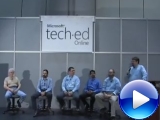
The videos from the Tech Ed 2008 interactive stage are now online.  One of them is the software quality panel in which I participated.  It’s available in several video and audio formats.  I’m the guy in the middle.

Software Quality Isn’t Optional!

Downloads:
Is Quality Assurance something you add at the end of your project? Don’t do it! This panel discussion moderated by Carl Franklin talks to a group of experts about the new focus on software quality. With Jeffrey Palermo, David Platt, Neelesh Kamkolkar, Neil Roodyn, and Billy Hollis.

Getting started with the ASP.NET MVC framework (excerpt from ASP.NET MVC in Action)

(excerpt from ASP.NET MVC in Action).

Depending on how long you’ve been building web applications on the Microsoft platform, you’ll relate to some or all of the following pain. In the 1990’s, developers built interactive websites using executable programs that ran on a server. These programs (CGI was a common technology at the time) accepted a web request and were responsible for creating an Html response. Templating was ad-hoc, and the programs were difficult to write, debug and test. In the late 1990’s, Microsoft, after a brief stint with Htx templates and Idc connectors, introduced Active Server Pages, or ASP. Active Server Pages brought templating to web applications. The server page was an Html document with dynamic script mixed in. While this was a big step forward from the alternatives, the world soon saw massive server pages with code indecipherable from the markup. In early 2002, along came ASP.NET. ASP.NET was a complete shift for ASP developers because it moved all server page code into a class file and replaced the Html markup with dynamic server controls in an Xml syntax. While performance increased, and the debugging experience improved, new problems arose. The server-side postback event lifecycle caused newsgroups to explode with activity as developer searched for the magic event in which to add those two simple lines of code. Viewstate, while good in theory, broke down as the application scaled with complexity. Simple pages broke 100KB in size, most of which was the Viewstate. Perhaps the greatest sin of the ASP.NET framework was the tight coupling to everything in the System.Web namespace. There was no hope of unit testing any code in the code-behind file, and today we see Page_Load methods that take several trees to print.

The ASP.NET MVC Framework has been introduced to simplify the complex parts of Web Forms while retaining the power and flexibility of ASP.NET. Controlling code is kept in a class separated from hard dependencies, and server pages have morphed into simple views, which are nothing more than Html templates filled in with objects passed in by the controller. The post-back event lifecycle is no more, and viewstate is no unnecessary. In the following chapter, we will walk through your first lines of code built on tops of the ASP.NET MVC Framework. After this primer, you’ll be ready for more advanced topics.

Throughout this chapter, we will take you through creating a new ASP.NET MVC Framework web application project, creating your first routes, controllers, and views. We will comb through the default application and explain each part. Then we will extend it, and you will create your first controller and view.

In this section, we will understand what the MVC pattern is and create our first ASP.NET MVC Web Application. We will focus first on the controller because in the Model-View-Controller triad, the controller is in charge and decides what model objects to use and what views to render. The controller is in charge of coordination and executes first when the web request comes in to the application. The controller is responsible for deciding what response is appropriate for the request.

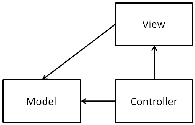
The MVC pattern is not new. In fact, it is quite old. A core tenet of the MVC pattern is to separate control logic from the view, or a screen. A view is responsible for rendering the user interface. By separating domain logic and decoupling data access calls from the view, the user interface can now stay the same even while logic and data access changes within the application. In figure 1.1, you will see a simple diagram of the model-view-controller triad. Note that the controller has a direct relationship with the view and the model, but the model does not need to know about the controller or the view. The web request will be handled by the controller, and the controller will decide which model objects to use and which view objects to render.

Figure 1.1 The model-view-controller pattern depicted

To begin, we will open up Visual Studio 2008 and create our project. The edition of Visual Studio 2008 makes some difference. You must be using Visual Studio 2008 Professional or a Team Edition sku that has all of the Professional edition’s functionality. The ASP.NET MVC Framework is supported with Visual Web Developer Express as of the Service Pack 1 release, which added web project and class library support. The ASP.NET MVC Framework builds on top of a web application projects, and while it is possible to make it work with Web Sites, the development experience is optimized for use with Web Application Projects.

Note:

You must already have the MVC Framework installed to proceed. The MVC Framework is an independent release that builds on .Net 3.5 Service Pack 1. You can also deploy your application by including the MVC Framework assemblies in the /bin folder of your web application if you need to run on a server with only .Net 3.5 SP1 installed. If you are fond of Reflector (Lutz Roeder’s Reflector: http://www.aisto.com/roeder/dotnet/), you want to be sure to familiarize yourself with the System.Web.Mvc namespace in the System.Web.Mvc assembly.

We’ll begin in Visual Studio 2008 Professional by creating a new ASP.NET MVC Web Application project. When you pull up the New Project dialog, make sure you have .Net Framework 3.5 selected. If you have .Net Framework 3.0 or 2.0 selected, Visual Studio will filter the list, and you won’t see the project template for ASP.NET MVC Web Application.

Stay tuned for more:  My feed:  http://feeds.jeffreypalermo.com/jeffreypalermo

You will also want to pay attention to my co-authors:  Ben Scheirman and Jimmy Bogard.

I (Headspring) am hiring senior developers and principal developers immediately

There are lots of folks in the industry I’d love to work with.  If you’d like to work with me, let me know.  Headspring is growing quickly, and I need folks who are passionate about agile development with .Net.  All Headspring developers report directly to me.  We are serious about agile and serious about keeping good people.  Personality is just as important as software skill

Agile .NET Developers (senior and higher)

Headspring Systems seeks talented and exceptional Agile .NET Developers. Ideal development experience should include extensive object-oriented design and experience with extreme programming (XP), especially test-driven development. Experience with Scrum, NAnt and NHibernate is a plus.

    Job Responsibilities
  • Work face-to-face in Austin, TX on a high-speed agile engineering team using one-week iterations.
  • Serve as a technical lead/hands-on developer on project teams to develop and maintain applications that improve our clients’ businesses.
  • Participate in all activities of development including user story definition, estimation, automated testing, architecture, coding, and deployment.
  • Enhance existing automated processes to streamline unit testing, integration testing, database change management, and application deployment.
  • Troubleshoot system problems and provide timely resolutions.
  • Communicate release status and escalate issues to management.
  • Deliver high quality technical solutions in support of defined business objectives.
    Job Requirements
  • Bachelor’s in Computer Science or equivalent working experience
  • Minimum of 2 years experience in Microsoft technologies
  • Minimum 1 agile project completed or extensive personal study.
  • Experience delivering at least 2 solutions to production
  • Strong ability to analyze business requirements, formulate multiple implementation options, and effectively communicate these options to clients
  • Self-motivated – able to work cohesively in a small team environment
  • Continuous learner that constantly seeks to improve by such means as reading books and blogs and participating in the development community
  • 5+ years of experience with OO-based languages (C#.NET is ideal) and database management systems (SQL Server preferred) for senior developers; 2+ years of application development and maintenance experience in ASP.NET including delivery of full life-cycle applications and/or web development and maintenance experience for junior and mid-level developers

Headspring Culture
Our work environment is a relaxed one. Our office is open so it gets a little noisy at times but we like the energy this creates. We like to have fun, but we also work hard, we like to have a balanced work life. Excellent medical benefits are also offered. To learn more about our organization, please visit us at www.headspringsystems.com

To apply:
Please send your resume to our recruiter via email: jobs@headspringsystems.com
In your cover, please include your high/low salary requirements and please explain why this role seems like a good match for you. Qualified applicants will be responded to as quickly as possible and by me personally.