The Onion Architecture : part 3
Part 1 – Part 2 – This is part 3. part 4. – My RSS feed
In my previous installments, I described what has become my approach to defining the architecture for an application. Based on feedback, I’ve modified my diagrams a bit to reduce ambiguity and emphasize key points. The goal of part 3 of this series is to compare and contrast the Onion Architecture with traditional layered architecture. I will flatten the Onion Architecture to see what it looks like compared to traditional layered architecture, and I will force the layered architecture into an onion. Whereas the shape can be either, the structure of the actual application is radically different from what is commonly known and accepted. I’ll define four tenets of Onion Architecture at the end.
I must stress again: I am not claiming any breakthroughs in technology or technique. I have learned from other industry thought leaders like Martin Fowler, Ward Cunningham, Kent Beck, Michael Feathers and others (especially those I’ve had the privilege to work with here in Austin, TX). I’m putting forth the Onion Architecture as an architectural pattern by which we can communicate this radically different architectural approach. Not "radically different as in new". Different as in not mainstream.
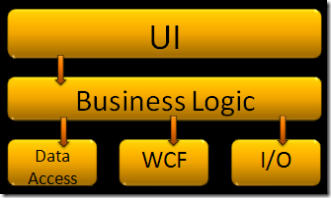 Let’s review. Traditional layered architecture can look somewhat like the diagram depicted on the right. Each layer communicates with the layer below it. The UI talks to business logic, but it does not talk directly to data access, WCF, etc. The layering approach does call out the need to keep certain categories of code out of the UI. The big downfall is that business logic ends up coupled to infrastructure concerns. Data Access, I/O, and Web Services are all infrastructure. Infrastructure is any code that is a commodity and does not give your application a competitive advantage. This code is most likely to change frequently as the application goes through years of maintenance. Web services are still fairly new, and the first version in .Net, ASMX, is already deprecated in favor of WCF. We can be assured that WCF’s days are numbered as well, so it is foolish to tightly couple the business logic to WCF. Data access changes every two years or so, so we definitely don’t want to be tightly coupled to it. For long-life, we would want our business logic to be independent of these infrastructure concerns so that as infrastructure changes, the business logic doesn’t have to.
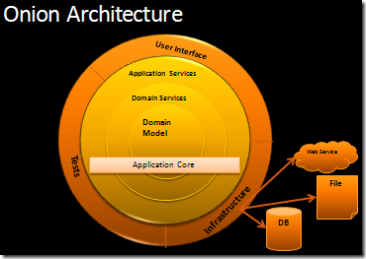
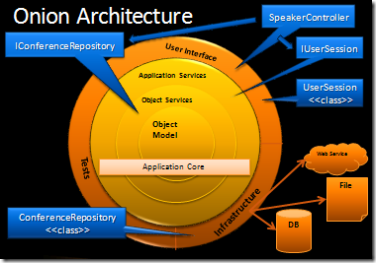 Let’s review Onion Architecture. The object model is in the center with supporting business logic around it. The direction of coupling is toward the center. The big difference is that any outer layer can directly call any inner layer. With traditionally layered architecture, a layer can only call the layer directly beneath it. This is one of the key points that makes Onion Architecture different from traditional layered architecture. Infrastructure is pushed out to the edges where no business logic code couples to it. The code that interacts with the database will implement interfaces in the application core. The application core is coupled to those interfaces but not the actual data access code. In this way, we can change code in any outer layer without affecting the application core. We include tests because any long-lived application needs tests. Tests sit at the outskirts because the application core doesn’t couple to them, but the tests are coupled to the application core. We could also have another layer of tests around the entire outside when we test the UI and infrastructure code.
This approach to application architecture ensures that the application core doesn’t have to change as: the UI changes, data access changes, web service and messaging infrastructure changes, I/O techniques change.
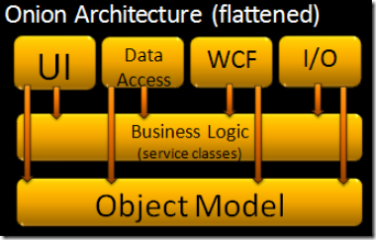 To the right, I have created a diagram which attempts to show what Onion Architecture would look like when represented as a traditionally layered architecture. The big difference is that Data Access is a top layer along with UI, I/O, etc. Another key difference is that the layers above can use any layer beneath them, not just the layer immediately beneath. Also, business logic is coupled to the object model but not to infrastructure.
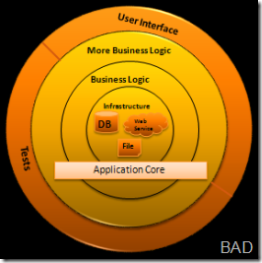
To the left here I have attempted to represent traditionally layered architecture using concentric circles. I have used black lines around the layers to denote that each outer layer only talks to the layer immediately toward the center. The big kicker here is that we clearly see the application is built around data access and other infrastructure. Because the application has this coupling, when data access, web services, etc. change, the business logic layer will have to change. The world view difference is how to handle infrastructure. Traditional layered architecture couples directly to it. Onion Architecture pushes it off to the side and defines abstractions (interfaces) to depend on. Then the infrastructure code also depends on these abstractions (interfaces). Depending on abstractions is an old principle, but the Onion Architecture puts that concepts right up front.
Key tenets of Onion Architecture:
- The application is built around an independent object model
- Inner layers define interfaces. Outer layers implement interfaces
- Direction of coupling is toward the center
- All application core code can be compiled and run separate from infrastructure
I encourage you to use the term "Onion Architecture" when speaking about architectures that adhere to the above four tenets. I believe that this approach to architecture leads to long-lived systems that are easy to maintain. Also, in my experience, this architecture yields dividends soon after a project starts since it makes the code a breeze to change.
Although I don’t call out an IoC container as a key tenet, when using a mainstream language like Java or C#, an IoC container makes the code fit together very easily. Some languages have IoC features built-in, so this is not always necessary. If you are using C#, I highly recommend using Castle Windsor or StructureMap.
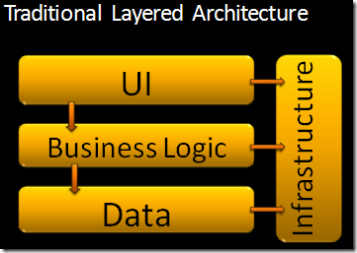 The diagram you see here is a representation of traditional layered architecture. This is the basic architecture I see most frequently used. Each subsequent layer depends on the layers beneath it, and then every layer normally will depend on some common infrastructure and utility services. The big drawback to this top-down layered architecture is the coupling that it creates. Each layer is coupled to the layers below it, and each layer is often coupled to various infrastructure concerns. However, without coupling, our systems wouldn’t do anything useful, but this architecture creates unnecessary coupling.