Headspring advanced .Net developer training available in Austin, TX (by yours truly)

.NET Boot Camp: From Journeyman to Master Series

This course will take competent .NET software developers and propel them towards becoming a master developer.

January 30, January 31, and February 1
From 8 a.m. to 6 p.m.
Click here for all the details

This advanced curriculum will cover everything involved in developing software in .NET, from setting up a new project and defining the architecture to implementing functionality in a loosely-coupled and testable manner. We will immerse ourselves in domain-driven design, test-driven development, design patterns, object-relational mapping, inversion of control (IoC), pair programming, automated builds, and continuous integration (CI). Students will discover which practices cause projects to fail and which practices help projects succeed. The course will include a strong focus on solid principles and values that can be applied to any .NET project. With a solid understanding of Agile values and object-oriented programming, students will emerge from the training with a refocused view on software development and the tools to immediately bring value back to their companies. All developers will take back working code developed during the course using the techniques and practices taught.

Call HeadspringJeffrey Palermo is the CTO of Headspring Systems. He specializes in doubling the productivity of software teams by introducing solid principles, values, and discipline. Along with holding the MCSD.NET certification and Solutions Architect MVP award, he also runs the Austin .NET User Group, is a board member of AgileAustin, and is a speaker on the INETA Speakers’ Bureau. He is a graduate from Texas A&M University, an Eagle Scout, and an Iraq war veteran.

Call Headspring

If you are looking for a course to learn more about .Net itself, I highly recommend JP Boodhoo’s course in College Station, TX at the beginning of January.   The above course assumes a strong understanding of .Net and is intended to take someone already well-versed with .Net and bring in the concepts and practices that will take them to the next level.


MvcContrib open source project call for participation

To keep up with this, subscribe to my feed:  http://feeds.feedburner.com/jeffreypalermo

As you’ve read in plenty of other places by now, the CTP of the ASP.NET Extensions is now available for download.  Here is a direct link.

Eric Hexter and I have started an open source project to contribute to and extend the ASP.NET MVC Framework.  There are things that Microsoft is not going to bundle with the official release (like IoC container support for Windsor, StructureMap, Spring.Net, etc), so the goal of this project is to add other useful features as determined by the community.

Go to http://mvccontrib.org.  There are links to the Subversion trunk for the project, and there is an issues list we are using for a backlog.  Anyone logged into CodePlex can contribute an idea to the backlog (issues list), and anyone can upload a patch for acceptance.  We’re pretty open to patches, but the one strict requirement is that all code submitted must come with full NUnit test coverage and be submitted as a patch file compatible with TortoiseSVN.

We’ll also need to provide documentation and samples for how to use the features contributed to MvcContrib, so even if you don’t want to contribute code, we could also use samples contributed.

ASP.NET MVC Framework CTP is now available – MvcContrib also available

To keep up with this, subscribe to my feed:  http://feeds.feedburner.com/jeffreypalermo

The long-awaited MVC Framework public CTP is available for download here:

http://asp.net/downloads/3.5-extensions/  — Here is a direct download link.

Check out Scott Guthrie’s MVC info here.  Brad Abrams announcement here.

To get some more View helpers that didn’t make it into the CTP (but will), download the mvctoolkit

http://asp.net/downloads/3.5-extensions/MVCToolkit.zip

And download MvcContrib, which gives you IoC container support for controllers as well as whatever the community deams appropriate.  If you have an opinion about what else should be offered with MvcContrib, come and add to the backlog list.   Who knows, some of these features might even make it into the actual product from Microsoft.

New NAnt beta release supports .Net 3.5/Silverlight – v0.86 beta 1

My company uses a combination of NAnt and MSBuild for build automation and some deployments.  We use MSBuild for purely Microsoft tool execution, like compiling.  We use NAnt for everything else, like moving files, packing the release, versioning, and everything else under the sun.  This solution is working very well for us, and I’ve used NAnt in major scenarios for over two years now. 

I’m very happy to share that the team has just released beta1 of version 0.86.  Go to the NAnt website to download it now or you can download it more directly here.  Read the full release notes here, but I want to highlight the more interesting things that came down the NAnt users list:

Support matrix for NAnt 0.86 beta 1

Framework                     Target      Runtime
—————————————————-
.NET Framework 1.0              *            *
.NET Framework 1.1              *            *
.NET Framework 2.0              *            *
.NET Framework 3.5              *            *
.NET Compact Framework 1.0      *
.NET Compact Framework 2.0      *
Mono 1.0 Profile                *            *
Mono 2.0 Profile                *            *
Mono 3.5 Profile                *            *
Moonlight 2.0                   *
Shared Source CLI 1.0           *
Silverlight 2.0                 *

To me, the big ones are .Net 3.5 and Silverlight 2.0 support.  Up to now (it’s only been a few weeks since .Net 3.5 was released) I used my own modification to the NAnt config file to make the build work with .Net 3.5, but I’ve pulled that out and am now using the beta 1 release.

For those wondering whether they should use it:  I just upgraded the MvcContrib open source project, and our build worked just fine.  It’s not hard to find out if there are any issues with your build.  Drop it in and run the build.  If there are any problems, revert your working copy. 

I would like to publicly express appreciation for the developers who are working on NAnt.  There are lots of users of the tool out there, including me, and I thank you for your contributions to the developer community.

ASP.NET MVC CTP, podcast, and mvccontrib open source project

As Scott Guthrie has stated, Microsoft is hoping to release the first public CTP of the ASP.NET MVC Framework tomorrow.  This is very exciting.

If you are interested, you can listen to a podcast Craig Shoemaker recorded with me on the ASP.NET MVC Framework.

Also, there is a new open source project forming.  It’s mvccontrib.  You can go there through this link.  There is no release yet (or code), but with the CTP going public, this project is being kicked off, and we are looking for people interested in submitting patches.  Show enough interest by submitting multiple patches, and we’ll make you a committer (that’s the way open-source works).

Who is to say that my knife is too sharp for my own good?

At DevTeach this past week, I had some great conversations, but one in particular is the conversation that many people have had:  about using sharp tools.  A common thought we come across is that a vendor or someone in management decides that the software team should be restricted in some way for their own good.  If this measure isn’t taken, the software team could hurt themselves or the software could come out wrong.  Some of the analogies used are:

  • Running with scissors
  • Unsafe tools
  • If given a sharp knife, you might cut yourself.

These can be applied to many environments.  For instance, an argument against dynamic languages is that without compile-time checking, errors won’t be found until runtime.  If developers are allowed to use dynamic languages for _real_ projects, then the software would fail because we don’t know if it works until we run it.  (I won’t bother replying to common arguments, but I invite readers to give their reply in the comments).

Unsafe tools could be IDE features, frameworks, libraries, or even permitted architectures.  For instance, if we use 3rd party libraries or frameworks, developers might hurt themselves.  Better stick to what comes from Microsoft.

Then, like children, I’ve heard that developers might cut themselves if given a sharp knife.

I credit 100% of the dysfunction of these thoughts to managers who allow or encourage these thoughts in their organizations.  Being a software manager myself, I know that I’m paying quite a bit for good developers.  I’m not paying for children, so I’m certainly not going to give them safety scissors, blunted markers or non-toxic playdough.  Developers should be adults, not children.  By the way, if you encounter developers who aren’t professional adults, then HR functions should step in.  I want to give my developers the best, sharpest tools possible.  They might hurt themselves or the company?  There are other ways to manage that risk other than giving developers safety scissors.

I was reminded of these conversations by a blog post by Oren Eini, with whom I spoke about this issue at DevTeach.  Oren came up with the following logo, which enumerates that one of the facets of the spirit of Alt.Net is that developers are professionals, and if there is a need to run with Scissors amids flying bullets, then they are capable of making that decision.

Chad Myers quickly condensed it down to the badge that I’ve added to my blog:

Temporarily disable code analysis for single code file with Resharper 3.0.2 and VS 2008

If you hit a code file that’s using one of the new funky features of C# 3.0, and Resharper code analysis doesn’t recognize it, like property initializers, var, etc, just press the following to disable code analysis for the current code file only:

CTRL+8

Code analysis will turn off, and the red will go away.  Resharper will remember this preference for that code file until you close and reopen Visual Studio.

If you want to turn code analysis back on, just press CTRL+8 again.  You can turn it on and off as much as you like.  I’m finding this especially useful when giving presentations such as the ones at DevTeach.  I want to keep Resharper enabled in order to use all the features, but for some of the code files, I need code analysis turned off.  CTRL+8 allows me to keep the global option on and just turn it off for a single code file.  I love little hidden gems!!

Upgrade NAnt for use with VS2008 solutions and .Net 3.5

Unfortunately, we don’t have a .Net 3.5-compatible NAnt distribution yet, but it’s trivial to get the latest version (.85) working with .Net 3.5 and a Visual Studio 2008 solution.  Open up you nant.exe config file, and add the following framework node just below your net-2.0 node.  Not much of a change, and it’s working well for me.

                <framework

name=”net-3.5″

family=”net”

version=”3.5″

description=”Microsoft .NET Framework 3.5″

runtimeengine=””

sdkdirectory=”${path::combine(sdkInstallRoot, ‘bin’)}”

frameworkdirectory=”${path::combine(installRoot, ‘v3.5’)}”

frameworkassemblydirectory=”${path::combine(installRoot, ‘v2.0.50727’)}”

clrversion=”2.0.50727″

                    >

                    <task-assemblies>

                        <!– include .NET specific assemblies –>

                        <include name=”tasks/net/*.dll” />

                        <!– include .NET 2.0 specific assemblies –>

                        <include name=”tasks/net/2.0/**/*.dll” />

                        <!– include Microsoft.NET specific task assembly –>

                        <include name=”NAnt.MSNetTasks.dll” />

                        <!– include Microsoft.NET specific test assembly –>

                        <include name=”NAnt.MSNet.Tests.dll” />

                    </task-assemblies>

                    <project>

                        <readregistry

property=”installRoot”

key=”SOFTWAREMicrosoft.NETFrameworkInstallRoot”

hive=”LocalMachine” />

                        <readregistry

property=”sdkInstallRoot”

key=”SOFTWAREMicrosoft.NETFrameworksdkInstallRootv2.0″

hive=”LocalMachine”

failonerror=”false” />

                    </project>

                    <tasks>

                        <task name=”csc”>

                            <attribute name=”exename”>csc</attribute>

                            <attribute name=”supportsnowarnlist”>true</attribute>

                            <attribute name=”supportswarnaserrorlist”>true</attribute>

                            <attribute name=”supportskeycontainer”>true</attribute>

                            <attribute name=”supportskeyfile”>true</attribute>

                            <attribute name=”supportsplatform”>true</attribute>

                            <attribute name=”supportslangversion”>true</attribute>

                        </task>

                        <task name=”vbc”>

                            <attribute name=”exename”>vbc</attribute>

                            <attribute name=”supportsdocgeneration”>true</attribute>

                            <attribute name=”supportsnostdlib”>true</attribute>

                            <attribute name=”supportsnowarnlist”>true</attribute>

                            <attribute name=”supportskeycontainer”>true</attribute>

                            <attribute name=”supportskeyfile”>true</attribute>

                            <attribute name=”supportsplatform”>true</attribute>

                            <attribute name=”supportswarnaserrorlist”>true</attribute>

                        </task>

                        <task name=”jsc”>

                            <attribute name=”exename”>jsc</attribute>

                            <attribute name=”supportsplatform”>true</attribute>

                        </task>

                        <task name=”vjc”>

                            <attribute name=”exename”>vjc</attribute>

                            <attribute name=”supportsnowarnlist”>true</attribute>

                            <attribute name=”supportskeycontainer”>true</attribute>

                            <attribute name=”supportskeyfile”>true</attribute>

                        </task>

                        <task name=”resgen”>

                            <attribute name=”exename”>resgen</attribute>

                            <attribute name=”supportsassemblyreferences”>true</attribute>

                            <attribute name=”supportsexternalfilereferences”>true</attribute>

                        </task>

                        <task name=”al”>

                            <attribute name=”exename”>al</attribute>

                        </task>

                        <task name=”delay-sign”>

                            <attribute name=”exename”>sn</attribute>

                        </task>

                        <task name=”license”>

                            <attribute name=”exename”>lc</attribute>

                            <attribute name=”supportsassemblyreferences”>true</attribute>

                        </task>

                        <task name=”ilasm”>

                            <attribute name=”exename”>ilasm</attribute>

                        </task>

                        <task name=”ildasm”>

                            <attribute name=”exename”>ildasm</attribute>

                        </task>

                    </tasks>

                </framework>

Next, change the following in your NAnt build:

<property name=”nant.settings.currentframework” value=”net-3.5″ />

Now you are off to the races.  If you have any differing experiences, please let me know.

Running VS2008 & VS 2005 side by side – project file difference

Previously, I posted how to support developers running Visual Studio 2008 and Visual Studio 2005 on the same .Net 2.0 solution on the same team, built, CI server, etc.  The solution is to have 2 solution files.  These files have to be kept in sync to keep a healthy build process.

It is very important to keep the VS2005 solution the main solution and the solution used in the continuous build because VS2008 supports everything there, but if you add a project using VS2008, VS2005 might not recognize some things.  An example of this is with the path to the Microsoft.CSharp.targets file.

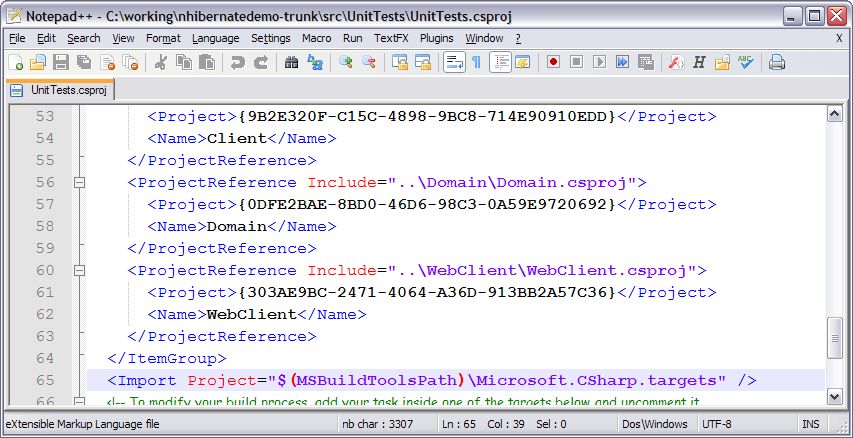
If you create a new project using VS2008, you’ll see the following in the newly created project:

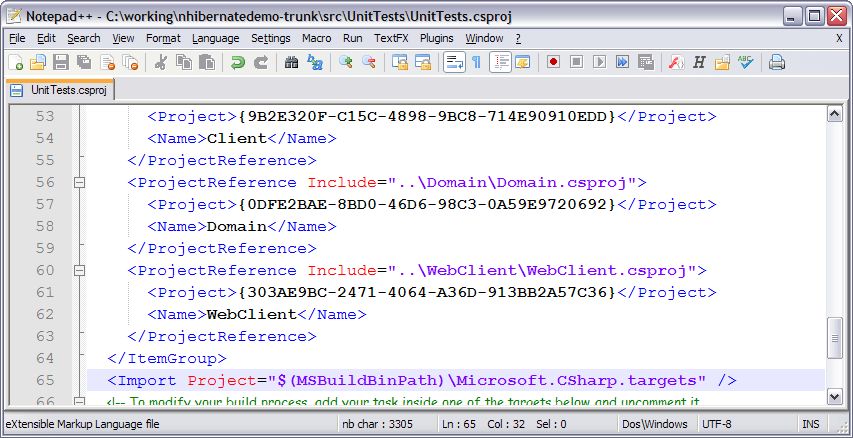
Note the $(MSBuildToolsPath) property.  This was added in .Net 3.5, and Visual Studio 2005 and MSBuild for .Net 2.0 doesn’t understand this property.  Changing the project file to the following makes both versions of Visual Studio happy. (change it to $(MSBuildBinPath)

DevTeach: Party with Palermo and speaking about ASP.NET MVC, NHibernate

DevTeach starts Monday in Vancouver, and after the pre-con we’re kicking it off with a blow-out Party with Palermo.  This is the official social event of the DevTeach conference, and it’s open to all conference attendees as well as the local community.  In short, if you are in Vancouver Monday night, come on out to Steamworks.  Click over here for all the details and to see the nearly 200 people who are already RSVPed and the sponsors who are helping to make it happen.

Tuesday afternoon I’ll be filling in for Ben Day in the architecture track and giving a talk outlining how NHibernate (an ORM) fits nicely into your application architecture without coupling too closely to the framework itself. (Tuesday 1:30pm)  Be sure to attend James Kovacs “The Persistence Ignorant Domain Model” talk about NHibernate earlier Tuesday morning.

Wednesday morning be sure to come to my session on the ASP.NET MVC framework.  This framework is set to change the way so many developers make ASP.NET web applications.  It won’t be long before we’ll be able to say goodbye to Web Forms. . . except for all the legacy Web Forms code out there :-(.  Check out the DevTeach session schedule for more details on the talk.

And if you want more MVC goodness (and who wouldn’t), then you should go to Justice Gray’s session also on MVC architecture.  Our sessions will overlap a tad, but he’ll cover a lot of things that I won’t, so I highly recommend you hit both.