Enabling team development with VS2008/2005 mix

Ok.  Now we have a problem.  Some folks want to use VS 2008 RTM while continuing to target an existing .Net 2.0 solution.  The project files don’t give us a problem, but the solution file does.  Here is the first line in a VS 2005 solution file:

Microsoft Visual Studio Solution File, Format Version 9.00

When this file is opened in VS 2008, the nice upgrade wizard comes up.  This wizard will do crazy things to our solution file, like changing the first line to:

Microsoft Visual Studio Solution File, Format Version 10.00

Joking aside, this is the ONLY difference in running a .Net 2.0 solution in VS 2008.  There is absolutely no change to the project files necessary.

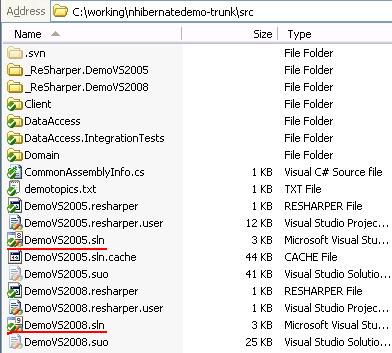
Given that, it ought to be possible to have some members of the team using VS 2005 and some using VS 2008.  Why not?  One way to accomplish this is to have two solution files in the source code trunk.  The files will be identical except the version number.

Below, I’ve provided two solution files for my NHibernate demo trunk.  You can use TortoiseSVN to checkout this trunk to try it out if you wish.

Note that you will have to pick one of these solution files for your automated build.  I’d recommend typing your automated Nant build to the VS 2005 solution and keeping that as the gold standard because, after all, your continuous integration server should only have .Net 2.0 installed if that’s what you are targeting.  The members of the team using VS 2008 will have to ensure the VS 2005 solution gets any solution modifications that are necessary.  Both the local and CI build should use the VS 2005 solution file.  With that policy, team synchronization won’t suffer.

Tips for immediately using R# 3.0.2 with VS 2008

There is a bit of confusion out there because R# 3.0.2 doesn’t immediately support code analysis and intellisense for the new C# 3.0 features like LINQ queries, etc.  What I’ve heard is that in Q12008, we’ll have a R# that will support all the new stuff.  While it’s a shame that it’s not ready to go immediately (because VS 2008 RTM is available as of this week), we can still us R# 3.0.2 with VS 2008 to get most of the value and ease of use we’ve come to expect from a productivity add-in.  Here are the steps:

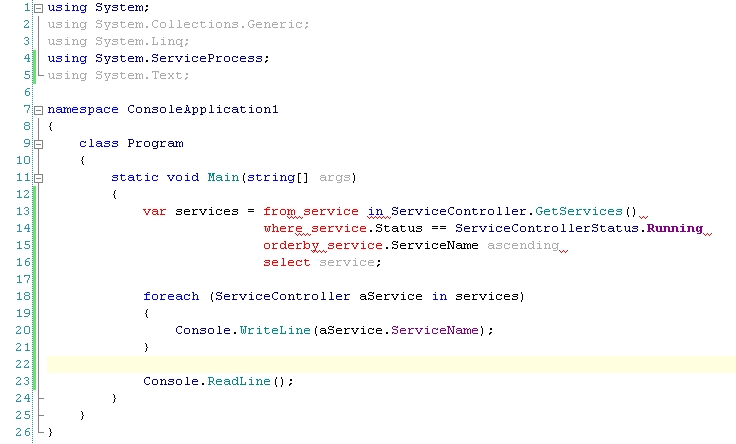
First, the big problem is that when we start using new features in VS 2008, R# doesn’t cooperate because it doesn’t know about the new syntax that’s now available.  The on-the-fly code analysis goes haywire as depicted in the screenshot below:

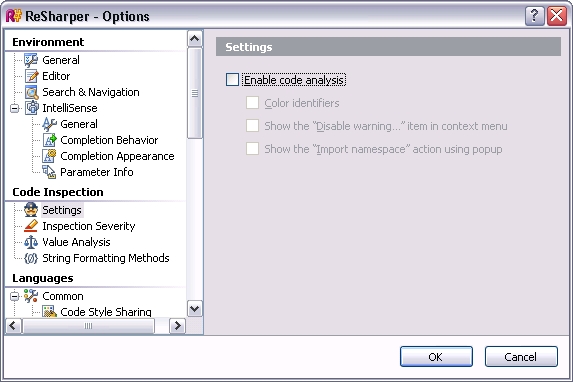
Not only does the code analysis not work properly, but the R# intellisense we get doesn’t show the proper options with extension methods.  We’ll go to Resharper>Options and change two settings.  First, let’s turn off R# code analysis:

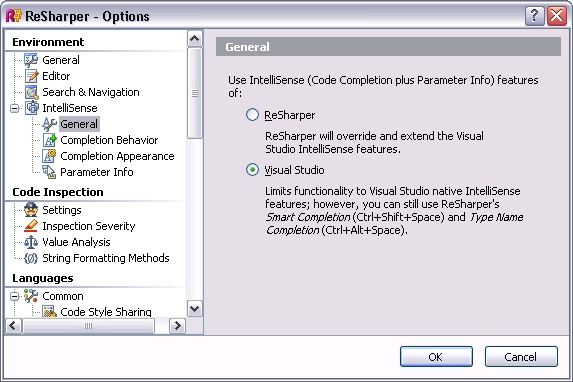
Next, we’ll tell R# to let VS give us intellisense since VS knows about the full options:

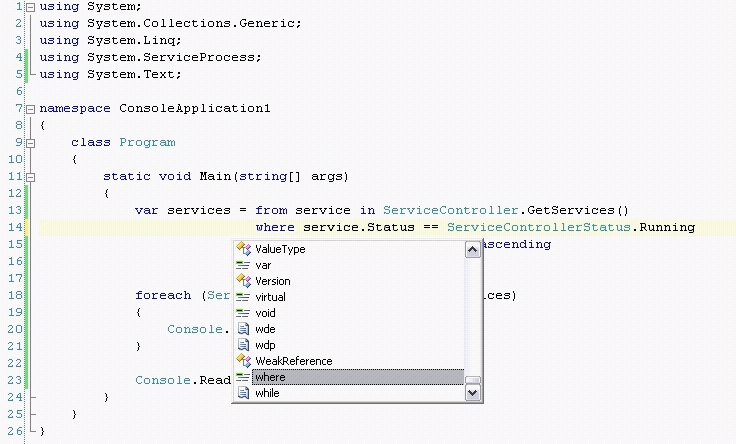
Now, if we look back at the code, all the red goes away, and our intellisense window has full support, like the “where” keyword in the LINQ query below:

With these two changes, we get rid of the immediate annoyances, but we can continue to leverage all the other great features R# gives us like file/type navigation, NANT/NUNIT support, etc.

If you have any more tips that would be helpful during the interim for using R# 3.0.2 with VS 2008 until R#4 comes out, please post a comment. 

Snapshot of my VSLive session on VS 2008

Tuesday at the VSLive conference in Austin, TX, I presented a session on Visual Studio 2008.  This was an all-demo session, but some of the demos required some prepared code, so you can grab that code, as always, from my Google Code SVN repository.  If you don’t want to checkout the trunk, you can grab the zip file that’s available on the right hand side of the home page “vslivedemos.zip”.

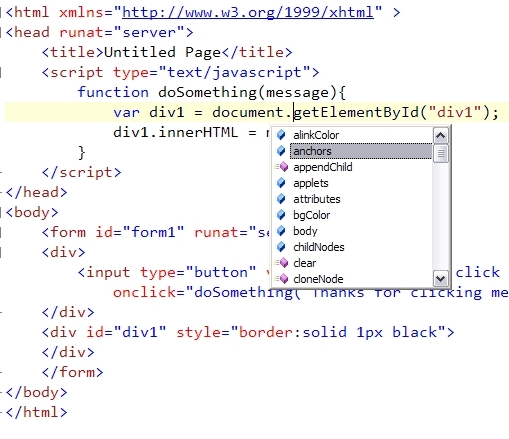
One of the really interesting features in 2008 is the cool javascript help: from intellisense to enhanced debugging, the entire javascript experience has had an overhaul, and with as much AJAX and general scripting folks do in web applications, this will be a great help.  Heck, even for the simple stuff, it’s nice to have javascript intellisense in the IDE. 

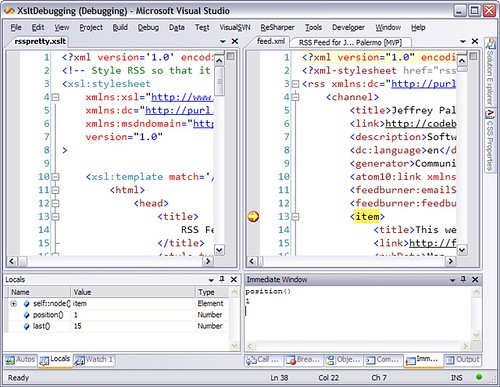
Another little known feature of VS 2008 is XSLT debugging.  Hopefully you don’t do too much custom XSLT, but I remember doing it and trying to figure out what what missing when it just wouldn’t do what I wanted.  Now we can set breakpoints both in the XSLT file as well as the Xml data file and examine what is going on while the transformation is happening.

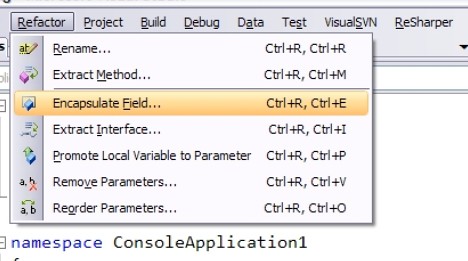
Downsides of VS 2008.  Same boring Refactoring menu.  There was a bunch of buzz around VS  2005 and refactoring, but they pretty much ignored it for 2008.  Shame.   Resharper continues to be a staple in my toolbox.

MSTest has now been brought to the developer sku, not just for Team edition for this release.  How much does that matter?  Not much given that it still has major shortcomings that make NUnit still come out on top.

This week at VSLive Austin, I’ll be. . .

 . . .presenting a session on Visual Studio 2008.  There have been numerous hints around the Internet of VS2008’s arrival in the next coming week, and this session will demonstrate new capabilities in the new IDE.  While I will continue to advocate the use of Resharper along with VS2008, the new IDE brings tool support for WPF and help with other new additions to the .Net framework.

If you are at VSLive in Austin, come by at 2pm on Tuesday for a deep look at the new features without the marketing slant.  I’ll cover which ones I find useful and give you tips on which features you can safely ignore. 

Also, Monday night the Austin .Net User Group will hold its November meeting at the VSLive location with a LINQ presentation given by Richard Hale Shaw.

NHibernate presentation files available for download

On November 7, 2007, I gave a presentation to the North Dallas .Net User Group entitled “Introduction to NHibernate 1.2”.

As promised, I have made all the code samples/demos available for download at the following link:
http://code.google.com/p/palermo/

At the above website, you will find a SVN trunk you can check out at the following URL:

http://palermo.googlecode.com/svn/nhibernatedemo/trunk 

NHibernate is one of the demos I have available and to make it easier, I have zipped it up and made it a stand-alone download on the right column; however, if you want to run these samples, I recommend  you doing  a checkout of the trunk.  You will then have the libraries needed to run the code.

Workstation dependencies include:

  • VS 2008 Beta 2 (solution file is in that format, although code works on CLR 2.0)
  • SQL Server running at (local) with the Northwind database loaded.
  • Run “ClickToBuild.bat”, and the other demo database will be created, and all the test scenarios will run to verify everything is hooked up.  Then you can open VS, browse and play.

In software consulting, low cost consulting can be real. . .

. . .or it can be a lie.  In my last post, Evan commented that low cost only goes so far.  I see where he is coming from.  Let me illustrate.  If a consultant puts together a system very quickly and doesn’t pay attention to the quality and structure of the system, he can deliver quickly in the short term.  The client initially pays less money, and he is happy.  What actually happened was that the client received a lemon.  The software meets the initial requirements, but it has a handicap with intolerance to change (which is inevitable).  There are probably cobwebs lurking in every corner.  The same consultant will probably be asked to add features at a later time “because of the great job he did”, but the second revision will cost significantly more because he will be faced with the poor decisions made in the past.  The second project is unlikely to be as inexpensive as the first, and it is very likely to be bug-riden and unstable.  The initial software delivered was a pig with lipstick on it.  I compare it to a bridge that works great at first but starts to crack and shake as the years go by.

The above is not providing the lowest cost to the client.  It is front-loading cost savings only to defer the actual bill to a later time.  Credit.  Technical debt.  The first release incurred technical debt the client will ultimately have to pay back.

This is not my model for consulting, and in this post, I hope to educate you on real low cost consulting.

What is real low-cost consulting, and how do we maximize ROI for the client?.

First, we want consistent clients.  We want to serve the client so well that they come back for the next project.  That doesn’t happen if all we deliver is technical debt.  Here is the plan.  First, we start the project with very high standards.  No bugs.  We don’t plan for bugs.  We don’t allocate time in the project for bug fixes at the end. In fact, we give a warranty for the software.  If there is a bug found later, it’s covered under warranty.  We keep the software bug-free at all times.  When a bug is found (because, yes, it happens), it becomes the highest priority.  We fix bugs right away.  If a requirement/use case/story is found to be flawed or lacking analysis, then that is a separate issue that’s taken up with the client to find an acceptable course of action.  We are able to achieve this by building quality in.  All the fundamental principles come in to play: separation of concerns, cohesion, depending on abstractions, etc.  We use extensive automated testing throughout the project along with continuous integration to provide rapid feedback that everything that works continues to work.  After all, after the first feature is added, that feature is in maintenance mode from then on.  By concentrating on maintainability, the software serves the client well, both now and in the future.

But doesn’t that end up costing MORE?

No.  On the surface, it might seem so since our standards are so much higher, but the end result is a lower cost and, consequently, a higher ROI for the client.  Let’s examine how that works:  First, we ensure we are building the right thing.  That eliminates the waste of building the wrong thing.  Next, we start testing immediately, not at the end of the project.  That means that bugs are found immediately, not right before release.  When bugs are found/fixed immediately, there are never more than a handful of outstanding bugs, and many days there are none.  The software always works as expected.  Next, the architecture is of the highest quality, and it evolves over time.  With refactoring, the software is always well-suited to the problem. The code depends on abstractions and is therefore resilient to change.  New types can be added to the system for new features, and working code doesn’t need to be modified (open/closed principle).  There are so many interlocking practices that go into achieving this that it is hard to list them all.  We keep the build fast and clean so it provides valuable feedback quickly.  With quick feedback, we can course-correct to ensure we are always on the right track.

End result

The end result is a system delivered at the lowest cost possible, not just for the first release, but when the client asks us back for a follow-on release (which they do), we are able to repeat the process and deliver a 2nd, 3rd revision with the same results as the first.

But why doesn’t everyone do it that way?

It’s hard.  Very hard.  It hard to get the quality people that can make it happen, and it’s hard to find management that has the experience to make it happen.  

I don’t claim to have all the answers (because I don’t), and we are constantly improving over time, but I can say that delivering the highest in quality also ends up costing the least. 

My approach to consulting. . .

. . . is to focus on solving the business problem at the lowest cost. In other words, drive the highest return for any investment. This is manifested by my whole company.

Yesterday, I had lunch with a client, and I related that some of the best solutions don’t use the “latest and greatest” technology. Take web services, for instance. When SOAP came out, it was all the rage. Xml messages over the wire for system integration. SOA theory was built on message passing. Then cam WSE1, 2, 3, WS Security, WS this and that. Now, REST is becoming all the rage. What is REST? In my opinion, along with being plain Xml over the wire, it’s a partial reaction to the WS* standards that seemed to bloat message passing. REST keeps with the basics.

That’s just one example of the overall theme that good solutions stick with the basics. With all the new technologies, there isn’t much that is changing with software engineering at this point. Language syntax changes, but for some reason, we’re all sticking with object-oriented languages for enterprise applications. I have yet to see folks abandoning OO for these. Not yet. Regardless of language, platform, class libraries, good practices are portable.

Separation of concerns, partitioning, testing, “Don’t repeat yourself”, cohesion, loose coupling, readability. All these apply regardless of the new technologies.

By applying time-tested principles to the current technology, programs don’t look that much different. And when they don’t look that much different, the hype seems to fall off the edges.

Dear reader, I implore you to focus on fundamentals and solid OO and SOA principles when building enterprise applications. Technologies come, and technologies go, but fundamental skills will last forever.

I expand on low-cost consulting here.