Bread and butter Resharper (demo) – level 300

I’ve been using Resharper full-time for a year.  I’d dabbled
with it before then, but I didn’t learn enough to get the full benefit.  I want
to thank Steve Donie and Jeremy Miller for helping me to learn the full
featureset of the product.  I can’t imagine coding without it now.  I’m using
Resharper 2.0 (with VS 2003 as well as VS 2005), and I’m not going to talk
about what features are different from 1.5 because v1.5 has all the features I
will talk about here. 

Resharper is a refactoring tool, yes, but that seems to be a
small portion of it.  It is an overall productivity tool.  It does some
code-generation, some fill-in-the-blank, some extract method/variable, some
move method, some create method/property/constructor, and a whole lot of
helping you with the job of programming. 
You can certainly use the mouse with
this tool if you wish, but the shortcut keys make me so productive on the
keyboard that I don’t have to slow down and reach for the mouse.

I’m going to go over the features that I use.  I’ve created a test project using the Movie application that comes as an example in VS 2005.  This is not
an exhaustive list, and it isn’t every dialog, but I use these all the time. 
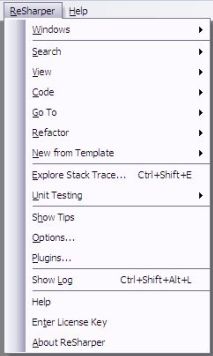
Every screenshot is inside Visual Studio in the code window.  Here is the menu
for Re#er.  It has the standard things.


Optimize usings

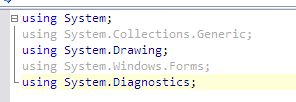
You’ll notice in the screenshot that two using statements
are grayed out.  These are unnecessary.  There is no code that requires these. 
They are visual noise.  Let’s get rid of them.  CTRL+ALT+O


Reformat code

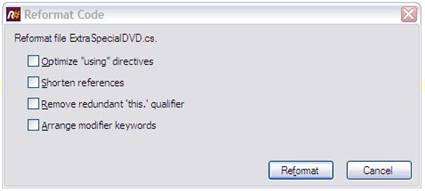
Resharper has so many formatting options that (if it’s
important to you) you can share settings with the team so that all code looks
uniform. 
But that not all there is.  Re#er will include optimize usings,
shorten System.DateTime to DateTime, remove unnecessary “this”
keywords and put your “virtual public void” back to “public
virtual void” (if you have a boneheaded programmer that left it like
that). CTRL+ALT+F


Find code file

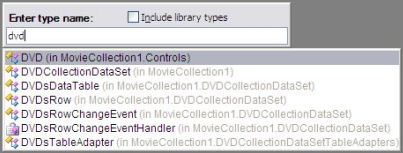
Why go for the solution explorer when you know the class you
want. 
Just start typing, and Re#er will narrow down the list as you type.  You
can take a shortcut and type “*Tester” to find all your NUnit
classes. 
CTRL+N


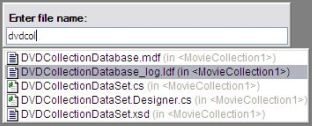
Find file

Now you need to open one of your NHibernate mappings, but
it’s not a code file.No problem.      Just narrow down from all files.  CTRL+SHIFT+N


Find usages

How many times have you wondered how many classes in your
solution are calling a particular method on IConfiguration.  Is it used at
all? 
How much?  Do you have any hope to change it without major regression? 
Find out who is using it easily and jump right to the usage, all from the code
window. 
CTRL+ALT+F7

 

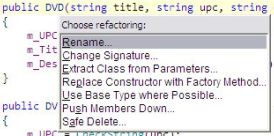
Context-sensitive refactoring

You will typically know what you want to do, and Re#er will
be there waiting for you.  Stick the cursor on a member name and choose from
the refactorings available there.  One of my favorites is “Change
Signature”. 
It makes it easy to add an extra parameter to a class
constructor, and Re#er will add it in all the places where that constructor was
used.  CTRL+SHIFT+R


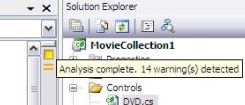
Error analysis

Ever wondered if you needed to clean up the class a bit? 
Re#er keeps a running tab on errors and warnings in the upper-right hand corner
of the code window.  When things are good, it will stay green.  It’s always
there.


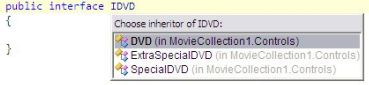
Find subclass

You know you need to go to your default implementation of
IConfiguration. 
You know, the one that actually reads from app.config?  Your
entire application uses IConfiguration since you don’t want to tightly-couple
to the app.config file. 
Sometimes you just want to pop over to whoever
implements the interface or inherits from a class.No problem.      Place the
cursor on the interface (or class) name and find who inherits.  CTRL+ALT+B


Context help

Wherever you are, if Re#er can help, it will show you a
yellow lightbulb or pop up a suggestion.  If you like what it shows you, give
Re#er the go ahead and continue without missing a beat.  in this case, I need
to add a using statement. 
Isn’t it annoying to stop your flow just to go up to
the top to adding a using? 
Now you don’t have to.  With all the
context-sensitive helps, and whenever there is a lightbulb, just press:  ALT+ENTER



Line-level refactoring

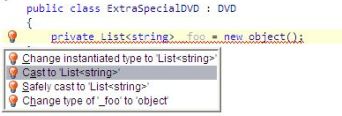
The red lightbulb is a context-sensitive help that is also a
warning. 
Go ahead and fix the error quickly (or just let Re#er do it for
you).  In this case, I really wanted to match up types, but I made a mistake.  ALT+ENTER
 

Live templates

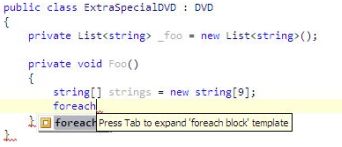
These are like code snippets but much simpler, and they have
been a Re#er feature for a long time, so just because VS 2005 has a similar
feature that is harder to use doesn’t mean that I should stop using my
templates.  I have created templates for common things like creating a new
NUnit test fixture and a test method.  In this example, I have typed
“foreach”, and Re#er awaits to take it from there.  Here is a before
and after.  CTRL+J


Name suggestions

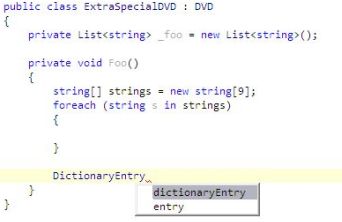
I always call my IDomainRepository “repository”
when using it in a method.  I like descriptive variable names, but it takes
more typing. . . but not with Re#er.  After the type name, just ask Re#er for a
name. 
Pick from the list.  CTRL+SPACE
  

Show Class Members

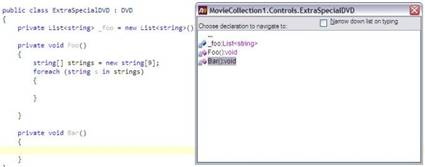
When you are in a class you want to remember what is there
and jump to it quickly.  Use Re#er to move around quickly.  CTRL+F12


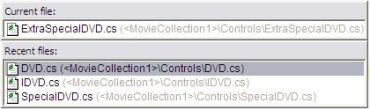
Recent files

If you want to jump between files that you have recently
opened, just pull up the list and arrow down to the one you want.  CTRL+E


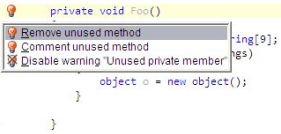
Dead code detection

If code is dead, delete it.  It’s never a good idea to save
code for a rainy day.  It just pollutes the codebase.  Re#er will color it gray
for you.  Let it help you keep the codebase clean. 


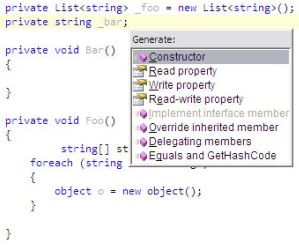
Generate Code

I saved this one for last because it’s my favorite one. 
This is a micro-code-generator.  It will create a property/constructor, etc
exactly the way I would have typed it.  In that case, why do I want to type
it. 
Imagine this:  You have a new domain class with 8 fields.  Do you really
want to type those 8 boring properties and a constructor?  I don’t.  A few
shortcut keys, and the class is done.  ALT+INSERT

[tags: programmer, programming, resharper, jetbrains, productivity, c#, .net, vs2005, visualstudio]

Hiring technical people, take 2 – level 100

This is a planned follow-on to my first post on hiring.  In my first post, I talked about the general process I like to go through when hiring a new programmer.  Of course, you can bet that this is continually evolving based on what works and what doesn’t.  So far, this is working very well.

When hiring, you obviously want to ask all kinds of questions, but I have to admit, I agree with a popular mantra that many speak about, including Joel Spolsky:  “Smart people who get things done.”  Smarts isn’t everything.  Take me, for example.  I know so many people who are smarter than me, hands down, but I make up for it with drive and persistence. 🙂   “Getting things done” isn’t everything either, because I’ve known my fair share of those people as well.  Sure, the system works (now), but with the “smart” in there, it could be a big jumbled mess that’s a maintenance nightmare.  I believe the two go together.

How the heck do I determine if the candidate is a good mix of the two?  Ha ha.  No easy answer there either.  I have to use my own experience to weight everything the candidate has to offer.  Some reference checks can help to determine the mix.  Some phone screen questions can contribute as well.  For me, I think the coding assignment can help determining the “smart” part.  I’m not fond of assignments like “create a Roman number converter” because that mostly tests procedural programming skills.  While there is value in that as well, I’ve preferred to ask them to do a little something with a technology that they have no experience in.  I leave it open-ended.  Using every available resource, this is downright easy for a smart person, and it should be because I need to respect their time.  It has the potential, though, of saving an interview for a candidate we wouldn’t hire.

Getting things done:  I think questions can bring this out.  It seems like it almost a mentality of getting things done as opposed to talking about getting things done.  Stories of past projects can help with this factor.

What else is pertinent in a candidate I’m looking for?  Ignorance of something!  What?  Did I read that correctly?  Yes.  If there is something the candidate doesn’t know, he is human.  If the candidate is so well-versed in everything, then he’s kidding himself.  Very few people are like that, and they certainly don’t have to interview.  Real people don’t know things.  Real people are constantly learning.  Someone who is slow to admit ignorance might be hard to work with.  From personal experience, the more I learn the more I realize how much I have to learn.  Does that scare anyone else but me?  I hope so, but it’s real.  Remember the teenager syndrome?  Teenagers know everything!  In fact, they know little, but are foolish enough to think they know everything.  Wise folks reject this notion as time progresses.  I’m impressed with someone who can talk about the things he doesn’t know.  This shows me that he can recognize gaps in knowledge that need to be filled.

Continual learning is another biggie for me.  Someone who is constantly learning impresses me.  I ask what technical things the candidate is reading/studying.  Answers that include books, magazines, etc are all good.  Nowadays, podcasts are in that boat too.  If a candidate struggles and finally comes up with an article they ran across “last week”, I get suspicious and follow up on the topic.

There are so many different techniques to find good people, and there is no way I can know them all, but I continue to learn. 🙂

[tags: hiring, technical, candidates, recruiting, interview, interviewing, managing, programmer]

Hiring technical people, take 1 – level 100

With unemployment at essentially ZERO these days, it’s hard finding the best people, especially skilled knowledge workers like programmers.  Every company needs programmers, so the good ones who happen to be looking are few and far between.  By contrast, the mediocre to poor programmers are abundant and available.  Wading through the duds to find the right guy can be a daunting task. 

In-person interviewing is the most expensive part of searching for new employees.  It requires real time from the people in the department.  Each time a candidate is turned away because of an interview, the company has lost time and money.  The trick is to keep the bad candidate from making it to the in-person interview.  I’ve recently employed a few techniques to minimize time spent by my team on interviews.  My goal was to bring a candidate to interview only if I felt we would be making an offer.  Here are the things to do to weed out the folks who are unlikely to make it to the offer stage:

  • Do a technical phone screen on every candidate.  Ask basic questions about levels of experience on required technologies and 3rd party libraries.  For instance, if your team uses 3rd party tools like CruiseControl.Net, Resharper, NAnt, NUnit, SVN, NHibernate, Rhino Mocks, etc, then it’s a plus if a candidate has used some of them.  This phone call should also ensure that you aren’t wasting each others’ time.  Make sure the candidate is interested in the kind of team you are running.
  • Given them a “take home test”.  Make the questions appropriate for the technology (no insulting trivia).  Good questions are ones that a good programmer could answer easily.  The duds will fail the test, and you will have saved some time.
  • Ask for a sample of code including code and SQL.  What they give you is a good indication of the types of things they have worked on and are confident in. 
  • Give a coding assignment.  Call it an audition if you wish.  This can be any small coding task, but make it a prerequisite to the interview.  The interview is the most expensive part of the recruiting process.  I like to find a technology the candidate is not familiar with and ask them to produce something with it.  This ensures that the candidate can pick up new things and produce quickly.

I fully recognize that recruiting is not a science.  The worse thing to do, however, is to just talk in the recruiting process.  I’m going to ask my programmer to write complex software, and talking about it is little indication of that aptitude.  I prefer to see some example of the professed ability.  When a candidate easily progresses through all the above steps, it’s pretty certain that the in-person interview will be a “getting to know you” gate that opens easily to an employment offer right away.

[tags: hiring, technical, candidates, recruiting, interview, interviewing, managing, programmer]

Changing companies to pursue another opportunity – level 000

Today is my last day at DataCert.  DataCert is a great company.  I had the pleasure of working in the Austin office with two great developers: Steve Donie and Jeremy Miller.

I’m moving to Vital Insight, a software company specializing in Enterprise Risk Management.  I’m coming on board as their Director of Product Development.  I’ll be helping them deliver new product features to market as quickly as possible.  We are working with the lastest in .Net technologies in the WinForms/C# space.

We will be hiring incrementally as the product grows.  If you are interested in working on my team in Austin, TX, send me a note.

I love it when all the builds are green!

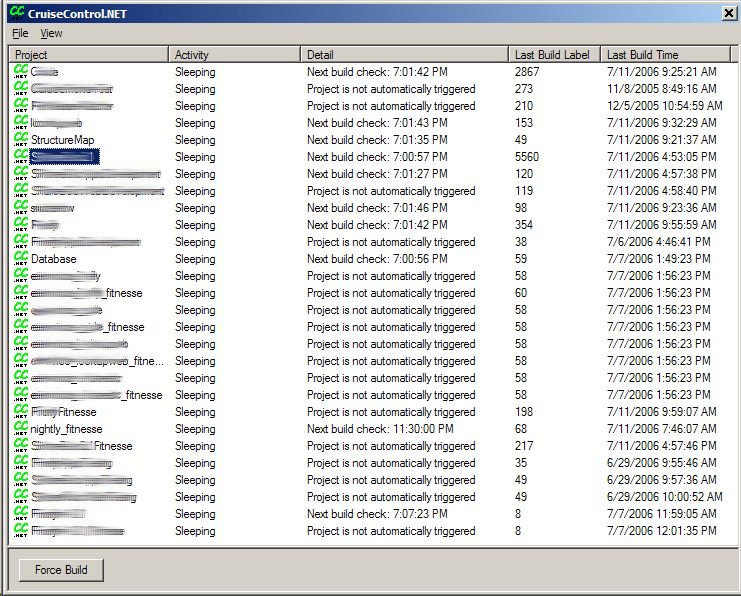
My team uses CruiseControl.Net and CCTray to run and track all of our automated builds.  For a while, we couldn’t get our largest test suite to pass all together.  Every test would pass individually, but all 1000+ tests wouldn’t pass together.  Jeremy pulled a trick out of his hat, and now even that one works every time.  I love it when all the builds are green!

No Fluff Just Stuff panel discussion – level 100

After lunch on Sunday, many of the speakers formed a panel,
and we had a panel discussion.  One of
the hot buttons was Java vs. Ruby.  Bruce
Tate
does all Ruby consulting, and it’s working well for him.  Others on the panel stress that Java and
other strictly typed languages can still be wildly useful.

One of the big points was that Ruby has turned the
conversation from compiled/interpreted and strictly typed vs. dynamically typed
to verifiable.  Ruby has proven that strict
typing isn’t as important as working code. 
The compiler has become a big spell-checker, but tests are the only
thing that can verify that the program is actually working as expected.  Many times we have to add syntax to get the
compiler to shut up.  What really matters
is how the program runs.

Venkat (author of Practices of an Agile Developer) added that many languages
check typing at runtime.  For instance,
Ruby does do type checking at runtime, but you don’t have declare types when
writing the code.  Even with compiled
languages with strict typing, he still wrote bugs and still had to write tests
to verify his code.  He has changed his
opinion about compilers and the need.  He
says that in dynamic languages, he can speak less, but the computer can infer
the rest from the context of the program.

Scott Bellware asked the question of tool support in Ruby,
and Bruce has acknowledged that the tool support isn’t there yet.  Bruce says that every language has grown up
on the command line and then went to an IDE. 
Bruce relates that some FUD is circulating that you can’t have
refactoring or write-time help with a dynamic language.  The smalltalk browser was very strong, so
that’s an example of a good IDE for that type of language.  There are some languages that are compelling
enough for folks to use even before they have good IDE support.

Ted Neward closed the panel with the following:  “If anyone disagrees with anything said on
this panel, you are wrong!” 🙂

No Fluff Just Stuff: Testing with Selenium with Neal Ford – level 200

On the 3rd day of NFJS, Neal gave a talk about
testing with Selenium.  Selenium is a
end-to-end testing solution for web applications.  This is testing on the customer acceptance
level and not the unit-testing level.

Selenium was developed by ThoughtWorks to test an
application they were working on.  It
grew out of an actual need.  The testing
framework was good enough to open-source it. 
They named it Selenium because it is the key mineral that protects the
body from mercury poisoning (if you recall Mercury testing tools).

With Selenium, tests run directly in the browser.  It supports most common browsers that are in
existence today.  The test engine itself
is written in JavaScript and runs directly in the browser.  It creates a compatibility layer across
browsers.  Calling an API in Selenium
will map to the right API in the current browser.

It deploys a browser bot that runs alongside your
application.  This bot can accept
commands.  The bot is embedded in an
IFrame.  Consequently, it will work with
any javascript-enabled browser.  To use
selenium, you must take the selenium folder and deploy it alongside the
application.  This will be in a
non-production environment, of course.

There are two modes for Selenium:  TestRunner mode and Driven mode.  In TestRunner mode, the browser is driven
inside the process.  In Driven mode, the
Selenium can be driven from another process remotely.

With TestRunner mode, Selenium is alongside the
application.  The user can launch it and
click the “Run Tests” button to run tests. 

Selenium test case is a simple html table.  The first row is a title and can be
ignored.  The next rows are the commands.  By default, it looks for
tests/TestSuite.html. 

You can run Selenium tests directly in a browser and watch
it exercise your application at full speed or “walk” speed.  You can also step through.  If you need to run it from another process, you
can use Driven mode to run it from Ant, Nant, Maven, CruiseControl or anywhere.  Once you have a big suite of tests, you’ll
want to have it integrated with your normal build process.

There is a Selenium IDE that can be used to record
tests.  The IDE is an extension for
FireFox at http://www.openqa.org/selenium/.  Selenium can test regular web applications as
well as AJAX web applications.

NFJS: Cleaning up your code with Neal Ford – level 200

Neal gave some great tips on improving code.  Here’s the rundown.  These are thoughts directly from Neal:

Coding standards aren’t necessary.  They are just preferences that folks in
charge force on underlings.  There are
more important things than coding standards. 
Tools can reformat code to some sort of standard.

#1:  Naming
things:  Use verbose variable names.  Don’t worry about having to type.  Modern IDEs give you these in a drop-down
list, so you only have to type them once. 
IntelliJ and Resharper will guess, and you don’t have to even type them
once.

#2:  Composed
Method:  Comments.  Xml comments are sometimes useful if you need
to generate documentation.  Intra-code
comments are not necessary most of the time. 
No one ever reads them, they smell, and they lie when the code around
them changes (because no one updates them). 
There is nothing that anchor line comments to the code they are supposed
to describe.  At least Xml comments are
anchored to the method.  So, if comments
in code don’t help as much as we’d like, what can we do?  Make the method name be a long, description
of what the method does, and no method should be longer than 5-15 lines of
code.  All public methods should read as
an outline of things that need to be done (and call private methods to get
these things done).

  • Benefits
    of compose method
    • Stack
      traces become easier to read
    • Debugging
      is easer.  Instead of stepping over
      lines of code, you step over private methods that are little chunks of
      work.
    • It
      makes writing unit tests easier because you can fake out any step.
    • It
      makes it easier to identify generic methods that can be pushed up the
      inheritance hierarchy.
    • Once
      the method reads easier, line comments become redundant and unnecessary.

#3:  Apply the Unix
Philosophies:  By applying unix
principles to software will make it better. 

  • Write
    simple parts connected by clean interfaces.
  • Clarity
    is better than cleverness.
  • Design
    programs to be connected to other programs
  • Separate
    policy from mechanism; separate interfaces from engines.
  • Design
    for simplicity; add complexity only where you must
  • Write
    a big program only when it is clear by demonstration that nothing else
    will do.
  • Design
    for visibility to make inspection and debugging easier.
  • Robustness
    is the child of transparency and simplicity.
  • Fold
    knowledge into data so program logic can be stupid and robust.
  • In
    interface design always do the lease surprising thing.
  • When a
    program has nothing surprising to say, it should say nothing.
  • When
    you must fail, fail noisily and as soon as possible.  (Don’t return null if something really
    bad happens).
  • Programmer
    time is expensive; conserve it in preference to machine time.
  • Avoid
    hand-hacking: write programs to write programs when you can.
  • Prototype
    before polishing. Get it working before you optimize it.
  • Distrust
    all claims for the “one true way”.
  • Design
    for the future because it will be here sooner than you think.

#4:  Syntactic
Stuff: 

  • If a
    constant is tied to a particular class, it should be defined within the
    class.
  • If a
    constant is not tied to a class, it should be tied to an interface.  Don’t implement a class for the
    constant.  You should use the
    constant through the interface name.
  • In
    Java, you can use the javax.print.attribute package and inherit from the
    EnumSyntax class.  Java 5 has native
    support for Enums as does .Net, but safe enumerations that are
    ranged-checked are important.
  • How to
    implement equals()
    • Use
      == to see if you have been passed yourself.
    • Use
      instanceOf to check the lineage of the object.
    • Check
      the equality of each field in your class. 
      If any test fails, return false.
  • Any
    time you override equals(), you should override GetHashCode(). 
    • If
      two objects are equal, they must return the same hash code. 
    • It’s
      not required that two unequal objects return different hash codes, but
      collection performance could suffer.
    • IntelliJ
      is smart enough to generate good equals() and hashCode() methods.  I’ll have to check to see if Resharper
      will do this.

#5:  Orthogonality:
the absence of side-effects.

  • Command/query
    separation:  You should not do two
    things under the guise of one. 
    Don’t calculate something if you name it “get”.
  • For
    example, in a Stack class, if you call “pop”, you remove something just to
    read it.  If an error happens, you’ve
    lost the object.  A more orthogonal
    approach would use a “top” method and “removeTop” method.

#6:  Don’t repeat
yourself.

·        
DRY principle. 
Every piece of information should have one authoritative representation.

·        
If you have an NHibernate mapping, you could
generate it from the database schema (if you have a 1-1 mapping). 

·        
If you want documentation of your system, you
should find a way to generate the documentation from the code.

o       yDoc
is a commercial documentation product that generates UML.

#7:  The Methodology
Rules

·        
Don’t live with broken windows:  If you have a broken window, it indicates
that nobody cares.  If you leave it
there, your source code is fragile.  Your
code will get stronger over time if you are adamant about automated testing and
fixing broken windows.

·        
From Agile Best Practices:

o       YAGNI
– You ain’t gonna need it.  If you aren’t
absolutely sure you need it right now, defer it until later.
o       Embrace
changing requirements by:

·        
Refactoring mercilessly

·        
Set aside time every day to refactor code.

·        
Refactoring is fun, and it is different from
“regular” coding.

·        
Automated testing.

·        
Test coverage gives confidence that you have
changed some code, and you haven’t broken anything.

·        
Testing is a frame of mind, not a tool set.

·        
Who cares if the test was written first or last
as long as the code and test are written close together.

·        
Applications tend to grow from the bottom up
with small, little units of verified code. 
The alternative is writing top down (which is hard).

·        
Generate code coverage reports on your tests.

#8:  Template method
design pattern.

  • If you
    know what the algorithm should look like but don’t know the details, you
    can write the outline and defer the details to child objects.
  • It
    encourages your to define the general order of operations for some process
    in an abstract parent, then implement the details in child classes.
  • This
    works best when the code is small, cohesive, and discrete.
  • You
    should aggressively pull methods up the hierarchy and look for definable
    processes.

#9: Bad Inheritance.

  • Inheritance
    is hard, so use composition instead of inheritance.  Encapsulate the type you were going to
    override and forward calls to it.
  • Inheritance
    is only applicable when the child “is-a” type of the parent in EVERY case.

#10:  Use interfaces
for decoupling

  • Whenever
    possible, define types and member variables as interfaces.
  • If you
    have a class that needs to act as two things, you can implement two
    interfaces.
  • Objects
    are more flexible because they can be treated as either a base class or an
    interface that’s implemented.
  • This
    allows libraries to be written that are not bound to specific classes.

The result of all this is framework code and
configuration.  Framework code is common
code that’s pulled up.  The code with the
details is configuration.  The end result
is a domain specific language that comes out of the APIs that result.

Neal’s final point is that code is the most important
artifact we create.  If you create the
most brilliant piece of software with not documentation and not bugs, you’ll be
a hero.  If you create beautiful
documentation without good software, you won’t be worth anything.

No Fluff Just Stuff comes to Austin – level 000

This past weekend, the NFJS conference came to Austin, TX,
and I’m glad it did.  Folks involved with
a user group of some type got a good discount, so we spread the word.  This conference focuses on Java, Ruby, and
Agility.  I was able to meet some great
folks (list names).

Saturday night I went to the speakers party at Bruce Tate’s
house, and it was a great time.  Scott
Bellware
commented that Ted Neward looked like Jesus with his hair wet playing
with the kids in the swimming pool.  I
enjoyed talking with David Hussman about how to drive efficient software
development into organizations.  David
consults for companies and helps them improve their development practices.

No Fluff Just Stuff is a small, local conference that has a
better attendee to speaker ratio that other conferences, which have thousands of
attendees.  This conference has about 250
attendees. 

I’m going to post some more about the sessions I attended.

I don’t know how Franklin comes up with these ideas – level 000

Carl Franklin has posted some pics of friends he hung out with at Tech Ed.
 
I don’t know how he comes up with these ideas.  If you aren’t familiar with Carl Franklin, you should be.  .Net Rocks was a podcast before anyone knew what a podcast was.  If you stopped listening to DNR when they had the non-technical spots like Google wierdos, and the like, they’ve come full circle.  It all content now.  It’s great for a commute or any time you might otherwise be listening to the radio.  www.dotnetrocks.com.
 
Here’s the picture Carl got of me at Tech Ed (my funny face).