StructureMap v1.1 (for .Net 2.0) released on sourceforge – level 000

Not long ago, Jeremy Miller released version 1.0 his excellent dependency injection tool, StructureMap.  I’ve ported it to .Net 2.0, and I’ve added generics to the bread and butter class, ObjectFactory.  Download the .Net 2.0 release on sourceforge.net.  StructureMap supports creating very loosely coupled applications by service location and dependency injection.

Coding to interfaces is fine and dandy, but at some point, you need an instance of the concrete class that implements the interface.  Typing “new SomeClass” tightly couples your code, so what do you do?

Slap an attribute on the interface, the concrete class, and then all you have to type is:

IMyInterface instance = ObjectFactory.GetInstance<IMyInterface>( );

That’s all it takes, and you have an instance of the interface you are binding against.  Using this pattern, you can harvest reuse in your applications and test any component in isolation.

Party with Palermo: Tech Ed 2006 – location announced! – level 000

Since this announcement is going out over my blog as it did last year, the folks at Party with Palermo will be folks who are plugged into the Microsoft developer community:  conference speakers, Microsofties, MVPs, user group leaders, INETA leaders and others bloggers/blog readers.  Here are the details:
Date/Time:  Saturday, June 10th @ 7:30PM until late, late, late
Location:  Millennium Bostonian Hotel’s Atrium Lounge (collared shirt required)
Who’s Invited:  Anyone who reads this.  Tell your friends.  Invite anyone and everyone.  Blog that  you will be attending.

At the Atrium Lounge, we’ll have plenty of drinks, and they have a light supper menu if you would like to grab something to eat as well.  The lounge looks on to the Faneuil Hall market place as well, so the hotel is right in the heart of where everything is happening in Boston.

The Atrium Lounge has free WiFi Internet, so pictures could be uploaded in realtime.

IMPORTANT:  I need to know how many people are planning on coming.  Please post a comment or email me through my blog with your name and email address so I can plan and notify you of late-breaking details the week before Tech Ed.

Tech Ed 2006: I’ll be facilitating BoF “Agile Development with .Net” – level 000

If you are going to Tech Ed 2006:

  • Come to Party with Palermo
  • Stop by my Bird’s of a Feather session on “Agile Development with .Net”

The session will be on Tuesday at 7:45PM

This BoF will not seek to convince people on the merits of Agile: there are plenty of print resources that weigh in on that topic.  It will focus on what has been working and what hasn’t for real teams practicing some or many of the Agile practices.  I personally with have some good success stories as well as a few “if we had only. . .” stories.

I hope you will come and share what has/has not been working for your team.

VS 2005 Web Application Projects installed! *breaths a breath of fresh air* – level 100

Upon hearing the announcement that Web Application Projects has been released, I wanted to get EZWeb converted
over as soon as possible (I’m close to making another release). 
I’d been limping along with the default web site option in Whidbey, and
I didn’t like it at all. 

First, you can download the VS 2005 add-in here.  There isn’t an automatic port of a VS 2005 website, but it was easy enough to do.  Here were my steps:

  1. Add new web application project to my solution. 
  2. In Win Explorer, copy the entire contents of my web site project to the web application folder.
  3. Delete my web site folder.
  4. Remove the website from my solution.
  5. Show all files in the web application.
  6. Explicitly include everything except bin and obj
  7. Add any assembly references necessary to the new project.
  8. Set any post-build events that you’ve been jerry-rigging up to this point.
  9. Run a build.  You’ll notice it fails on control declarations in code-behind files.
  10. Right click on the web project and run “Convert to Web Application”.  This adds an explicit partial class to  your code-behinds that hold your control declarations from the markup file.
  11. Run the build again.  It passed for me at this point.  I ran my application, and all was well.
  12. Run all unit tests and integration tests.  They all passed for me.

This project model is so much easier to use for real web applications
(that aren’t just web _sites_).  Kudos to the ASP.NET team for
getting this patch out.

If you are using Resharper 2.0 (beta), you’ll notice a slight
difference in navigating to files.  CTRL+N will locate the ascx.cs
and ascx.designer.cs files since they are C# code files.  To get
to the ascx files, you’ll need to use CTRL+SHIFT+N.

Integration testing demonstrated – level 200

In this
post, I’ll talk about and demonstrate integration testing.  If you are just starting out with integration
testing, you want to test small before you test big.  Full-system tests are good, but if they fail,
they don’t give much of a hint as to where the failure is.  Smaller integration tests will help narrow
the area where the failure lies.

A few
rules to live by

·                    
An
integration test must be isolated in setup and teardown.  If it requires some data to be in a database,
it must put it there.  Environmental
variables should not cause the test to fail randomly. 

·                    
It
must also run fast.  If it is slow, build
time will suffer, and you will run fewer builds – leading to other
problems. 

·                    
Integration
tests should be order-independent.  It
should not matter the order you run them. 
They should all pass.

·                    
Feel
free to make up rules that objectively result in fewer bugs.

Testing
a custom SiteMapProvider

In my
example, I have a custom SiteMapProvider (PageInfoSiteMapProvider).  This site map provider gets it’s data from
inside my EZWeb application, specifically, the IPageConfigProvider interface.  I use StructureMap for service location, so
one of the things that an integration test will validate is that my interface
implementations can be resolved correctly. 
I’m going to focus on an integration test for one method on the site map
provider, FindSiteMapNode(url). 

Here
is the constructor and method on my custom site map provider:

        public
PageInfoSiteMapProvider()

        {

            _provider = (IPageConfigProvider) ObjectFactory.GetInstance(typeof (IPageConfigProvider));

            ICurrentContext
context = (ICurrentContext)ObjectFactory.GetInstance(typeof(ICurrentContext));

            IConfigurationSource
config = (IConfigurationSource)ObjectFactory.GetInstance(typeof(IConfigurationSource));

            _applicationPath =
context.ApplicationPath;

            _defaultPage = config.DefaultPage;

        }

        public override SiteMapNode
FindSiteMapNode(string rawUrl)

        {

            VirtualPath
path = new VirtualPath(rawUrl,
_applicationPath, _defaultPage);

            PageInfo
config = _provider.GetPageConfig(path);

            SiteMapNode
node = MakeNodeFromPageInfo(config);

            return
node;

        }

This is
simple enough.  The site map provider is
just a wrapper around the interface call. 
Notice in the constructor, that I’m using a call to StructureMap’s
ObjectFactory class to resolve the interfaces that I need.  I need the current HttpContext and some stuff
in the web.config file.  Obvious in my
integration test I don’t have the ASP.NET runtime, and I don’t have the
web.config file, so I’ll need to simulate thing (mock, stub, fake, whatever you
want to call it).  In my integration
test, I’m going to have to use fake implementations of these interfaces.

Here
is the integration test fixture that tests this provider all the way down to
the point where it reads the data from the xml file on the disk. 
I’ve chosen this scope because it’s not too large, and it’s
not too small.

    [TestFixture]

    public class PageInfoSiteMapProviderTester

    {

        [SetUp]

        public void Setup()

        {

            IConfigurationSource
source = new TestingConfigurationSource();

            ICurrentContext
context = new TestingCurrentContext(source);

            ObjectFactory.InjectStub(typeof(IConfigurationSource),
source);

            ObjectFactory.InjectStub(typeof(ICurrentContext),
context);

        }

        [Test]

        public void ShouldGetRootSiteMapNode()

        {

            string
xmlFileContext = @”<?xml
version=””1.0″”
encoding=””utf-16″”?>

                <PageInfo
xmlns:xsi=””http://www.w3.org/2001/XMLSchema-instance”&#8221;
xmlns:xsd=””http://www.w3.org/2001/XMLSchema””&gt;

                 
<VirtualPath>/</VirtualPath>

                  <Title>My home
page</Title>

                  <Template />

                  <Theme />

                  <Plugin />

                 
<HasParent>false</HasParent>

                  <Children />

                  <Links />

                  <Editors />

                </PageInfo>”;

            string
fileName = FilePageConfigProvider._fileName;

            string
fileSubDir = FilePageConfigProvider._filesDir;

            string
fileDirectory = Environment.CurrentDirectory + “\” + fileSubDir;

            string
path = fileDirectory + “\” +
fileName;

            FileHelper
helper = new FileHelper();

            helper.SaveFileContents(path,
xmlFileContext);

            PageInfoSiteMapProvider
provider = new PageInfoSiteMapProvider();

            SiteMapNode
node = provider.FindSiteMapNode(“/mywebapplication/default.aspx”);

            Assert.AreEqual(“My home page”, node.Title);

            Assert.AreEqual(“/myWebApplication/Default.aspx”,
node.Url);

            Assert.AreEqual(“/”, node.Key);

        }

    }

This is
my entire integration test to make sure that the SiteMapNode object is put
together correctly. Notice that I have data setup with the xml file.  Then I call the provider and assert on the
results.

Faking
the “cruise missile” with StructureMap

If my
code was in charge of launching a cruise missile correctly, then I would have
to fake out the cruise missile when testing my code.  In fact, my code might not ever run in its
true environment until the world plunged into war again.  On a small scale, I have to fake the two
interfaces that are not reproduceable in my test context.  Direct your attention to the Setup
method.  You’ll notice that I’m creating
two fake instances and instructing StructureMap to “InjectStub”.  Because of this, when my code asks for an
instance of one of those interfaces, the class I created in Setup will be
returned.

Here
are the stub classes

    public class TestingCurrentContext
: CurrentContext

    {

        public
TestingCurrentContext(IConfigurationSource
source) : base(source) { }

        public override string
MapPath(string path)

        {

            string
executingDir = Environment.CurrentDirectory;

            string
combinedPath = executingDir + “\”
+ path;

            return
combinedPath;

        }

        public override string
ApplicationPath

        {

            get

            {

                return
“/myWebApplication”;

            }

        }

    }

    public class TestingConfigurationSource
: ConfigurationSource

    {

        public override string
ClientFilesPath

        {

            get

            {

                return
@””;

            }

        }

        public override string
DefaultPage

        {

            get

            {

                return
“Default.aspx”;

            }

        }

    }

These
classes are simple enough.  They merely
return expected environmental settings so that I can test my code.

Integration
testing is hard at first

If your
style of coding isn’t loosely coupled, then it will be difficult to do
automated integration testing.  Seams
must exist in the code where fake implementation can be inserted.  In my case, I had a web.config file and the
HttpContext of the web application that get in the way.  I stub these out for my test.  My tools list for integration testing is:

·                    
NUnit
for organizing and running the tests.

·                    
StructureMap
for resolving interfaces and for stubbing interfaces at hard boundaries.

My way
or the highway

Just kidding.  I’m not saying that this
is the “golden” way of doing integration testing.  There are many ways, and that’s why software
engineering is engineering and not assembly-line work.  The above approach has worked well for me,
and I put interfaces where they make sense (everywhere) in my code to maintain
flexibility.  I’m open for critique or
questions.

VS 2003 web projects model now available in VS 2005 – level 200

One of the biggest criticizms of VS 2005 was the radical change in the way web applications had to be set up.  From the folks doing more simple websites, this change was welcome, but the folks doing complex web applications, this change caused a bit of trouble.  It’s clear that some folks like the new way, and some folks like the way VS 2003 handled it (minus the mandatory control declarations).

Scott Guthrie has just announced the release of the Web Application Projects add-in for VS 2005 that brings the VS 2003 model to Whidbey.  It’s a simple install for VS 2005, and the project type is immediately available.   I’ll be installing and using it shortly, so I’ll be back with a personal review.

The word is that this will be included in VS 2005 SP1 as well.

StructureMap 1.0 released – Don’t create a loosely coupled system without it – level 200

StructureMap is very easy to use, but it makes creating loosely coupled OO systems a breeze (ok, that’s exaggerating.  it still requires engineering).  I use it in every project I work on, and I like it better than Spring.Net.  Spring needs Xml configuration for every mapping between an interface and a class.  This causes the Xml file to continue to grow and grow and grow.  StructureMap uses Attributes to tag the interface and class definition.  At runtime, it hooks them up.  This type of metadata is much easier to manage.

Jeremy Miller recently released version 1.0 of StructureMap.  I was please he included a feature I explicitly asked for.  If you need a port to .Net 2.0, let me know.  I’ve done it.

Unit testing demonstrated – level 300

I use NUnit for my
automated tests.  Because of that, all my
tests are unit tests, right?

WRONG!  The name of
the testing framework has no bearing on the type of test you have.  NUnit is a framework for running automated
tests.  You _can_ write unit tests with
it, but you can also write integration tests as well as full-system tests with
it.  A
unit test is a special type of developer test and can be done with or without
NUnit.
 

A unit test tests a
single line of code.

How big is a unit? 
Well, that’s up to you, and there is not scientific answer.  Typically, you only give a class a single
responsibility.  The class may have several
methods since the class may need to do several things to accomplish the single
responsibility.  The class may have to
collaborate with several other classes to accomplish its purpose.  A unit of code is an identifiable chunk of
code needed to accomplish part of a responsibility.  Is that vague enough for you?  In my example below, I’ll clear this up a
bit.

A unit test isolates
the code being tested.

A class will need to talk to other classes.  That’s a given.  Sometimes this is ok for testing, and
sometimes this just gets in the way.  It
might be ok to talk to a class that just builds a string (like StringBuilder),
but it’s not ok to talk to a class that grabs information from a configuration
file.  In a unit test, you need to take
environmental dependencies out of the equation so that a pass or failure is
truly dependent on the code being tested. 
You don’t want the test failing because the configuration file wasn’t in
the right spot.  There are plenty of
techniques available for this.  To start,
you need to code against interfaces and use fake objects like stubs and
mocks.  I like the Rhino mock framework
for this.

Here are some
dependencies that will need to be frequently simulated for unit testing:

  • Config
    files
  • Registry
    values
  • Databases
  • Environment
    variables
  • Machine
    name
  • System
    clock (Yup.  Even that has the
    potential to get in your way).

Example:

This example will show a real web user control that I’ve
unit-tested.  This is not
theoretical.  This is inside my EZWeb
software.  The purpose of the following
screen is to maintain a few pieces of information for the page being
viewed.  The user can set the title of
the page and some other things.
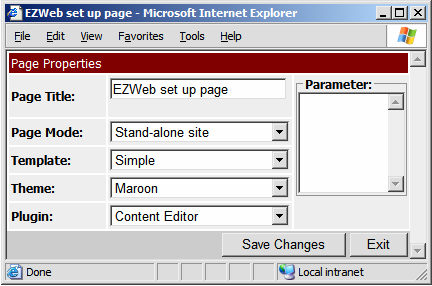
I’ve used the Mode-View-Presenter pattern to make unit
testing this easier.  Obviously if all my
code is in the code-behind of the ASCX, then I won’t be able to test any of it
because I can’t run that code outside of the ASP.NET runtime.  If you aren’t familiar with the MVP pattern
now, take some time to read up on it. 
The presenter is the controlling class that will be tested.  The code-behind becomes very dumb.  The code-behind will implement my view
interface and be responsible for taking information and setting the correct
control.  The view is very small, and all
the intelligence is in the controlling class (the Presenter).  The presenter is where the bugs will hide, so
I’ll unit test that class.  The model is
represented by an interface IPageConfig that you’ll see being referenced.

The following example
shows a unit test of the code that gets data from the model and publishes it to
the view.  The textboxes and drop-downs
need to be set properly.  This is not the
full code.  The full code also reacts to
the save button being clicked and taking modifying information and saving it.

Here is the view interface:

namespace
Palermo.EZWeb.UI

{

    public interface IPagePropertiesView

    {

        string
Title { get; set;
}

        bool HasParent
{ get; set; }

        string
Template { get; set;
}

        string
Theme { get; set;
}

        string
Plugin { get; set;
}

        string
Parameter { get; set;
}

        bool
IsPostback { get; }

        DictionaryList
GetTemplateChoices();

        void SetTemplatesDropDown(DictionaryList
list);

        DictionaryList
GetThemeChoices();

        void
SetThemesDropDown(DictionaryList list);

        DictionaryList
GetPluginChoices();

        void
SetPluginDropDown(DictionaryList list);

        void
EnableTitle(bool enabled);

        void
EnableTemplate(bool enabled);

        void
EnableTheme(bool enabled);

        void
EnablePlugin(bool enabled);

        void
EnableParameter(bool enabled);

        void
ReloadParent();

    }

}

Here is the
code-behind that implements the view interface (truncated):

      public partial class PageAdministration : UserControl,
IPlugin, IPagePropertiesView

      {

        private
PagePropertiesPresenter _presenter;

        public string Title

        {

            get
{ return txtTitle.Text; }

            set
{ txtTitle.Text = value; }

        }

        public bool HasParent

        {

            get
{ return Convert.ToBoolean(ddlHasParent.SelectedValue);
}

            set
{ ddlHasParent.SelectedValue = value.ToString();
}

        }

        public string Template

        {

            get
{ return ddlTemplate.SelectedValue; }

            set
{ ddlTemplate.SelectedValue = value; }

}

. . .

Here is the part of
the Presenter that we’ll be focusing on:

    public class PagePropertiesPresenter

    {

        private
readonly IPagePropertiesView
_view;

        private
ICurrentContext _context;

        public
PagePropertiesPresenter(IPagePropertiesView
view)

        {

            _view = view;

            _context = (ICurrentContext) ObjectFactory.GetInstance(typeof (ICurrentContext));

        }

        //testing
constructor

        public PagePropertiesPresenter(IPagePropertiesView view, ICurrentContext
context)

        {

            _view = view;

            _context = context;

        }

        public virtual void
LoadConfiguration()

        {

            if
(!_view.IsPostback)

            {

                IPageConfig
config = _context.GetPageConfig();

                _view.Title = config.Title;

                _view.HasParent =
config.HasParent;

                DictionaryList
templates = removeBadItems(_view.GetTemplateChoices());

               
_view.SetTemplatesDropDown(templates);

                _view.Template =
config.Template;

                DictionaryList
themes = removeBadItems(_view.GetThemeChoices());

               
_view.SetThemesDropDown(themes);

                _view.Theme = config.Theme;

                DictionaryList
plugins = removeBadItems(_view.GetPluginChoices());

               
_view.SetPluginDropDown(plugins);

                _view.Plugin = config.Plugin;

                _view.Parameter = config.Parameter;

            }

}

.  .  .

Notice that the LoadConfiguration() method checks for
postback (through the view) and then uses the MODEL to set pieces of
information on the VIEW.  You may think
that this code is boring, but it’s essential for the behavior of the screen.

Now for the
test.  Note that we’re simulating the
view and the ICurrentContext interface since these are collaborators.  The ICurrentContext provides the MODEL to the
Presenter:

    [TestFixture]

    public class PagePropertiesPresenterTester

    {

        [Test]

        public void ShouldSetAllInformationOnPage()

        {

            MockRepository
mocks = new MockRepository();

            IPageConfig
mockConfig = (IPageConfig)mocks.CreateMock(typeof(IPageConfig));

            IPagePropertiesView
view = (IPagePropertiesView)mocks.CreateMock(typeof(IPagePropertiesView));

            ICurrentContext
context = (ICurrentContext)mocks.CreateMock(typeof(ICurrentContext));

            Expect.Call(view.IsPostback).Return(false);

            Expect.Call(context.GetPageConfig()).Return(mockConfig);

            string
title = “fake title”;

            Expect.Call(mockConfig.Title).Return(title);

            view.Title = title;

            bool
hasParent = false;

            Expect.Call(mockConfig.HasParent).Return(hasParent);

            view.HasParent = hasParent;

            string
selectedItem = “foo”;

            Expect.Call(mockConfig.Template).Return(selectedItem);

            DictionaryList
list = new DictionaryList();

            list.Add(“first”,
“first”);

            list.Add(“Foo”,
selectedItem);

            list.Add(“.svn”,
“.svn”);

            list.Add(“_something”,
“_something”);

            Expect.Call(view.GetTemplateChoices()).Return(list);

            view.SetTemplatesDropDown(null);

            LastCall.On(view).Constraints(new PropertyIs(“Count”, 2));//.
and _ should be stripped out.

            view.Template = selectedItem;

            Expect.Call(mockConfig.Theme).Return(selectedItem);

            Expect.Call(view.GetThemeChoices()).Return(list);

            view.SetThemesDropDown(null);

            LastCall.On(view).Constraints(new PropertyIs(“Count”, 2));

            view.Theme = selectedItem;

            Expect.Call(mockConfig.Plugin).Return(selectedItem);

            Expect.Call(view.GetPluginChoices()).Return(list);

            view.SetPluginDropDown(null);

            LastCall.On(view).Constraints(new PropertyIs(“Count”, 2));

            view.Plugin = selectedItem;

            string
fakeParameter = “faky”;

            Expect.Call(mockConfig.Parameter).Return(fakeParameter);

            view.Parameter = fakeParameter;

            mocks.ReplayAll();

            PagePropertiesPresenter
presenter = new PagePropertiesPresenter(view,
context);

            presenter.LoadConfiguration();

            mocks.VerifyAll();

}

. . .

Your first thought might be that this unit test method is
too long.  It certainly pushes my comfort
level as well.  I could have chosen a
small one for this example, but I chose my largest one instead.  I’ve seen other unit testing examples that
are so trivial that they don’t demonstrate much.  In this sample, I chose one of the most
difficult things to unit test:  A UI
screen.  Notice that I’m using Rhino
mocks to set up my fake objects.  The call
to “mocks.VerifyAll()” does a check to ensure that the collaborators were
called with the correct input.  After all,
my presenter method is in charge of getting information from the MODEL and
publishing them to the VIEW.  If you
spend some time going over this test, you can see some of the rules the code
has to live by.  One of the side-effects
of the unit test is documentation of the code (developer documentation).  At this point, I can refactor my method
knowing that I have this test as a safety net.

How do I unit test my
legacy code?

Change it.  This
screen started out several years ago with all the code in the code-behind
class.  It was impossible to test this
way.  I had to refactor to the MVP
pattern to enable testing.  I had to
break some things away by inserting an interface so that I’d have a seam to
break dependencies.  In short, you must
refactor your existing code to get it to a point where it is testable.  The reason it’s not testable is that it’s
tightly-coupled with its dependencies.  I
hope by now that the words “loosely-coupled” are recognized as “good” and “tightly-coupled”
are recognized as “bad”.  Testable code
is loosely-coupled.  Loosely-coupled code
is testable.  And now the big leap:  Testable code == good.

Automated testing with .Net – an overview – level 200

Reality

In reality, developers don’t like to do much testing.  Developers aren’t testers.  We typically will write code while making
certain assumptions about variables and, objectively knowing the expected behavior
of the syntax, we might run it once and call it done.  Typically, bugs hide where the code wasn’t
rigorously tests or in paths that weren’t tested at all.  I think everyone agrees that without testing,
the software will have bugs (and often even after testing).  I heard of a crazy management quote that is
very sad: “If you have to test it, you aren’t building it right.”  I sure am glad that manager wasn’t involved
with automobile development!  In reality,
we need testing

Types of common
developer testing

  • Actually
    running the code written
  • Simple
    console application or winforms test harnesses
  • Running
    the application through the UI locally or on a development server.

Types of testing

  • Unit
    testing
  • Integration
    testing
  • Acceptance
    testing
  • Load
    testing
  • Performance
    testing
  • Security
    testing
  • Exploratory
    testing
  • And
    many more

Approaches

  • Do all
    manual testing with or without the help of small tools.
    • With
      this approach, the cost is high because for every run of the test, human
      time is required.  For every
      release, every test case must be repeated.
    • This
      approach doesn’t scale.  When more
      testing is needed, that directly calls for more human time.  Human time is very expensive compared
      to computing time.
  • Automate
    all testing.
    • The
      cost is low for about 80%, but then goes up.
    • Some
      types of tests are hard or impossible to automate effectively, such as
      security, exploratory, and concurrency testing.  This type of testing needs more human
      attention and isn’t easily repeatable.
    • To
      fully succeed at this approach, testers need to be highly skilled at
      scripting.
  • A
    pragmatic approach – automate the testing that is easiest.
    • Unit
      testing
    • Integration
      testing
    • Acceptance
      testing

Unit testing

What is a unit test? 
From Wikipedia:  A “. . . unit
test
is a procedure used to validate that a particular module of source
code is working properly”.  A unit test
is a very unique type of test with some fundamental constraints.  If a test violates a constraint, it ceases
existence as a unit test.

Characteristics of a
unit test

  • A unit
    test isolates and tests a single responsibility.
  • A unit
    test isolates a failure.
  • A unit
    test simulates other collaborators using various methods such as fake
    objects.
  • A unit
    test can run and pass in any environment.

When an automated test reaches out to a file, registry key,
database, web service, external configuration, environment variable, etc, it
becomes an integration test and is polluted with dependency on its
environment.  At that point, the binary
can no longer be sent to another location with the expectation that test
continue to pass. 

Unit testing is hard. 
It requires constant vigilance to ensure application code is
loosely-coupled.  Because a unit test
must test a piece of code in isolation, the code must be designed so that
collaborators can be easily separated. 
In short, calling out to a static method from inside a constructor is a
tight-coupling.  This type of code will
hinder unit testing.

Integration testing

What is integration testing? 
An integration test is a developer test that combines several units of
code and tests the interaction among them. 
A good integration strategy will include tests along all integration
boundaries.  If a unit of code is tested
at the unit level and then tested during interaction with all collaborators,
the developer has confidence that the code will work well when the entire
system is assembled.  Integration
testing
is the second step in a “test small, test medium, test large”
strategy.  Larger integration tests are certainly useful, but
large tests alone don’t help to pinpoint a problem if they fail. 

Characteristics of a
good integration test

  • It
    only includes a few classes.  It
    typically focuses on a single class and then includes collaborators.  If a class has 3 collaborators, the test
    would include 4 classes (the first class and its 3 collaborators).  This test would aim to fake the
    collaborators twice removed so that the focus on the test can remain
    narrow.  This is a subjective rule,
    and the developer should use good judgment regarding how many classes to
    include in an integration test.
  • It is
    completely isolated in setup and teardown. 
    Should not be environmentally sensitive.  If the test requires a file to be on the
    drive, then setup for the test should place the required file there
    first.  If the test needs data in a
    database, the setup should insert the required records first.  It should not depend on any environment
    setting being present before the test is run.  It should run on any developer
    workstation.
  • Must
    run fast.  If it’s slow, the build
    time will suffer, and you will run fewer builds.
  • It
    must be order-independent.  If an
    integration test causes a subsequent test to fail, it is indicative of a
    test not owning its own environmental setup.

Acceptance testing

What is acceptance testing? 
An evaluation of acceptance criteria on the system to ensure the system
meets the customers’ needs.  Before a
piece of software can be written the software team must have acceptance
criteria.  This is often called
requirements.  Acceptance testing seeks
to execute the requirements on the system for a pass/fail result.

Characteristics of a
good acceptance test

  • Easily
    understood by non-developers as well as the customer.
  • Easily
    created by non-developers as well as the customer.
  • When
    it passes, the customer is assured that the system behaves as needed.
  • Very
    expressive using jargon of the business domain.
  • Is
    repeatable.

Automated acceptance testing is the final big gain in the
suite of automated tests.  The acceptance
tests actually define requirements in an objective and executable way.  If a tester finds a bug, he can write an
acceptance test that fails in the presence of the bug.  When the bug is fixed, the test will
pass.  Acceptance tests become an
important part of a regression test suite over time.

Stay tuned for more
detailed information on the following testing topics:

  • Unit
    testing
  • Integration
    testing
  • Acceptance
    testing