Resharper 2.0 alpha has many interesting new features – level 200

You can try out the Resharper 2.0 alpha for Visual Studio 2003 or 2005.  I tried it out for Visual Studio 2005.  Immediately, some cool new features jumped out at me. 


  • Resharper runs NUnit tests for you right from the code.  It includes a graphics window similar to the NUnit gui.

  • Many new refactories with context-sensitive offering.  One common one is to breat a variable declaration from the constructor.

I tried it out for about an hour, and then I uninstalled it.  It is an alpha, and I did experience some of the known issues which include hangs at several places:


  • Adding new class to project.

  • Opening a solution.

  • Saving a file.

  • Compiling

These known issues are published on the download site.  After all, it’s an alpha, but when it performs as snappily as Resharper 1.5, it’ll be a great productivity tool.

For the time being, I’m evaluating another refactoring tool called JustCode!.  It has similar features to the other tools in the space, and I’m giving it a shot.  I recognize that I have a bias because I’m already familiar with the Resharper shortcut keys, but JustCode! is nicely filling in the gaps of the VS 2005 refactorings.

MSF for Agile update released – still doesn’t hit the mark – level 200

A new beta of MSF
for Agile is available from Microsoft
. 
I read through it (more reading that I normally like to do about
process-oriented stuff), and it’s better than classic MSF.  

Classic MSF was very waterfall even though it called the
waterfall a cycle.  There were very rigid
phases of envisioning, planning, build, stabilize, deploy, and maintain.  The new MSF does a lot to emphasize Agile
concepts that keep us more focused on the software than the process, but it
keeps a death grip on all the documents that classic MSF had.

Documents

Some documents have been renamed and shuffled around, but
here are _some_ of the documents required by the MSF Agile process:

  • Vision
    statement
  • Persona
  • Scenario
    List
  • Quality
    of Service Requirement List
  • Project
    Checklist
  • Threat
    Model
  • Scenario
    Description
  • Iteration
    Plan
  • Storyboard
  • Application
    Diagram
  • System
    Diagram
  • Test
    Approach
  • Release
    Plan

I have no doubt that there are full-time folks at Microsoft
who maintain these documents all the time, but the average software company isn’t
the mammoth that Microsoft is.  Most of
the points of all these documents can be summed up by some bullet points on a
whiteboard.  My team uses a wiki to keep
current information since we have stakeholders in another city, so anything
that concerns them is jotted on the wiki so anyone can view or change it.  Most stuff goes on a whiteboard until it’s no
longer useful.

Documents are only useful for a time, so I believe there is
too much document overhead still in the MSF process.

Builds

MSF for Agile describes a daily build and an accepted
build.  There isn’t mention of continuous
integration, and it allows many checks before a daily integration build is
done.  I believe that more feedback is
desirable.  Even with dependencies from
other teams, you always have a good build of those, so a build on every
check-in would give more instant feedback. 
This point also stresses the need for fast builds.  If your build takes hours to complete, you
have no choice but to run it daily.  I
build measured in minutes (10 or less) will be run very often and build
confidence that the software is still working.

Work Items

The MSF for Agile process uses Visual Studio team system
terms, naturally.  They have different
levels of work items:

  • Scenario
    Overview
  • Quality
    of Service Requirement Overview
  • Task
    Overview
  • Bug
    Overview
  • Risk
    Overview

All work items must be tracked permanently according to the
process.  The one that jumps out as
overkill is the task work item.  Tasks
are very small, and merely recording them in a tool might lengthen the duration
of the task 20% for small ones.  My team
tracks at the story level and tasks out on a whiteboard when necessary.  If there is a very large story with large
task within, the product manager might record the large tasks (that might need
to be called separate stories anyway), but we as developers concentrate on
creating working software.

Conclusion

MSF for Agile misses one major point:

Software teams should be self-organizing.

Each software team is different and has different
goals.  The process should be customized
for each team.  MSF for Agile, even if
used, can be used out of the box.  I
believe the process should stress that inappropriate items be omitted.  MSF for Agile still seems pretty heavy for
me, and there is a lot of tracking that doesn’t directly validate that the
software works as intended.  Tracking
every work item and having every document doesn’t matter if the customer isn’t
happy.  The key metric should be customer
acceptance at every level, not just the end of the release.  Automated testing wasn’t stressed either, and
that is a key way to get build feedback quickly and ensure that something a
customer liked yesterday isn’t broken today by an unrelated change.

Overall, it appears that MSF for Agile is trying to embrace
real Agile, but it won’t let go of waterfall. 
Right now, it’s sitting on the fence looking at both sides.

Rhino Mocks are strongly typed. Refactor unit tests with ease – level 200

I completed my first unit test with Rhino Mocks today. 
With well-designed code, one can pick apart a section, mock the
interfaces it needs and run/debug/test it in isolation.  This is a
huge advantage of a loosely-coupled design.  The alternative is a
tightly-coupled design where every class knows about the API of every
other class, and nothing can be run unless _everything_ is
operational.  The worst of this is if you have a development
resource like a database or message queue that isn’t operational at the
moment.  You can’t run any of your code because three classes
away something depends on it.

The biggest win, in my opinion, for a loosely-coupled design is
testability.  If every dependency is hidden behind a custom
interface, those interfaces can be mocked at will, and your code that
uses these interfaces can be run/debugged/tested at will.  This is
where mocking frameworks come in.

I currently use NMock in my automated tests.  I’ve also used the mocking framework in nunit.mocks.dll that is available with NUnit (by
the way, version 2.2.5 is out).  NMock uses expectations as
strings to define how it will simulate an object that you need. 
You can read up on NMock here:

Rhino Mocks serve
the same purpose, but instead of strings to represent the method that
should be called, it uses the actual method.  If follows a record
and play pattern, and you don’t use a string while setting up any of
it.  This is a huge time-savor.  When you want to rename a
method, you don’t have to search for strings that contain that method
name.  The compiler will now catch any errors resulting from the
rename, and your refactoring tool will rename all calls to that method
for you.  Here’s a sample test for a custom MembershipProvider I was playing with:

        [Test, Explicit]

        public void ShouldUpdateUserInformationInProviderWithRhinoMocks()

        {

            Rhino.Mocks.MockRepository mocks = new Rhino.Mocks.MockRepository();

            MembershipDataSet dataSet = new MembershipDataSet();

            dataSet.Users.AddUsersRow(new Guid(), “lerma”, “lerma”, “lksd”, “”,

                 DateTime.Now.ToShortDateString());

            IDataSetStore store = (IDataSetStore)mocks.CreateMock(typeof(IDataSetStore));

            Rhino.Mocks.Expect.Call(store.GetDataSet()).Return(dataSet);

            store.SaveDataSet(dataSet);

            mocks.ReplayAll();

            StructureMap.ObjectFactory.InjectStub(typeof(IDataSetStore), store);

            IMembershipProvider provider = (IMembershipProvider)StructureMap.ObjectFactory.GetInstance(

                 typeof(IMembershipProvider));

            Assert.AreEqual(1, dataSet.Users.Count);

            MembershipUser user = provider.GetUser(“lerma”);//call should trigger the GetDataSet() call;

            user.Email = “lerma@address.com”;

            provider.UpdateUser(user);//Should call SaveDataSet(…);

            user = provider.GetUser(“lerma”);//DataSet should be cached, so no call.

            Assert.AreEqual(“lerma@address.com“, user.Email);

            mocks.VerifyAll();//make sure the interaction with IDataSetStore was correct.

        }

Note one very big difference between Rhino and NMock.  When you
first create the mock, you are in record mode, and for void methods, to
set up the expectation, you actually _call_ the method.  Rhino
sees that and adds the expectation.  For non-void methods, you use
Expect.Call to set up the return value.  When you are ready
to run the code under test, you have to switch to play mode using the
ReplayAll() method.  And then at the end there is the obvious
VerifyAll() method.  Rhino supports Replay and Verify for all
mocked objects at once or one by one.

In this code sample. I’m using StructureMap in my production code to
link dependencies.  Here, I tell StructureMap to use the mocked
object instead.  Read up on StructureMap here.

So far, I’ve found Rhino Mocks to have every feature that I currently use with NMock plus the strongly-typed expectations. 
I’m considering making a switch.  For the time being, I’ll
continue to use Rhino for new tests as a longer evaluation.  To
get more information on how Rhino Mocks work, read the documentation, which is very good.

Visual Studio 2005 Refactoring is sub-par – level 200

This is a time that envy VB developers who have access to DevExpress’
Refactor tool
which is far better than the meager refactoring support
available for C# devs in Visual Studio 2005.  There was a bunch of
hype around this feature, and it is really useless.  I love
Resharper 1.5 for VS 2003, and I can’t wait until it comes out for VS
2005, but until then, I develop EZWeb with a stock VS 2005
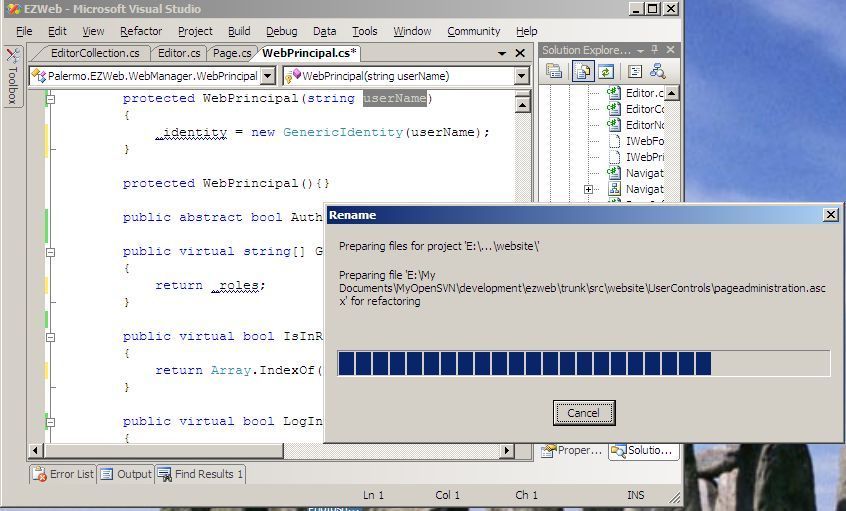
install.  I made a screen shot of renaming a parameter so you can
see what happens. 

Any time you invoke a refactor feature, a modal dialog pops up that
halts your work.  Every time takes at least 15 seconds even for
the small solution I have going.  This feature was very poorly
designed, and I hope it is improved in a service pack. 

Renaming a
method parameter is one of the simplest refactorings.  It can’t
affect code other than in that method, so why is there the need to search
every file in the solution?  Only code inside that method could
_possibly_ be affected.

Another downer is that the refactorings don’t have shortcut keys
defined by default.  You can only get to them with the
mouse.  To keep my hands on the keyboard, custom keyboard mappings
are required. 

Here’s an area where we still need to catch up with Java IDEs – refactoring.

Mike Roberts integrates FitNesse with CruiseControl.Net and Subversion – level 300

A while back, I posted about how my team integrated and versioned our FitNesse wiki with CruiseControl.Net and Subversion.  Mike Roberts found it helpful for creating a similar solution for his team.  He’s shared his experience on his blog.  Hopefully others will find it useful.

For those who don’t know about FitNesse (or Google), Fit is a framework
for creating system-level acceptance tests using Excel worksheets or
Html tables.  FitNesse is a wiki that provides a UI to Fit for
maintaining the acceptance test tables in a hierarchical wiki
website. 

My team uses FitNesse tables to allow testers and product managers to
exercise our entire system (or entire subsystems) through their
tables.  This is far more flexible than the application’s UI, and
it allows for more exploratory testing.

The greatest strength of FitNesse acceptance tests is that they are
executable requirements.  When all the acceptance tests pass, we
know we are done.  If a bug surfaces, we write an acceptance test
to describe the bug and we keep it in a large suite that become strong
regression tests.  There is no mistake about the difference in a
bug an a missed requirement as well.  If it doesn’t have an
acceptance test, then it isn’t a requirement. 

Finally, if you’d like to learn more, here’s a great google search.

Share login and other state between ASP.NET and classic ASP – level 300

Sharing a login (some call it single sign-on) between ASP.NET and
classic ASP takes quite a bit of thought.  Even if you have a
single web application with 1 .asp and 1 .aspx, the two are running in
completely separate memory spaces.  You can’t share Session, or
any other piece of information.  Only shared resources can be
accessed by both.  Shared resources could include:

  • File sytem
  • Database
  • Registry
  • Available services (Web services, COM, queues, etc).

That last bullet point is what you want to concentrate on.  Using
the file system or database to act as a Session object substitute is
not something I would recommend even if it would technically
work.  I would recommend against the registry as well since it’s
just a specialized database.

Web services would allow you to expose anything inside the ASPX memory
space, but web services are currently the slowest way to communicate
between processes, so consider the pros and cons before deciding to use
them.

COM+ components are services in themselves, and communications with
them are fast, so they provide a unique way to communicate between
applications without sacrificing performance.  I’d recommend
porting ASP to ASP.NET, but for a time, it might be necessary to make
the two work together.

Using COM or COM+, you can share .Net libraries with your ASP
applications, and if you have your .Net library run as a COM+
application on it’s own, it could hold application state that could be
shared between the ASP and ASP.NET.  If you use this approach, try
to minimize the amount of shared state and only use it as a temporary
means while you convert your ASP application to ASPX.

Hint:  Regasm.exe is a tool for exposing your .Net libraries as COM.

FoxIE expands browsing options for Internet Explorer users – level 100

I haven’t used the stock Internet Explorer in several years, and many people agree that it lacks some essential features found in other browsers like Maxthon and FireFox.  For instance, both of these browsers have tabbed browsing and other convenience features like pop-up blocking and some ad-blocking available. 

Maxthon is a browser shell that uses IE as the rendering engine.  Firefox is a shell also that uses the Mozilla engine.  Browser extensions exist for both, but certainly more exist for Firefox.

I have used Maxthon since it was renamed from MyIE2, and MyIE2 befor that.  Maxthon served me well while Firefox was making it to version 1.0.  I’ve now fully converted to Firefox as my main browser.  I wasn’t satisfied by the stock Firefox, but I’m completely satisfied now that I’ve installed extensions like the developer toolbar, IE Tab (that embeds the IE engine in a Firefox tab), and others.

Since I develop web applications, I need to evaluate the experience in Internet Explorer still, so I still have to deal with that. 

There is an extension for Internet Explorer that I really like initially.  It’s Foxie.  It adds a tab bar to IE as well as search box and other features like a adware/spyware firewall.  It’s early in it’s development, but I’m impressed.